Comments and tracked changes
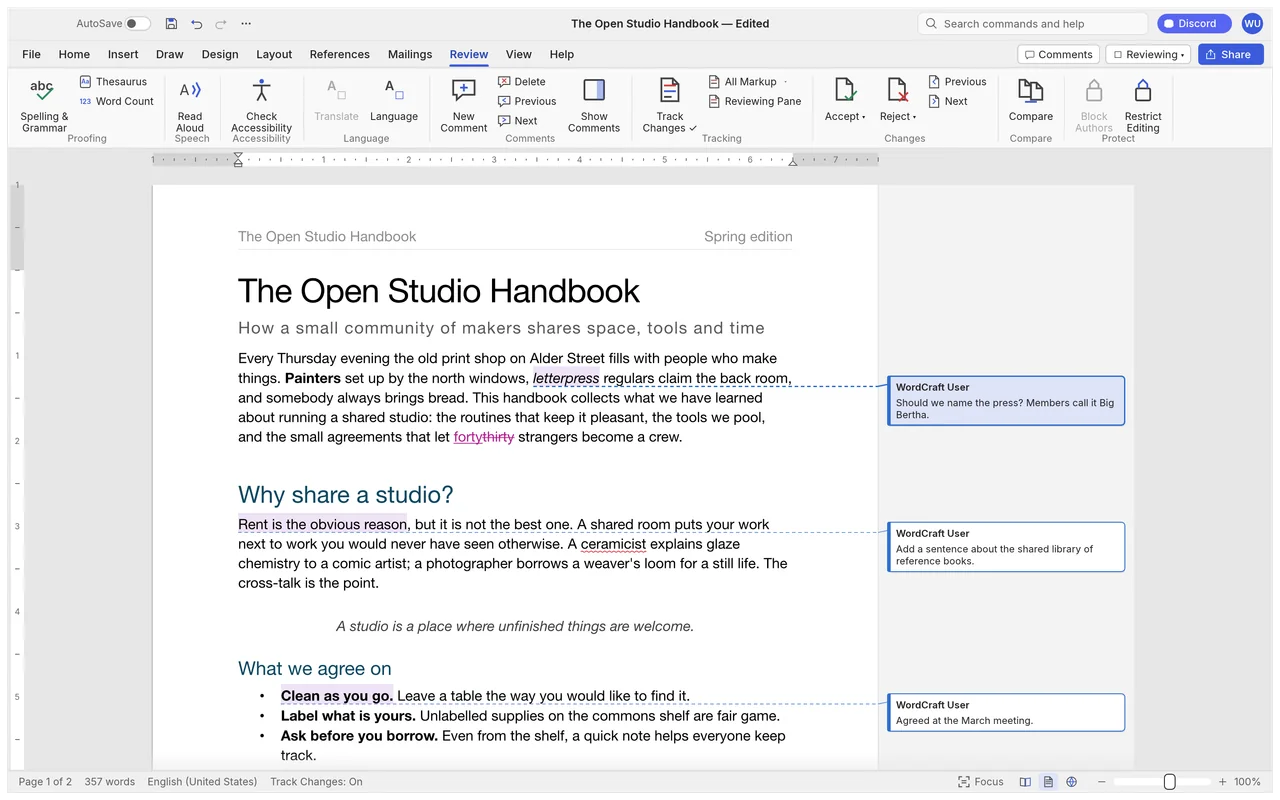
See inserted and deleted text alongside comment balloons in the document margin.
Write and format documents with tables, comments and tracked changes.
Good for everyday documents; check complex DOCX layouts and embedded objects before sharing.
Keep Word for complex layouts, embedded objects and established team workflows.
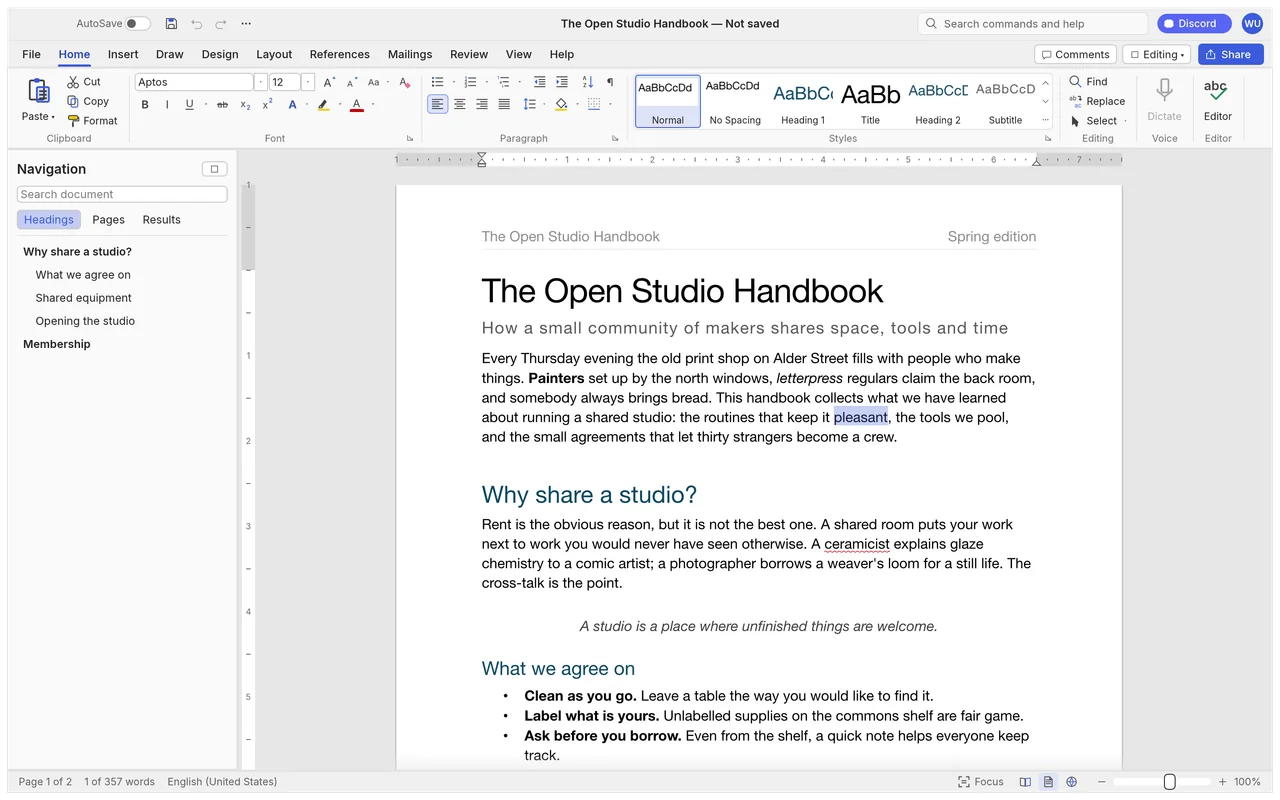
Its Word-style workspace puts writing, styles, tables and review tools in a familiar ribbon. A document you write for yourself is a simpler starting point than a client's heavily formatted report, especially when that client expects to continue editing in Word.
The official screenshots show a sample document in the writing workspace and a draft with review marks. The first image above includes the Home ribbon, live style previews and a navigation pane for headings.
See inserted and deleted text alongside comment balloons in the document margin.
Local document editing is free, with no subscription.
The developers haven't published a complete account policy for connected services.
WordCraft's writing, spelling and grammar tools work offline on your computer.
ArtCraft's AI workbench is a separate product, and hosted generation uses credits. Optional external services have their own requirements; for example, the Zotero citation connection needs the Zotero desktop app running.
You need internet access to download the installer. See Is ArtCraft free? for the distinction between local Craft apps and the separate generation service.
Choose the official WordCraft package for your system below. Use Craft Launcher if you want one place to install and update several Craft apps; WordCraft also has its own download.
For several editing apps, use Craft Launcher to install, verify and update them.
Choose your system and processor to get an official package. The complete package list is available below.
wordcraft-0.6.1-windows-arm64.msi
SHA-256
3ea2f2cebb3b8e9f66522f44cb2b3530339ff23b129f8077d4197378dd637645Calculate the local file’s SHA-256, then compare the complete value for this filename.
Get-FileHash -LiteralPath "<downloaded-file>" -Algorithm SHA256wordcraft-0.6.1-windows-arm64-portable.zip
SHA-256
baf28c75a7bb41efded0d8ea110451bfb8e57b722ab0a64243c4458338ea0879Calculate the local file’s SHA-256, then compare the complete value for this filename.
Get-FileHash -LiteralPath "<downloaded-file>" -Algorithm SHA256wordcraft-0.6.1-windows-x86.msi
SHA-256
08b6ac9b364a7873523447912aa8f169741e3986b88dd1b65622055c36de9afeCalculate the local file’s SHA-256, then compare the complete value for this filename.
Get-FileHash -LiteralPath "<downloaded-file>" -Algorithm SHA256wordcraft-0.6.1-windows-x86-portable.zip
SHA-256
a5ae4f6c16ed89b64e2a47bd380148d577a71b5991a75c13ef4ead790b0c5fbdCalculate the local file’s SHA-256, then compare the complete value for this filename.
Get-FileHash -LiteralPath "<downloaded-file>" -Algorithm SHA256wordcraft-0.6.1-windows-x64.msi
SHA-256
ec1761f5efb32247d2674c5d05e488f4a8f8c0323f7dfcd608266510d636deb8Calculate the local file’s SHA-256, then compare the complete value for this filename.
Get-FileHash -LiteralPath "<downloaded-file>" -Algorithm SHA256wordcraft-0.6.1-windows-x64-portable.zip
SHA-256
4576d76363b0513242e0c1e5038fabaee4b3369909de60821900a01fc6277261Calculate the local file’s SHA-256, then compare the complete value for this filename.
Get-FileHash -LiteralPath "<downloaded-file>" -Algorithm SHA256wordcraft-0.6.1-macos-universal.dmg
SHA-256
6cfbc5b0c1270894f4df7eed15f6d880d01f4733f856cee55d3793bd738786aeCalculate the local file’s SHA-256, then compare the complete value for this filename.
shasum -a 256 "<downloaded-file>"wordcraft-0.6.1-linux-aarch64.AppImage
SHA-256
78edd2b884fee4cfcfe8a072c4f1608759882e524f73c74c92dbc21612db860eCalculate the local file’s SHA-256, then compare the complete value for this filename.
sha256sum "<downloaded-file>"wordcraft-0.6.1-linux-aarch64.deb
SHA-256
165e5c0634d6a8f9ecc312792e85f6d9ceea034267365ba3681b6a764c2403c7Calculate the local file’s SHA-256, then compare the complete value for this filename.
sha256sum "<downloaded-file>"wordcraft-0.6.1-linux-aarch64.flatpak
SHA-256
3001f7964cbe0cbed4b322d1d8820feb218b4801d923a0c46a85d59dcb99cb6bCalculate the local file’s SHA-256, then compare the complete value for this filename.
sha256sum "<downloaded-file>"wordcraft-0.6.1-linux-aarch64.rpm
SHA-256
9bad1ebd1e9818bc3d475393b27a2cf13ed808aa68a4c6e127b8a61cf4a833e5Calculate the local file’s SHA-256, then compare the complete value for this filename.
sha256sum "<downloaded-file>"wordcraft-0.6.1-linux-aarch64.tar.gz
SHA-256
8d58f745d29fe17e8e5b4268e07553f140005b6986c27c6aa40b53f3cfb1e0f1Calculate the local file’s SHA-256, then compare the complete value for this filename.
sha256sum "<downloaded-file>"wordcraft-0.6.1-linux-riscv64.deb
SHA-256
214f23ca59c638ba1c5f8127e252c57295eafe0550676f93b6dc78340c4f959dCalculate the local file’s SHA-256, then compare the complete value for this filename.
sha256sum "<downloaded-file>"wordcraft-0.6.1-linux-riscv64.rpm
SHA-256
1e936815ccdf7ca0493988730f0526944888d6db0a967dadebaf53ec70ce6ae6Calculate the local file’s SHA-256, then compare the complete value for this filename.
sha256sum "<downloaded-file>"wordcraft-0.6.1-linux-riscv64.tar.gz
SHA-256
2a1eea6990f62a8326c1f58deaba4eb987ddccd4b7e6902662dc3c6164155329Calculate the local file’s SHA-256, then compare the complete value for this filename.
sha256sum "<downloaded-file>"wordcraft-0.6.1-linux-x86_64.AppImage
SHA-256
36ed3844c4e58391cf1341d133bf6b569b5221f8e707e5e271db3c38df6dc3c3Calculate the local file’s SHA-256, then compare the complete value for this filename.
sha256sum "<downloaded-file>"wordcraft-0.6.1-linux-x86_64.deb
SHA-256
7c86f97e43cc24eae765de431f9d924cc19370c0cbac2ebd108d732386220508Calculate the local file’s SHA-256, then compare the complete value for this filename.
sha256sum "<downloaded-file>"wordcraft-0.6.1-linux-x86_64.flatpak
SHA-256
4aac50474bd964948cda9c1eb6b8e9495f35992be81568be7431ec9258585a8fCalculate the local file’s SHA-256, then compare the complete value for this filename.
sha256sum "<downloaded-file>"wordcraft-0.6.1-linux-x86_64.rpm
SHA-256
95ed5cf7ed688121d409078cfdfb0981a0c6ac5daa0b2c61f4f445681b2d2eeeCalculate the local file’s SHA-256, then compare the complete value for this filename.
sha256sum "<downloaded-file>"wordcraft-0.6.1-linux-x86_64.tar.gz
SHA-256
79bd54c81276f6ea551222432adec15e0eaab4cb5881decee38eafd7a5ca38f9Calculate the local file’s SHA-256, then compare the complete value for this filename.
sha256sum "<downloaded-file>"wordcraft-0.6.1-freebsd-x86_64.tar.gz
SHA-256
3dab8a41638e6305590405a7768c76e7300a2de67d76d1211430c84e142720c3Calculate the local file’s SHA-256, then compare the complete value for this filename.
sha256 -q "<downloaded-file>"flatpak install --user followed by its filename.| System | Published requirement |
|---|---|
| macOS | Universal package for Intel and Apple silicon; minimum macOS version unpublished. |
| Windows | x64, ARM64 and x86 packages; minimum Windows version unpublished. |
| Linux | General minimum runtime requirements unpublished; riscv64 tarball needs glibc 2.39 or later. |
| RAM, GPU and storage | The developers haven't published complete minimum values. |
The developers haven't published app-specific steps for Gatekeeper or SmartScreen warnings. If WordCraft is blocked or won't open, use the official support tracker and include the message and your system.
Check your processor before choosing a Windows or Linux package. The official download notes describe other Linux packages and Windows graphics-startup troubleshooting if you need them.
Start by changing a short DOCX, then save an editable copy and a PDF. Use a copy of your own document so you can compare the original page layout with the result.
Ten shortcuts for opening, saving and everyday document edits.
| Action | Windows / Linux | macOS |
|---|---|---|
| New | Ctrl+N | Command+N |
| Open | Ctrl+O / Ctrl+F12 | Command+O / Command+F12 |
| Save | Ctrl+S / Shift+F12 | Command+S / Shift+F12 |
| Save As | F12 | F12 |
| Ctrl+P / Ctrl+Shift+F12 / Ctrl+F2 | Command+P / Command+Shift+F12 / Command+F2 | |
| Close | Ctrl+W / Ctrl+F4 | Command+W / Command+F4 |
| Undo | Ctrl+Z | Command+Z |
| Redo | Ctrl+Y / Ctrl+Shift+Z | Command+Y / Command+Shift+Z |
| Cut | Ctrl+X | Command+X |
| Copy | Ctrl+C | Command+C |
| Action | Windows / Linux | macOS |
|---|---|---|
| New | Ctrl+N | Command+N |
| Open | Ctrl+O / Ctrl+F12 | Command+O / Command+F12 |
| Save | Ctrl+S / Shift+F12 | Command+S / Shift+F12 |
| Save As | F12 | F12 |
| Ctrl+P / Ctrl+Shift+F12 / Ctrl+F2 | Command+P / Command+Shift+F12 / Command+F2 | |
| Close | Ctrl+W / Ctrl+F4 | Command+W / Command+F4 |
| Undo | Ctrl+Z | Command+Z |
| Redo | Ctrl+Y / Ctrl+Shift+Z | Command+Y / Command+Shift+Z |
| Cut | Ctrl+X | Command+X |
| Copy | Ctrl+C | Command+C |
| Paste | Ctrl+V | Command+V |
| Paste: Keep Text Only | Ctrl+Shift+Alt+V | Command+Shift+Option+V |
| Find | Ctrl+F | Command+F |
| Find Next | Ctrl+G / F3 / Ctrl+PageDown | Command+G / F3 / Command+PageDown |
| Find and Replace | Ctrl+H | Command+H |
| Go To | Ctrl+Alt+G / F5 | Command+Option+G / F5 |
| Go Back | Shift+F5 | Shift+F5 |
| Copy Formatting | Ctrl+Shift+C | Command+Shift+C |
| Paste Formatting | Ctrl+Shift+V | Command+Shift+V |
| Bold | Ctrl+B | Command+B |
| Italic | Ctrl+I | Command+I |
| Underline | Ctrl+U | Command+U |
| Double Underline | Ctrl+Shift+D | Command+Shift+D |
| Underline Words Only | Ctrl+Shift+W | Command+Shift+W |
| Subscript | Ctrl+= | Command+= |
| Superscript | Ctrl+Shift+= | Command+Shift+= |
| All Caps | Ctrl+Shift+A | Command+Shift+A |
| Small Caps | Ctrl+Shift+K | Command+Shift+K |
| Hidden | Ctrl+Shift+H | Command+Shift+H |
| Font | Ctrl+Shift+F | Command+Shift+F |
| Font Size | Ctrl+Shift+P | Command+Shift+P |
| Increase Font Size | Ctrl+Shift+. / Ctrl+Shift+> | Command+Shift+. / Command+Shift+> |
| Decrease Font Size | Ctrl+Shift+, / Ctrl+Shift+< | Command+Shift+, / Command+Shift+< |
| Grow Font 1 Point | Ctrl+] | Command+] |
| Shrink Font 1 Point | Ctrl+[ | Command+[ |
| Change Case | Shift+F3 | Shift+F3 |
| Font Dialog | Ctrl+D | Command+D |
Use the five steps above for a first document edit. Open the Zotero guide when your work needs references; it focuses on citations rather than teaching every writing tool.
Published feedback includes a successful small-file check and a report of a slow, unstable heading edit.
Their earlier-release macOS command-line check kept text, a table and an italic edit in a small DOCX. Read their file check.
This user reported a long slowdown followed by a crash when changing text into a heading on an M4 MacBook. Read the comment.
Save a separate copy before making broad formatting changes.
WordCraft opens and saves DOCX files. Check page layout, revisions, fonts and embedded objects in Word before returning a document to someone who will edit it there.
| Format | Open / save | What to watch |
|---|---|---|
| DOCX | Read and write | Complex pagination, charts and SmartArt need checking. |
| DOC | Import | Legacy Word import; DOC export is undocumented. |
| ODT / RTF / HTML / Markdown / LaTeX / TXT | Import and export | Check formatting in the app receiving the file. |
| PDF / PNG pages | Export | Reading copies or page images, rather than editable Word documents. |
Keep an editable file for further revisions and make a separate PDF for reading. When sharing a review, check that the comments and tracked changes you want to deliver remain in the returned DOCX. See the full format reference.
Choose around your usual documents and the people receiving them. WordCraft offers familiar local writing and review tools; the other free desktop options below cover broader office work too.
| App | Good for | Free option |
|---|---|---|
| WordCraft | Everyday documents and draft review | Free local editing; complex DOCX exchange needs checking. |
| LibreOffice Writer | Offline word processing, long documents and styles | Free open-source desktop app; professional support can cost money. |
| ONLYOFFICE Desktop Editors | Common Office documents and a familiar interface | Free desktop editors; cloud, enterprise and external AI services have separate terms. |
No. WordCraft's local document editing is free; the separate ArtCraft AI workbench uses credits for hosted generation.
Try an ordinary report first. Keep Word for complex pagination, embedded charts, SmartArt and team workflows that depend on its add-ins.
Yes, WordCraft has a DOC import path. Save an editable DOCX or another supported output format afterward; DOC export is undocumented.
No. The connection needs Zotero desktop running, and the browser build cannot connect to it.
Use the official download selector above or Craft Launcher. The selector links to WordCraft's official GitHub release packages.
Based on official docs and published reviews; we didn't install it ourselves.
Last checked: 14 Oct 2026.
Current release: 0.6.1.

