
Blended shapes and layers
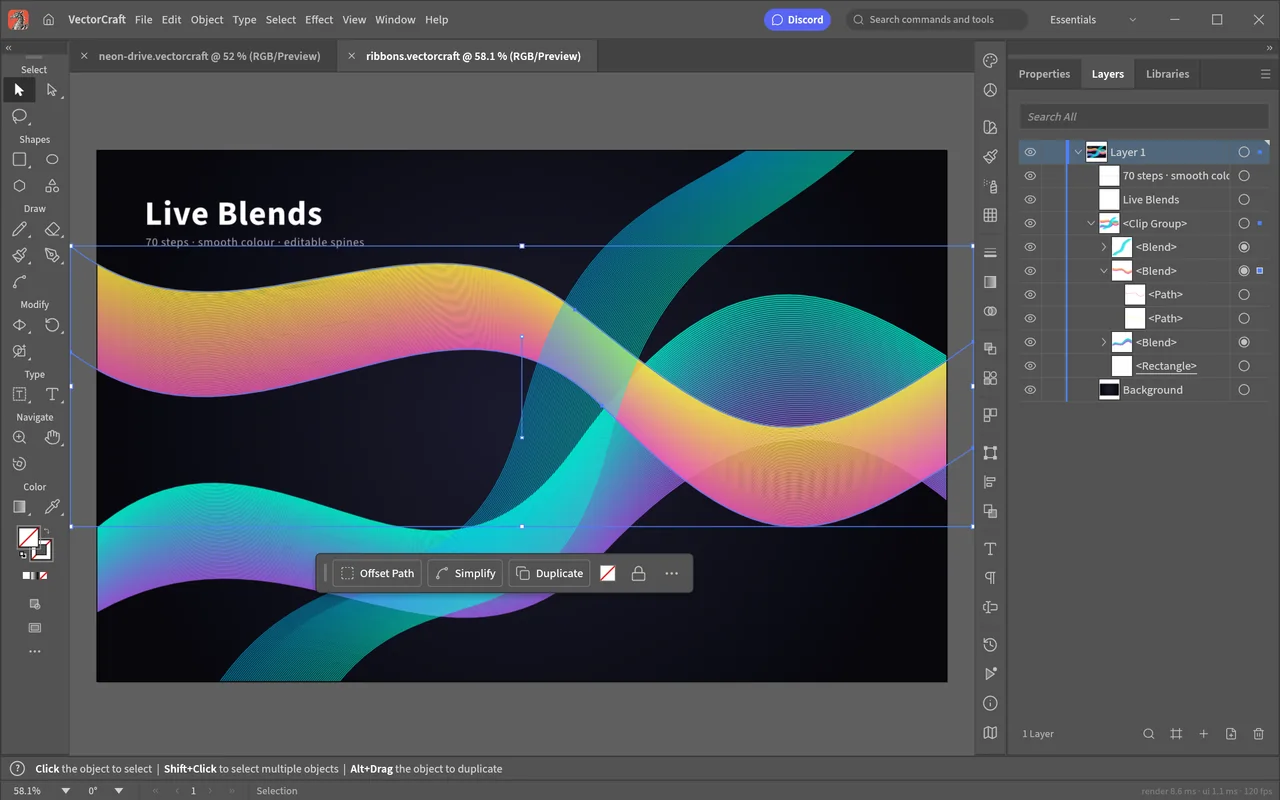
Work with editable coloured ribbons while keeping the composition's objects organised in the Layers panel.
Draw vector artwork with paths, layers, shape operations and swatches.
Good for SVG and PDF artwork; keep Illustrator when editable Illustrator .ai file details must survive.
Choose the delivery format before starting a logo, illustration or other vector drawing.
The familiar workspace gives you layers, swatches, artboards and path-editing tools. If the recipient needs a finished image, the job differs from handing them a native Illustrator project they can continue editing.
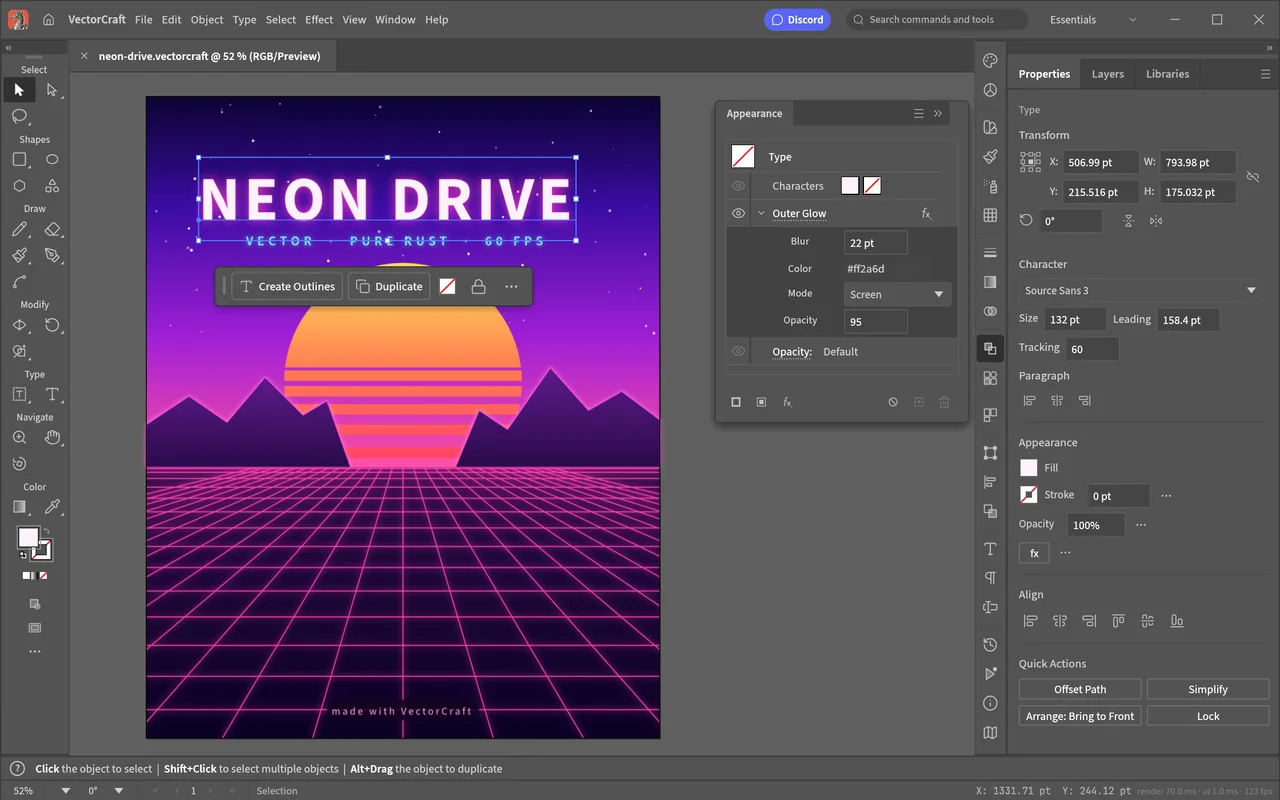
The official screenshots show a neon poster and a colourful ribbon composition in the drawing workspace.
Work with editable coloured ribbons while keeping the composition's objects organised in the Layers panel.
Local vector drawing is free, with no subscription.
The developers haven't stated whether any features require an account.
The drawing workspace uses local files on your computer.
Downloading the app and its updates needs internet access. ArtCraft's hosted AI workbench is a separate product with generation credits; see AI Workbench and Is ArtCraft free?.
Choose the official desktop package for your system below. Craft Launcher is another route if you want one place to install and update several apps; VectorCraft can also be downloaded on its own.
For several editing apps, use Craft Launcher to install, verify and update them.
Choose your system and processor to get an official package. The complete package list is available below.
vectorcraft-0.10.0-windows-arm64.msi
SHA-256
b4a26c7af3c0736841f38e53743ef12911464311a21e0b6c0d10b13833d6aae7Calculate the local file’s SHA-256, then compare the complete value for this filename.
Get-FileHash -LiteralPath "<downloaded-file>" -Algorithm SHA256vectorcraft-0.10.0-windows-arm64-portable.zip
SHA-256
f5169227259c1530972be35636c88dbe6f9366233b92b293dcf85a9f20463d76Calculate the local file’s SHA-256, then compare the complete value for this filename.
Get-FileHash -LiteralPath "<downloaded-file>" -Algorithm SHA256vectorcraft-0.10.0-windows-x86.msi
SHA-256
b14805f9430f1cbc8228a9f48462a0c02350cb2dfb48a87b8d500db4895399e1Calculate the local file’s SHA-256, then compare the complete value for this filename.
Get-FileHash -LiteralPath "<downloaded-file>" -Algorithm SHA256vectorcraft-0.10.0-windows-x86-portable.zip
SHA-256
81dade275039ed1bd913539d07561adfbe046168b4cb4dd7d5ad454187741a70Calculate the local file’s SHA-256, then compare the complete value for this filename.
Get-FileHash -LiteralPath "<downloaded-file>" -Algorithm SHA256vectorcraft-0.10.0-windows-x64.msi
SHA-256
eec78d309d218c08ded9785134da4a2dffffefbb40c8170bfdaa24f8aa3676a7Calculate the local file’s SHA-256, then compare the complete value for this filename.
Get-FileHash -LiteralPath "<downloaded-file>" -Algorithm SHA256vectorcraft-0.10.0-windows-x64-portable.zip
SHA-256
269a297a2c61e7a48ca740e0ac7c64d651cf4ed3584cd6e47988f2fc50fa8da7Calculate the local file’s SHA-256, then compare the complete value for this filename.
Get-FileHash -LiteralPath "<downloaded-file>" -Algorithm SHA256vectorcraft-0.10.0-macos-universal.dmg
SHA-256
c0e6d3de60d9c4217830f65e136a6a8f9381881c2525dae0558292cd36352e29Calculate the local file’s SHA-256, then compare the complete value for this filename.
shasum -a 256 "<downloaded-file>"vectorcraft-0.10.0-linux-aarch64.AppImage
SHA-256
65cc3c24bd2152c14756a9cecb14f67c198b32fdae07640f5127cb89271840f7Calculate the local file’s SHA-256, then compare the complete value for this filename.
sha256sum "<downloaded-file>"vectorcraft-0.10.0-linux-aarch64.deb
SHA-256
837cd0cc3f8eab902479789f8a15e33d21a30f19a7325824db2d8c595503135aCalculate the local file’s SHA-256, then compare the complete value for this filename.
sha256sum "<downloaded-file>"vectorcraft-0.10.0-linux-aarch64.flatpak
SHA-256
d2418a462d047a95933171a37bc1cbf0e14c784407567c9c20001879ae80e149Calculate the local file’s SHA-256, then compare the complete value for this filename.
sha256sum "<downloaded-file>"vectorcraft-0.10.0-linux-aarch64.rpm
SHA-256
d7bb753d044bab55ee7503e52144a0d0958f4187996352e78cc7abc0c7618213Calculate the local file’s SHA-256, then compare the complete value for this filename.
sha256sum "<downloaded-file>"vectorcraft-0.10.0-linux-aarch64.tar.gz
SHA-256
1ab5a2739c4f06d27538914c86839f6a78582f94aed7c411caa1988fe22b8a6bCalculate the local file’s SHA-256, then compare the complete value for this filename.
sha256sum "<downloaded-file>"vectorcraft-0.10.0-linux-riscv64.tar.gz
SHA-256
f14ed02c4fe3e19edf71da64d28abb16d143f9f39c23cff532a1755b07d17a0fCalculate the local file’s SHA-256, then compare the complete value for this filename.
sha256sum "<downloaded-file>"vectorcraft-0.10.0-linux-x86_64.AppImage
SHA-256
2d2d89587014465c3096a6e456d73a73bb6aec104ec0ed213a406a148026c029Calculate the local file’s SHA-256, then compare the complete value for this filename.
sha256sum "<downloaded-file>"vectorcraft-0.10.0-linux-x86_64.deb
SHA-256
f8f184353baa739b819b68a836ffa7b5587f9d3aba4460e376b37d362bf5d901Calculate the local file’s SHA-256, then compare the complete value for this filename.
sha256sum "<downloaded-file>"vectorcraft-0.10.0-linux-x86_64.flatpak
SHA-256
b71d6d68d747727f71d8746fc5b6436d0a42b2aba492c3c01f9245e8a952698cCalculate the local file’s SHA-256, then compare the complete value for this filename.
sha256sum "<downloaded-file>"vectorcraft-0.10.0-linux-x86_64.rpm
SHA-256
bfc827746396686d266d42eee0b3734f0f1bf008bd4d456a826ee9dae3b4bf99Calculate the local file’s SHA-256, then compare the complete value for this filename.
sha256sum "<downloaded-file>"vectorcraft-0.10.0-linux-x86_64.tar.gz
SHA-256
a55735a192877038c9b4c3069504f7a73a05433a48edddd8e94fc7d2995aa6fcCalculate the local file’s SHA-256, then compare the complete value for this filename.
sha256sum "<downloaded-file>"vectorcraft-0.10.0-freebsd-x86_64.tar.gz
SHA-256
796728a9e17a3b0c30af7533059822316369d15ff3369aa487028f329819360aCalculate the local file’s SHA-256, then compare the complete value for this filename.
sha256 -q "<downloaded-file>"flatpak install --user followed by its filename.| System | Published requirement |
|---|---|
| macOS | macOS 11 or later; Intel and Apple silicon |
| Windows | x64, ARM64 and x86 packages; the supported-build table doesn't give a minimum Windows version |
| Linux | x86_64/aarch64 builds need glibc 2.35 or later; riscv64 needs 2.39 or later. |
| CPU performance, RAM, GPU and storage | The developers haven't published complete minimum values. |
The developers haven't published app-specific steps for Gatekeeper or SmartScreen warnings. If your computer blocks the app or it won't open, use the official support tracker and include the message and your system.
Other downloads include Windows portable ZIPs and Linux AppImage, DEB, RPM and tarball packages. Follow the official installation guide for the package you choose, rather than combining instructions from different package types.
Open a simple SVG, duplicate its artwork and save an editable copy. This introduces opening, selecting, copying and saving without making your original file the only copy.
.vectorcraft copy for further editing.Ten tool shortcuts for selecting, drawing and colouring artwork.
| Action | Windows / Linux | macOS |
|---|---|---|
| Selection Tool | V | V |
| Direct Selection Tool | A | A |
| Pen Tool | P | P |
| Type Tool | T | T |
| Rectangle Tool | M | M |
| Ellipse Tool | L | L |
| Paintbrush Tool | B | B |
| Pencil Tool | N | N |
| Gradient Tool | G | G |
| Eyedropper Tool | I | I |
| Action | Windows / Linux | macOS |
|---|---|---|
| Selection Tool | V | V |
| Direct Selection Tool | A | A |
| Magic Wand Tool | Y | Y |
| Lasso Tool | Q | Q |
| Pen Tool | P | P |
| Add Anchor Point Tool | + | + |
| Delete Anchor Point Tool | - | - |
| Anchor Point Tool | Shift+C | Shift+C |
| Curvature Tool | Shift+~ | Shift+~ |
| Type Tool | T | T |
| Touch Type Tool | Shift+T | Shift+T |
| Line Segment Tool | \ | \ |
| Rectangle Tool | M | M |
| Ellipse Tool | L | L |
| Paintbrush Tool | B | B |
| Blob Brush Tool | Shift+B | Shift+B |
| Shaper Tool | Shift+N | Shift+N |
| Pencil Tool | N | N |
| Eraser Tool | Shift+E | Shift+E |
| Scissors Tool | C | C |
| Rotate Tool | R | R |
| Reflect Tool | O | O |
| Scale Tool | S | S |
| Width Tool | Shift+W | Shift+W |
| Warp Tool | Shift+R | Shift+R |
| Free Transform Tool | E | E |
| Shape Builder Tool | Shift+M | Shift+M |
| Live Paint Bucket | K | K |
| Live Paint Selection Tool | Shift+L | Shift+L |
| Perspective Grid Tool | Shift+P | Shift+P |
| Perspective Selection Tool | Shift+V | Shift+V |
| Mesh Tool | U | U |
| Gradient Tool | G | G |
| Eyedropper Tool | I | I |
| Blend Tool | W | W |
| Symbol Sprayer Tool | Shift+S | Shift+S |
| Column Graph Tool | J | J |
| Artboard Tool | Shift+O | Shift+O |
| Slice Tool | Shift+K | Shift+K |
| Hand Tool | H | H |
| Rotate View Tool | Shift+H | Shift+H |
| Zoom Tool | Z | Z |
Begin with a small drawing whose objects you can identify easily. Save the native copy for continued editing, and make a separate SVG, PDF or image for the recipient.
A published production diary describes both completed artwork and an export problem.
The author's earlier AI-assisted Windows workflow produced editable artwork across twelve artboards and several export formats. An EPS export failed until the output directory was created. Read the production diary.
The diary follows scripts and AI-assisted production; use the steps above for a first desktop edit.
VectorCraft reads PDF-compatible Illustrator artwork, but Illustrator-specific editing information is not written back. Use SVG or PDF when that is enough for your handoff, and inspect native Illustrator details in the receiving app.
| Format | Open / save | What to watch |
|---|---|---|
| Illustrator AI | Partial read and write via PDF-compatible content | Illustrator-specific editable information is not retained. |
| SVG / PDF | Import and export | Inspect paths, text and the final appearance. |
| Affinity files | Import with warnings or a preview fallback; no original-format save | Choose another output format with the recipient. |
| PSD / PSB | Open the merged picture; PSD export is a separate route | Original Photoshop layers are not editable on import. |
Keep your original Illustrator or Affinity document alongside the VectorCraft copy. Before returning artwork, agree on whether the next person needs editable source details or a finished vector/image export. See the full format reference.
Choose by the drawings you make most often. VectorCraft gives you an Illustrator-style workspace; SVG illustration and diagramming also have established free tools.
| App | Good for | Free option |
|---|---|---|
| VectorCraft | Everyday vector artwork with SVG or PDF delivery | Free local editor; native Illustrator details need another route. |
| Inkscape | SVG illustrations, icons and logos | Free open source official download. |
| LibreOffice Draw | Flowcharts and simple vector layouts | Free open source official download; professional support is separate. |
Try it for everyday vector drawings delivered as SVG or PDF. Keep Illustrator for specialist tools, scripts, plug-ins and native projects whose editing details must survive.
Here, .ai is the Illustrator file extension. It refers to a vector document, not ArtCraft's AI generation workbench.
No. VectorCraft can import supported Affinity content or show a preview fallback, but cannot save the original Affinity format.
Use the official download selector above or Craft Launcher. Choose the package that matches your system and processor.
Follow the five-step SVG task, then read the official drawing and export guide for the tool or output you need.
Based on official docs and published reviews; we didn't install it ourselves.
Last checked: 14 Oct 2026.
Current release: 0.10.0.

