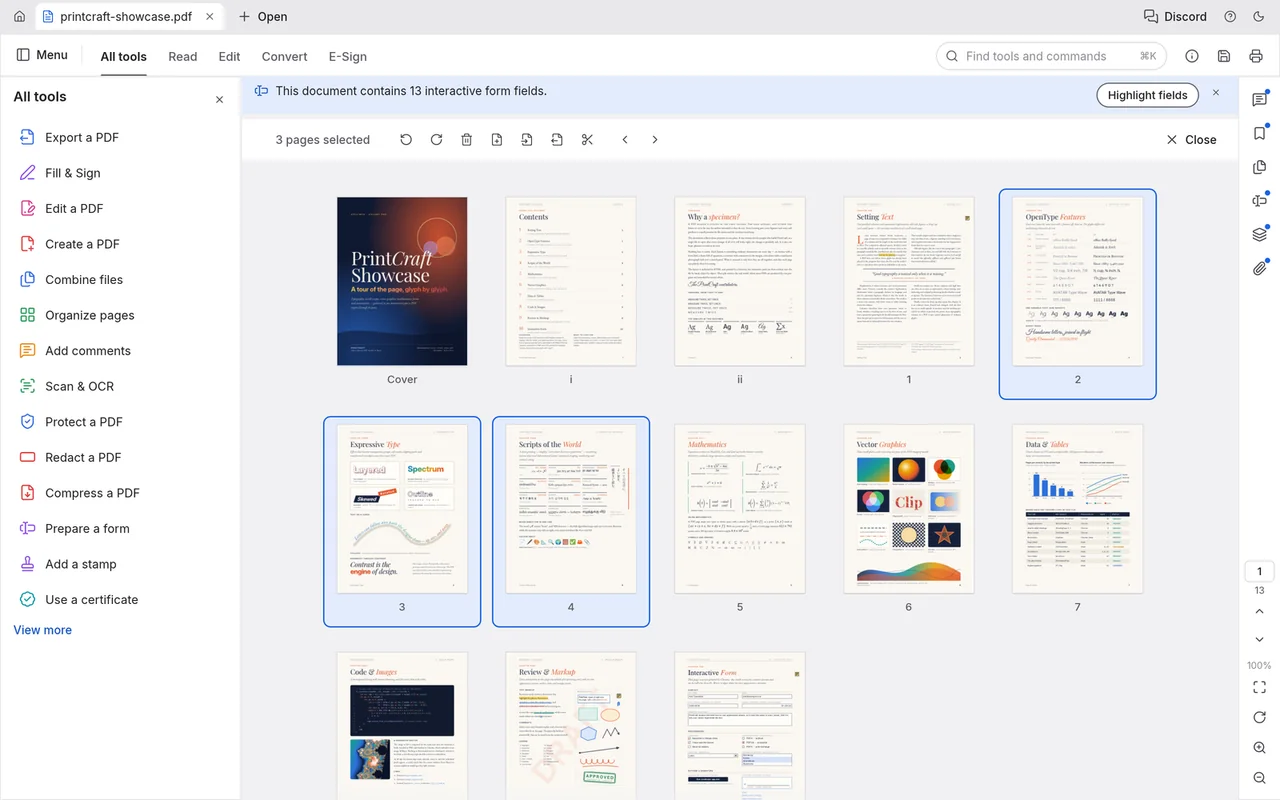
Organise pages
Select page thumbnails in a grid to work on the pages you want to rearrange or rotate.
Read, combine, split and annotate PDFs, and fill interactive forms.
Free · No subscription · No account needed for local editing · Windows / macOS / Linux
Useful for everyday PDF tasks; keep Acrobat for demanding conversions and compliance workflows.
Reading, forms and page organisation are its clearest starting points.
Choose the task before choosing the tool: rotating a page is much simpler than rebuilding its text as a Word document. For a document you need to return, open a copy and inspect the saved pages, annotations and form fields.
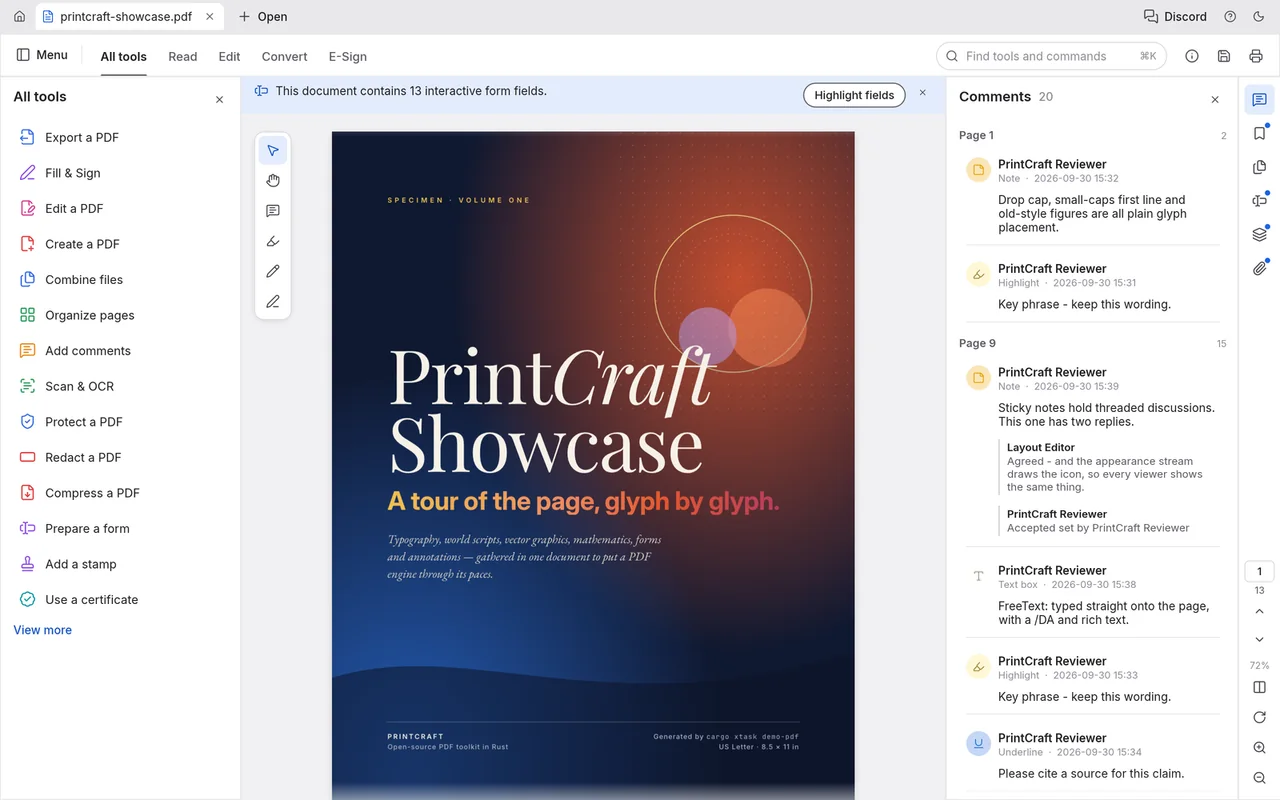
These official historical screenshots show PdfCraft's page tools, forms and text search. The document title PrintCraft Showcase uses the app's earlier name.
Select page thumbnails in a grid to work on the pages you want to rearrange or rotate.
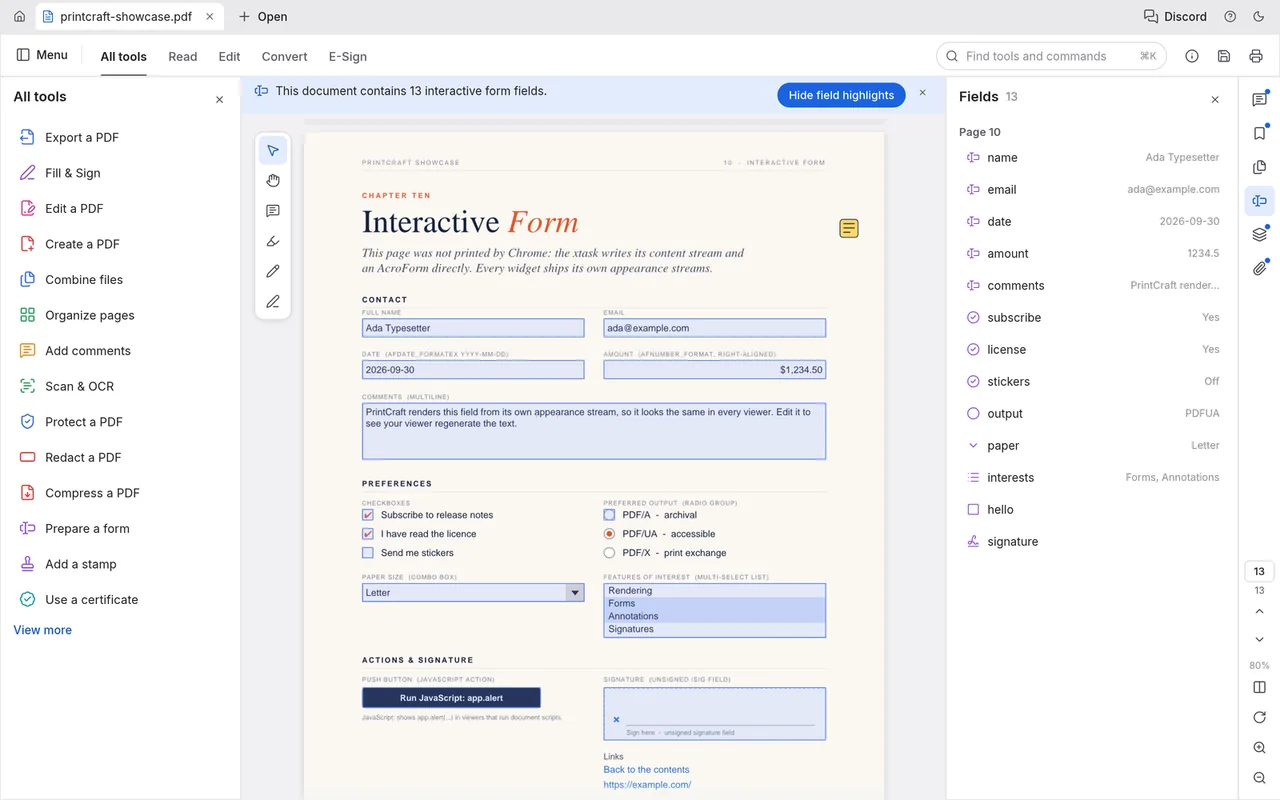
View an interactive form alongside its field list while completing the document.
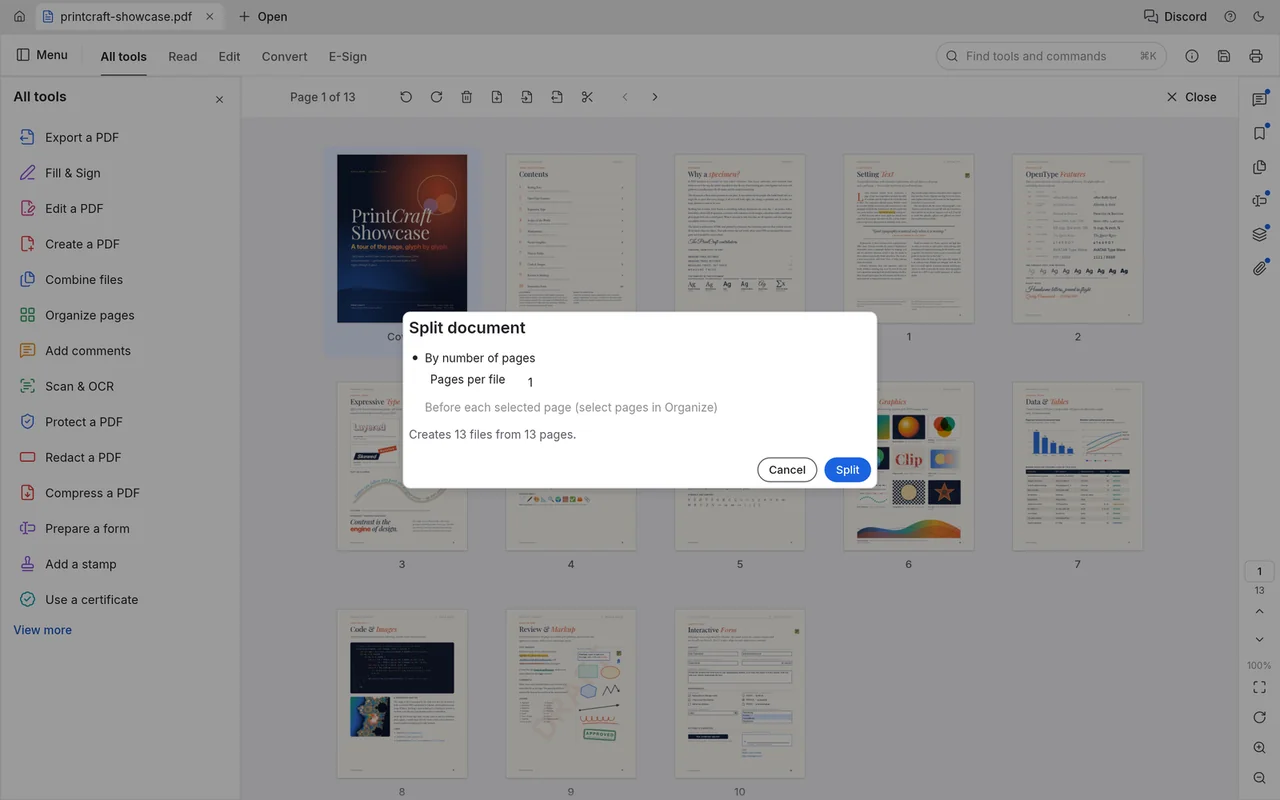
Choose a page count per output file in the Split document dialogue.
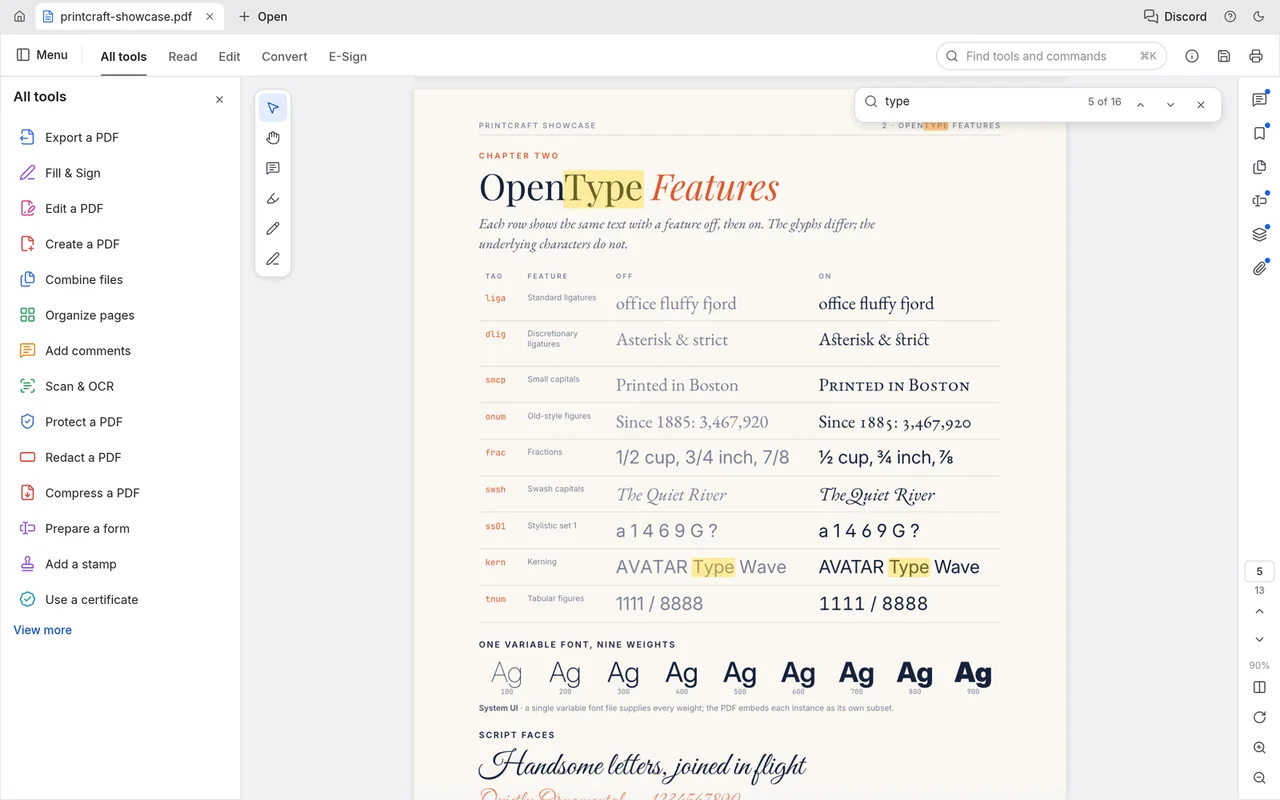
Search the document and locate highlighted matches on its pages.
Local PDF editing is free, with no subscription.
You don't need an account for local PDF work.
The desktop app works offline, and your documents stay on your computer.
You need internet access to download the app and its updates. ArtCraft's hosted AI workbench is a separate product that uses credits; see AI Workbench and Is ArtCraft free?.
Choose the official desktop package for your system below. Craft Launcher is another route if you want to install and update several apps from one place; PdfCraft can also be downloaded on its own.
For several editing apps, use Craft Launcher to install, verify and update them.
Choose your system and processor to get an official package. The complete package list is available below.
pdfcraft-0.7.1-windows-arm64.msi
SHA-256
a896c293b560f0c5bb740fbae06d013e0ad341cba2f95a106b976a9dfd557969Calculate the local file’s SHA-256, then compare the complete value for this filename.
Get-FileHash -LiteralPath "<downloaded-file>" -Algorithm SHA256pdfcraft-0.7.1-windows-arm64-portable.zip
SHA-256
f0d6f39ae6a18038306b5a7af3c21e5c815b3551b2a6801ad0ca10634cba9a78Calculate the local file’s SHA-256, then compare the complete value for this filename.
Get-FileHash -LiteralPath "<downloaded-file>" -Algorithm SHA256pdfcraft-0.7.1-windows-x86.msi
SHA-256
ead5d5c1abca2f3175694185e9388d67ca9cff244c4889d09e6b17801b434b43Calculate the local file’s SHA-256, then compare the complete value for this filename.
Get-FileHash -LiteralPath "<downloaded-file>" -Algorithm SHA256pdfcraft-0.7.1-windows-x86-portable.zip
SHA-256
00de2b5783a62439842e24af8e1b826aaf00e092c8f27982c8728e0978b47615Calculate the local file’s SHA-256, then compare the complete value for this filename.
Get-FileHash -LiteralPath "<downloaded-file>" -Algorithm SHA256pdfcraft-0.7.1-windows-x64.msi
SHA-256
07f6d8838db6e9d55242d480ab4d782c76d130df5c1730385b5ee7cd9c81dafcCalculate the local file’s SHA-256, then compare the complete value for this filename.
Get-FileHash -LiteralPath "<downloaded-file>" -Algorithm SHA256pdfcraft-0.7.1-windows-x64-portable.zip
SHA-256
6632068a4f7fdf1fb6a3b9d431e6d088bb7cbbeb066e47f815a1e498b45d7ecfCalculate the local file’s SHA-256, then compare the complete value for this filename.
Get-FileHash -LiteralPath "<downloaded-file>" -Algorithm SHA256pdfcraft-0.7.1-macos-universal.dmg
SHA-256
cafa51b2bbd2fa7fd532cb38cafec54e988dd37c81bc47c26e5f08e472dc92bfCalculate the local file’s SHA-256, then compare the complete value for this filename.
shasum -a 256 "<downloaded-file>"pdfcraft-0.7.1-linux-aarch64.AppImage
SHA-256
3d36374bc10f541a92142ba3d884a827bbdd8ac88932ce20c26ccc52b1727f84Calculate the local file’s SHA-256, then compare the complete value for this filename.
sha256sum "<downloaded-file>"pdfcraft-0.7.1-linux-aarch64.deb
SHA-256
3e21d9857221ef933ba6de2f9679e1ffb8ee3cebb8ccccc6db8eb8f7f72c2891Calculate the local file’s SHA-256, then compare the complete value for this filename.
sha256sum "<downloaded-file>"pdfcraft-0.7.1-linux-aarch64.flatpak
SHA-256
fd8a078702d724c202c0fe96a9ea39fdc81ea735a4a5c61e58a0313159fbd4c5Calculate the local file’s SHA-256, then compare the complete value for this filename.
sha256sum "<downloaded-file>"pdfcraft-0.7.1-linux-aarch64.rpm
SHA-256
58bb2766f5d0105ea7622715f33c485c8b41d4fd46db4baca39b0cc8853abf30Calculate the local file’s SHA-256, then compare the complete value for this filename.
sha256sum "<downloaded-file>"pdfcraft-0.7.1-linux-aarch64.tar.gz
SHA-256
77baad6346e6d0087872fcb6f6f64e6bdb7f8401658ac96119d462aa1d7ae4e0Calculate the local file’s SHA-256, then compare the complete value for this filename.
sha256sum "<downloaded-file>"pdfcraft-0.7.1-linux-riscv64.deb
SHA-256
6d0240e6df34ebc214fb670826144b87e8fcb4d9828619c310a10c854e681a71Calculate the local file’s SHA-256, then compare the complete value for this filename.
sha256sum "<downloaded-file>"pdfcraft-0.7.1-linux-riscv64.rpm
SHA-256
198de249315ae62b8e66fc5ae29580f66d7031cced301f8d8b3fa3e1d45ad016Calculate the local file’s SHA-256, then compare the complete value for this filename.
sha256sum "<downloaded-file>"pdfcraft-0.7.1-linux-riscv64.tar.gz
SHA-256
cc299ca538504d48c942ce34553e904fe008a1f352c6c4103a51eb240a4d5ce4Calculate the local file’s SHA-256, then compare the complete value for this filename.
sha256sum "<downloaded-file>"pdfcraft-0.7.1-linux-x86_64.AppImage
SHA-256
ae5c879bb326d0e91a241e9f9c6c17608ef766c005c66c2d7280270107bf635aCalculate the local file’s SHA-256, then compare the complete value for this filename.
sha256sum "<downloaded-file>"pdfcraft-0.7.1-linux-x86_64.deb
SHA-256
91d54edfddbb04237beea42396478f0bd30941a0c59dcac18617ea1ed311123bCalculate the local file’s SHA-256, then compare the complete value for this filename.
sha256sum "<downloaded-file>"pdfcraft-0.7.1-linux-x86_64.flatpak
SHA-256
dbb2c8d06e9b1fd0b772626da6c0ddd413c137fb2341d9a5bd21ac66fcdec709Calculate the local file’s SHA-256, then compare the complete value for this filename.
sha256sum "<downloaded-file>"pdfcraft-0.7.1-linux-x86_64.rpm
SHA-256
4b6543e061b737bbe82b2942c1984a52a9815b5ca911242580d492d4827c1a27Calculate the local file’s SHA-256, then compare the complete value for this filename.
sha256sum "<downloaded-file>"pdfcraft-0.7.1-linux-x86_64.tar.gz
SHA-256
bc7d651511273720f6a5ccbe0dd5b2c4ddccb6c576a0aff619f39d2c5667a315Calculate the local file’s SHA-256, then compare the complete value for this filename.
sha256sum "<downloaded-file>"pdfcraft-0.7.1-freebsd-x86_64.tar.gz
SHA-256
a707eeebf9436a75ddf6033b3143dabdb56ab1145880142ab7b7eabe35586ea0Calculate the local file’s SHA-256, then compare the complete value for this filename.
sha256 -q "<downloaded-file>"| System | Published requirement |
|---|---|
| macOS | macOS 11 or later; Intel and Apple silicon |
| Windows | Windows 10 or later for x64/x86; Windows 11 on ARM64 |
| Linux | x86_64/aarch64 builds need glibc 2.35 or later; riscv64 tarballs need 2.39 or later. |
| CPU performance, RAM, GPU and storage | The developers haven't published complete minimum values. |
The developers haven't published app-specific steps for Gatekeeper or SmartScreen warnings. If your computer blocks the app or it won't open, use the official support tracker and include the message and your system.
Windows also has a portable ZIP: extract it and run pdfcraft.exe. Linux has other packages, including Flatpak; the Flatpak package does not support printing, so choose another route if you need that task. The official installation guide explains the package choices and checksums.
Rotate a sideways page and save a separate PDF. This gives you a simple first task with a visible result, while keeping the original document available.
Ten shortcuts for opening, saving, searching and changing the view.
| Action | Windows / Linux | macOS |
|---|---|---|
| Open | Ctrl+O | Command+O |
| Save | Ctrl+S | Command+S |
| Save as | Ctrl+Shift+S | Command+Shift+S |
| Undo | Ctrl+Z | Command+Z |
| Redo | Ctrl+Shift+Z | Command+Shift+Z |
| Find | Ctrl+F | Command+F |
| Find tools and commands | Ctrl+K | Command+K |
| Next match | Ctrl+G | Command+G |
| Zoom in / larger page thumbnails | Ctrl++ or Ctrl+= | Command++ or Command+= |
| Zoom out / smaller page thumbnails | Ctrl+- | Command+- |
| Action | Windows / Linux | macOS |
|---|---|---|
| Open… | Ctrl+O | Command+O |
| Save | Ctrl+S | Command+S |
| Save as… | Ctrl+Shift+S | Command+Shift+S |
| Close file | Ctrl+W | Command+W |
| Close all | Ctrl+Shift+W | Command+Shift+W |
| Print… | Ctrl+P | Command+P |
| Document properties… | Ctrl+D | Command+D |
| Undo | Ctrl+Z | Command+Z |
| Redo | Ctrl+Shift+Z | Command+Shift+Z |
| Find… | Ctrl+F | Command+F |
| Advanced search… | Ctrl+Shift+F | Command+Shift+F |
| Find tools and commands… | Ctrl+K | Command+K |
| Fit visible | Ctrl+3 | Command+3 |
| Full screen mode | Ctrl+L | Command+L |
| Read mode | Ctrl+H | Control+Command+H |
| Go to page… | Ctrl+Shift+N | Command+Shift+N |
| Preferences… | Ctrl+, | Command+, |
| JavaScript console… | Ctrl+J | Command+J |
| New bookmark | Ctrl+B | Command+B |
| Next match | Ctrl+G | Command+G |
| Previous match | Ctrl+Shift+G | Command+Shift+G |
| Copy selected text / pages | Ctrl+C | Command+C |
| Cut selected pages | Ctrl+X | Command+X |
| Paste pages | Ctrl+V | Command+V |
| Select all | Ctrl+A | Command+A |
| Actual size | Ctrl+1 | Command+1 |
| Fit page / reset Organize thumbnail size | Ctrl+0 | Command+0 |
| Fit width | Ctrl+2 | Command+2 |
| Zoom in / larger page thumbnails | Ctrl++ or Ctrl+= | Command++ or Command+= |
| Zoom out / smaller page thumbnails | Ctrl+- | Command+- |
| Rotate view clockwise | Ctrl+Shift++ or Ctrl+Shift+= | Command+Shift++ or Command+Shift+= |
| Rotate view counterclockwise | Ctrl+Shift+- | Command+Shift+- |
| Previous view | Ctrl+[ | Command+[ |
| Next view | Ctrl+] | Command+] |
| First page | Home | Home |
| Last page | End | End |
| Next page | → or Ctrl+PageDown | → or Command+PageDown |
| Previous page | ← or Ctrl+PageUp | ← or Command+PageUp |
| Scroll line / turn at edge | ↑ / ↓ | ↑ / ↓ |
| Scroll screen | PageUp / PageDown | PageUp / PageDown |
| Select tool | V | V |
| Hand tool | H | H |
| Temporary hand tool | hold Space | hold Space |
| Delete selection | Delete / Backspace | Delete / Backspace |
| Cancel / clear | Esc | Esc |
| Palette previous / next result | ↑ / ↓ | ↑ / ↓ |
| Run palette result | Enter | Enter |
| Confirm comment / existing-text edit | Ctrl+Enter | Command+Enter |
| Finish polygon / polyline | Enter | Enter |
| Combine select all files | Ctrl+A | Command+A |
| Combine move selected files earlier / later | Alt+↑ / Alt+↓ | Option+↑ / Option+↓ |
| Combine choose file / row | ↑ / ↓ (grid also ← / →) | ↑ / ↓ (grid also ← / →) |
| Combine preview selection | Space | Space |
| Combine preview previous / next page | ← / PageUp; → / PageDown | ← / PageUp; → / PageDown |
| Save at Save changes prompt | Enter | Enter |
| Cancel Save changes prompt | Esc | Esc |
| Discard at Save changes prompt | Ctrl+D; Alt+D / Alt+N | Command+D; Option+D / Option+N |
| Form next / previous field | Tab / Shift+Tab | Tab / Shift+Tab |
| Commit single-line form field | Enter | Enter |
| Cancel focused form field | Esc | Esc |
| Run JavaScript console input | Ctrl+Enter | Command+Enter |
| Add comment / commit reply | Enter | Enter |
| Finish perimeter / area measurement | Enter | Enter |
| Remove last measurement point | Backspace | Backspace |
| Delete selected link / added content | Delete / Backspace | Delete / Backspace |
| Search redaction terms | Enter | Enter |
| Confirm edited numeric/page value | Enter | Enter |
Use the page tools for the five-step task above. Rotate view only changes how you see a page; Rotate pages clockwise changes the page rotation that you save, so choose the latter for a sideways document.
Community users liked PDF reading, while published analyses highlighted text and conversion limits.
PdfCraft felt smoother than Acrobat to this user, who removed Acrobat after trying it. Read the post.
The same PDF opened quickly and smoothly on their low-powered work PC. Read the discussion.
His analysis of the app's documentation points to existing-text editing and non-Latin OCR as reasons to keep an established editor. Read his analysis.
The site's earlier browser-app article highlights heavy text editing and faithful Office export as tasks for another tool. Read the article.
Start with the PDF task you actually need, then reopen the saved document to inspect the result.
PdfCraft works directly with PDFs, but PDF-to-Word is a partial conversion. It cannot open a DOCX to turn the original Word document into a PDF.
| Format | Open / save | What to watch |
|---|---|---|
| Read and write | Check saved text, annotations and form fields. | |
| DOCX | Partial export from PDF; no DOCX import | Inspect reconstructed layout, fonts and tables in Word. |
| PPTX | Partial export from PDF; no PPTX import | Inspect slide layout and text overflow in PowerPoint. |
A readable PDF and an editable Word document are different deliveries. Keep the original Office app for Office-to-PDF work, and choose PdfCraft when your task starts with a PDF. See the full format reference.
Choose a tool for the part of PDF work you do most often. Page assembly, reading and annotations do not always need the same app as text editing or document conversion.
| App | Good for | Free option |
|---|---|---|
| PdfCraft | Reading, forms, annotations and page organisation | Free local editor; demanding conversion and compliance tasks have gaps. |
| PDFsam Basic | Offline merge, split, rotate and extract tasks | Basic is free open source, with no watermark or size limit; other PDFsam products are separate. |
| PDF Arranger | Visual page rearranging, cropping, merging and splitting | Free open source app. |
| Okular | Reading, annotation and signature verification | Free official download. |
This page covers the storytold PdfCraft desktop app. Start with its official repository or product page to find the right download.
PdfCraft has Edit text & images, but complex multilingual text, font replacement and unusual layouts still need care. Inspect a saved copy before returning the document.
Yes. PdfCraft provides Combine files… and Create PDF from multiple files…, including image and text inputs; Office document import is a separate gap.
Printing is not supported in that package. Choose another Linux package if printing is part of your workflow.
The developers provide a self-hosted browser ZIP but haven't published an official hosted editor URL. Independent websites offering online PdfCraft are separate services.
Based on official docs and published reviews; we didn't install it ourselves.
Last checked: 14 Oct 2026.
Current release: 0.7.1.


