
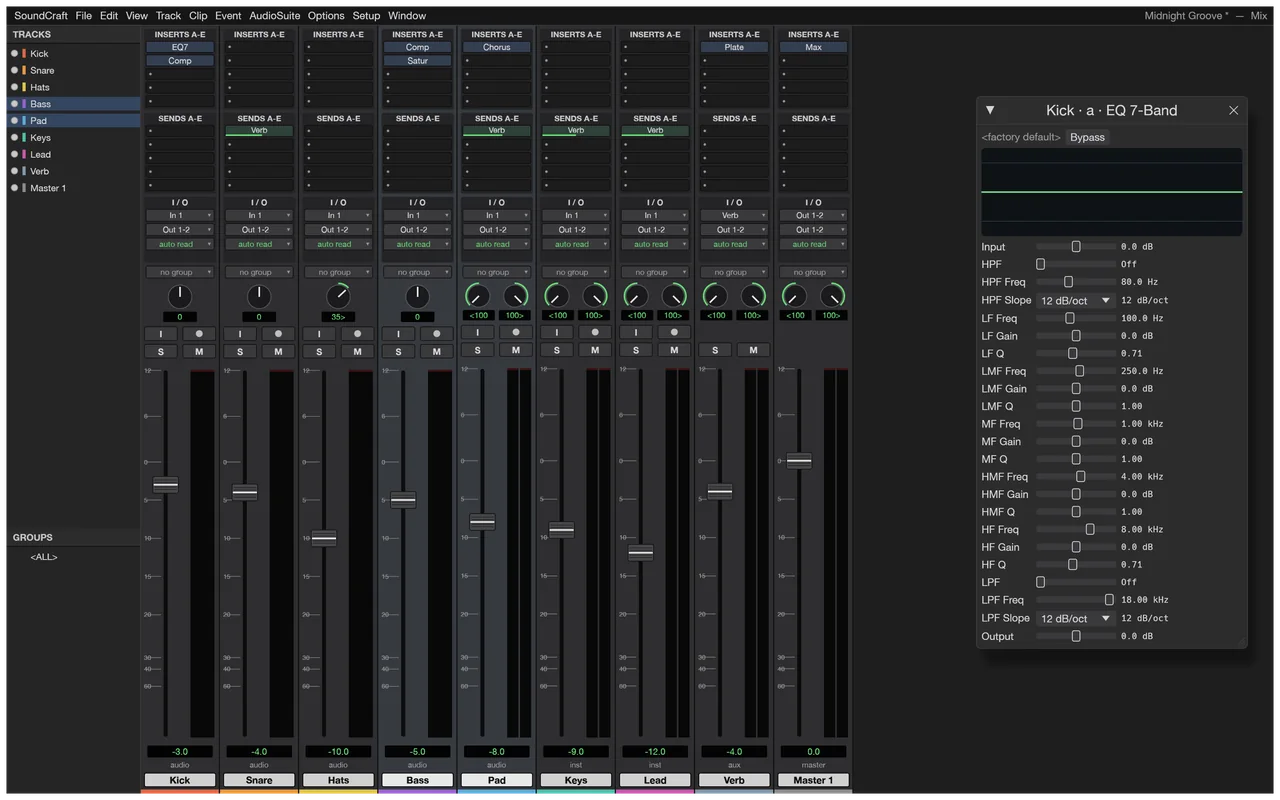
Balance tracks in the mixer
Use the Mix view's track faders and equaliser to adjust the levels and tone of a session.
Record, edit and mix audio with MIDI, automation and local effects.
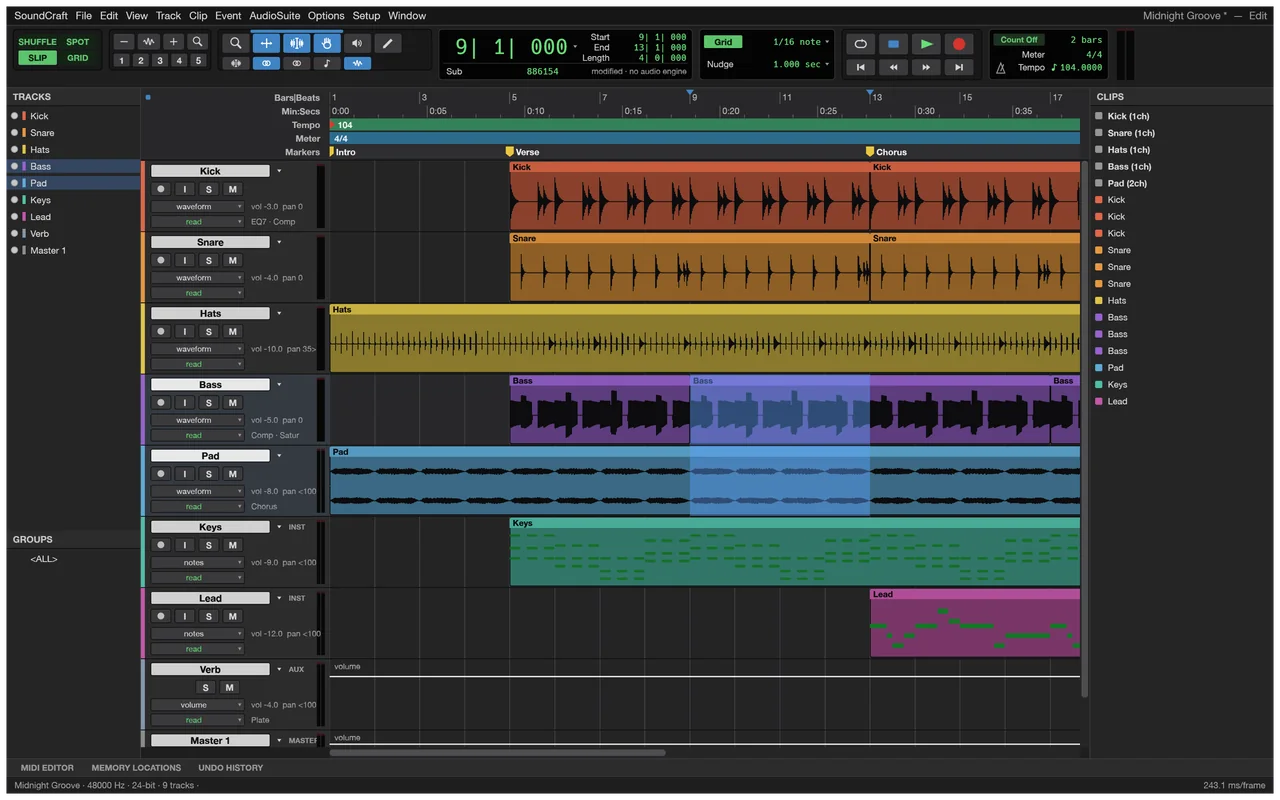
Try audio and MIDI media workflows; keep your original DAW for session exchange.
SoundCraft is a more practical choice for a standalone edit or mix than for taking over a studio session with all its hardware and routing intact.
The app has a multitrack editor, a mixer, automation and built-in effects. You can work on clips, set track levels and prepare a finished mix, while keeping the original audio and session available for further work.
The official screenshots show the edit and mix views of a synthetic demonstration session. The timeline in the opening image is useful for seeing clip arrangement; the mixer below shows the same session's faders and equaliser.
Use the Mix view's track faders and equaliser to adjust the levels and tone of a session.
Local audio editing is free, with no subscription.
The developers haven't published a separate account policy for SoundCraft.
The developers haven't published an app-wide offline policy.
ArtCraft's AI workbench is a separate product, and hosted generation uses credits. Choose the desktop editor for your own audio; see AI Workbench and Is ArtCraft free? for the generation service.
Choose the official desktop package for your system below. Craft Launcher can install and update several Craft apps in one place, while the standalone download installs SoundCraft on its own.
Check the processor before choosing a Windows package, and check the package's audio permissions on Linux. The Flatpak route uses PulseAudio access and does not provide raw ALSA-device or JACK access, which matters when choosing a package for your audio setup.
For several editing apps, use Craft Launcher to install, verify and update them.
Choose your system and processor to get an official package. The complete package list is available below.
soundcraft-0.6.1-windows-arm64.msi
SHA-256
8d813302ccd64f1801721336482b5ed42fe6676315878289644708816fcfe764Calculate the local file’s SHA-256, then compare the complete value for this filename.
Get-FileHash -LiteralPath "<downloaded-file>" -Algorithm SHA256soundcraft-0.6.1-windows-arm64-portable.zip
SHA-256
c9fc5e8bfa4abe7264d3b05ace44948786d018c94d79b0112121153d1acd636aCalculate the local file’s SHA-256, then compare the complete value for this filename.
Get-FileHash -LiteralPath "<downloaded-file>" -Algorithm SHA256soundcraft-0.6.1-windows-x86.msi
SHA-256
a0bd9e2e493c0b40842e964988a99b1d74894940cc799e107a06f75b52e7afbaCalculate the local file’s SHA-256, then compare the complete value for this filename.
Get-FileHash -LiteralPath "<downloaded-file>" -Algorithm SHA256soundcraft-0.6.1-windows-x86-portable.zip
SHA-256
4ec65ce5ae933ed0cc3aac7df090a9570758391efa7d2393e394c16ba347a8b6Calculate the local file’s SHA-256, then compare the complete value for this filename.
Get-FileHash -LiteralPath "<downloaded-file>" -Algorithm SHA256soundcraft-0.6.1-windows-x64.msi
SHA-256
abc6f2e0df79729150cd4b4a0a0eb2e381f668a5ff067ffbec79531d45844037Calculate the local file’s SHA-256, then compare the complete value for this filename.
Get-FileHash -LiteralPath "<downloaded-file>" -Algorithm SHA256soundcraft-0.6.1-windows-x64-portable.zip
SHA-256
cd5f8d98257f771191fa1c1b7c524501ebf381311ff3d13509fd83a1926e1f20Calculate the local file’s SHA-256, then compare the complete value for this filename.
Get-FileHash -LiteralPath "<downloaded-file>" -Algorithm SHA256soundcraft-0.6.1-macos-universal.dmg
SHA-256
94f014708e0173c13630bb8fa4163124d3bbb7af571e0f03d9f9b3027f90d0e7Calculate the local file’s SHA-256, then compare the complete value for this filename.
shasum -a 256 "<downloaded-file>"soundcraft-0.6.1-linux-aarch64.AppImage
SHA-256
ec80d1bbd66d4c0102272b1462368e92a0504e4d99466255e46477fb5f907852Calculate the local file’s SHA-256, then compare the complete value for this filename.
sha256sum "<downloaded-file>"soundcraft-0.6.1-linux-aarch64.deb
SHA-256
40db8380441b4b9c5e7376668076c75e00ba65c80dc526f26fb24b7bf39e5a84Calculate the local file’s SHA-256, then compare the complete value for this filename.
sha256sum "<downloaded-file>"soundcraft-0.6.1-linux-aarch64.flatpak
SHA-256
edb667df99e10a09b127a5bf80b64ca5da016d28b57988bb472f9009e4b4c35bCalculate the local file’s SHA-256, then compare the complete value for this filename.
sha256sum "<downloaded-file>"soundcraft-0.6.1-linux-aarch64.rpm
SHA-256
92d6092ea152e2b7b8ff5c2da1341200aefb7d0715a3af80163f165d8622342fCalculate the local file’s SHA-256, then compare the complete value for this filename.
sha256sum "<downloaded-file>"soundcraft-0.6.1-linux-aarch64.tar.gz
SHA-256
55a18458670f1723edc8ba45da01f3dd8b85feba7cc3f83d44e7038120245ca4Calculate the local file’s SHA-256, then compare the complete value for this filename.
sha256sum "<downloaded-file>"soundcraft-0.6.1-linux-riscv64.deb
SHA-256
ca96fa4ab09c9bbcde6f406fd06eb181341b3966b968b9ec99573192a5d0fda8Calculate the local file’s SHA-256, then compare the complete value for this filename.
sha256sum "<downloaded-file>"soundcraft-0.6.1-linux-riscv64.rpm
SHA-256
0dbda8306f44359a51321a46d7341e281c2b2884e941a041109046fa4f030f43Calculate the local file’s SHA-256, then compare the complete value for this filename.
sha256sum "<downloaded-file>"soundcraft-0.6.1-linux-riscv64.tar.gz
SHA-256
d501f45e9e1dfda6a858e1d2ddc6a20c9f4b54120f8136b461fdf08ec6d711bbCalculate the local file’s SHA-256, then compare the complete value for this filename.
sha256sum "<downloaded-file>"soundcraft-0.6.1-linux-x86_64.AppImage
SHA-256
68c658f2e72d74a3277f48df3ce13e4db9c6eafd7f1425f63e2dc85d86791200Calculate the local file’s SHA-256, then compare the complete value for this filename.
sha256sum "<downloaded-file>"soundcraft-0.6.1-linux-x86_64.deb
SHA-256
cb35f0b64c1a6bcb817c2a9c66e2683b5f7f207a31f2cea6fa137323ef623e95Calculate the local file’s SHA-256, then compare the complete value for this filename.
sha256sum "<downloaded-file>"soundcraft-0.6.1-linux-x86_64.flatpak
SHA-256
8ba12a0222c882e7eddb79fc7ee092d60dcfa7781408da8df2df2dd03d0b1c1bCalculate the local file’s SHA-256, then compare the complete value for this filename.
sha256sum "<downloaded-file>"soundcraft-0.6.1-linux-x86_64.rpm
SHA-256
affebe1021b999648d8607b3fffa8594710564b73e12771beb59709089304ee1Calculate the local file’s SHA-256, then compare the complete value for this filename.
sha256sum "<downloaded-file>"soundcraft-0.6.1-linux-x86_64.tar.gz
SHA-256
f3bfa3735146e4d7b12cd8363b8fe77bbeff31ee95392295033f50b1916efceeCalculate the local file’s SHA-256, then compare the complete value for this filename.
sha256sum "<downloaded-file>"soundcraft-0.6.1-freebsd-x86_64.tar.gz
SHA-256
1da08ebf968bf92c7de95932aea1bdb4e1009ff1207980b4b02fcd16692d635cCalculate the local file’s SHA-256, then compare the complete value for this filename.
sha256 -q "<downloaded-file>"flatpak install --user followed by the downloaded filename.| System | Published requirement |
|---|---|
| macOS | macOS 11 or later; Intel and Apple silicon; microphone permission for recording. |
| Windows | Windows 10 or later for x64/x86; Windows 11 for ARM64. |
| Linux | glibc 2.35 or later; riscv64 needs 2.39. AppImage/tarball need alsa-lib; Flatpak has different audio permissions. |
| RAM, GPU and storage | The developers haven't published complete minimum values. |
The developers haven't published SoundCraft-specific steps for Gatekeeper or SmartScreen warnings. If the app is blocked or won't open, describe the message and your system in the official support tracker.
Make a new session with a short audio recording of your own, adjust its level and prepare a bounce. Keep the original audio file so you can return to it after experimenting with the mix.
Ten shortcuts for playback and common editing modes and tools.
| Action | Windows / Linux | macOS |
|---|---|---|
| Play / stop | Space | Space |
| New marker | Enter | Enter |
| Shuffle edit mode | F1 | F1 |
| Slip edit mode | F2 | F2 |
| Spot edit mode | F3 | F3 |
| Grid edit mode | F4 | F4 |
| Zoom tool | F5 | F5 |
| Trim tool | F6 | F6 |
| Selector tool | F7 | F7 |
| Grabber tool | F8 | F8 |
| Action | Windows / Linux | macOS |
|---|---|---|
| Mix | Ctrl+= | Command+= |
| Edit | Ctrl+= | Command+= |
| Toggle Mix/Edit | Ctrl+= | Command+= |
| Transport | Ctrl+1 | Command+1 |
| Big Counter | Ctrl+3 | Command+3 |
| Memory Locations | Ctrl+5 | Command+5 |
| Narrow Mix | Ctrl+Alt+M | Command+Option+M |
| Close Window | Ctrl+W | Command+W |
| Hide All Floating Windows | 无默认键(macOS单独Control修饰键;从菜单打开) | Command+Ctrl+W |
| Video | Ctrl+9 | Command+9 |
| Automation | Ctrl+4 | Command+4 |
| Search | 无默认键(macOS单独Control修饰键;从菜单打开) | Command+Ctrl+S |
| Score Editor | 无默认键(macOS单独Control修饰键;从菜单打开) | Command+Ctrl+= |
| Play / stop | Space | Space |
| New marker | Enter | Enter |
| Shuffle edit mode | F1 | F1 |
| Slip edit mode | F2 | F2 |
| Spot edit mode | F3 | F3 |
| Grid edit mode | F4 | F4 |
| Zoom tool | F5 | F5 |
| Trim tool | F6 | F6 |
| Selector tool | F7 | F7 |
| Grabber tool | F8 | F8 |
| Scrubber tool | F9 | F9 |
| Pencil tool | F10 | F10 |
| Zoom out | R | R |
| Zoom in | T | T |
| Separate clip | Ctrl+E | Command+E |
| Duplicate | Ctrl+D | Command+D |
| New tracks | Ctrl+Shift+N | Command+Shift+N |
| Undo | Ctrl+Z | Command+Z |
| Redo | Ctrl+Shift+Z | Command+Shift+Z |
| Restore Last Selection | Ctrl+Alt+Z | Command+Option+Z |
| Cut | Ctrl+X | Command+X |
| Copy | Ctrl+C | Command+C |
| Paste | Ctrl+V | Command+V |
| Clear | Ctrl+B | Command+B |
| Clip Gain | 无默认键(macOS单独Control修饰键;从菜单打开) | Command+Ctrl+X |
| Clip Gain | 无默认键(macOS单独Control修饰键;从菜单打开) | Command+Ctrl+B |
| Repeat to Fill Selection | Ctrl+Alt+V | Command+Option+V |
| Select All | Ctrl+A | Command+A |
| Change Timeline to Match Edit | Alt+Shift+5 | Option+Shift+5 |
| Change Edit to Match Timeline | Alt+Shift+6 | Option+Shift+6 |
| Move Edit Left | Ctrl+Alt+L | Command+Option+L |
| Move Edit Right | Ctrl+Alt+' | Command+Option+' |
| Duplicate | Ctrl+D | Command+D |
| Alt+R | Option+R | |
| Alt+H | Option+H | |
| Insert Silence | Ctrl+Shift+E | Command+Shift+E |
| At Selection | Ctrl+E | Command+E |
| Heal Separation | Ctrl+H | Command+H |
| To Selection | Ctrl+T | Command+T |
| Start to Insertion | Alt+Shift+7 | Option+Shift+7 |
| End to Insertion | Alt+Shift+8 | Option+Shift+8 |
| Mute | Ctrl+M | Command+M |
| Strip Silence | Ctrl+U | Command+U |
| Ctrl+F | Command+F | |
| Fade to Start | 无默认键(macOS单独Control修饰键;从菜单打开) | Command+Ctrl+D |
| Fade to End | 无默认键(macOS单独Control修饰键;从菜单打开) | Command+Ctrl+G |
| Nudge | Plus/Minus | Plus/Minus |
| Edit Mode | F1-F4 | F1-F4 |
| Edit Tool | F5-F10 | F5-F10 |
| Consolidate | Alt+Shift+3 | Option+Shift+3 |
| Play | Space | Space |
| Stop | Space | Space |
| Play/Stop | Space | Space |
| Record | Ctrl+Space | Command+Space |
| Half-Speed Playback | Shift+Space | Shift+Space |
| Play Edit | Alt+[ | Option+[ |
| Return to Zero | Home | Home |
| Go to End | End | End |
| Ctrl+N | Command+N | |
| Ctrl+O | Command+O | |
| Close Session | Ctrl+Shift+W | Command+Shift+W |
| Save Session | Ctrl+S | Command+S |
| Ctrl+Shift+S | Command+Shift+S | |
| Ctrl+Shift+I | Command+Shift+I | |
| Ctrl+Alt+I | Command+Option+I | |
| 无默认键(macOS单独Control修饰键;从菜单打开) | Command+Ctrl+I | |
| Ctrl+Alt+B | Command+Option+B | |
| Ctrl+Shift+K | Command+Shift+K | |
| Ctrl+P | Command+P | |
| Quit | Ctrl+Q | Command+Q |
Use the desktop-control descriptions for the installed app. The same README has command-line examples for creating and bouncing a demo session if you want to explore that separate workflow later.
One Linux community user liked the responsiveness but wanted more development before relying on it for projects.
After using the multitrack editor, thom described it as fluent and promising, while still seeing substantial work before using it for real projects. Read the community post.
Use audio and MIDI media to move work into SoundCraft; Pro Tools PTX and AAF/OMF session exchange are unavailable. A finished mix, separate stems and an editable session are different deliveries, so agree on the recipient's format first.
| Format | Open / save | What to watch |
|---|---|---|
| WAV / AIFF / FLAC | Import and export | Available for mix and stem bounce. |
| Standard MIDI File | Import and export | Inspect timing and instrument assignments after exchange. |
| MP3 / AAC | Import | Final bounce uses WAV, AIFF or FLAC. |
| AAF / OMF | Unsupported | Keep the original DAW for session-level exchange. |
Listen to the exported mix and check its timing, channels and levels before delivery. Keep the source session and media together for further editing; a bounce gives the recipient audio without carrying your full session setup. See the full format reference.
Choose by the audio job you do most often. SoundCraft has a multitrack mixing workspace, Audacity suits recordings and quick edits, and LMMS is aimed at beats, electronic music and MIDI arrangement.
| App | Good for | Free option |
|---|---|---|
| SoundCraft | Standalone audio edits and mixes | Free local editor. |
| Audacity | Podcasts, recording, quick cuts and format conversion | Free and open source; promoted plug-ins and cloud services may have separate costs. |
| LMMS | Beats, electronic music and MIDI arrangement | Free and open source; external plug-ins and samples have their own terms. |
No. SoundCraft's local editing is free; the separate AI workbench uses credits for hosted generation.
Use audio and MIDI files for a media workflow. PTX and AAF/OMF session exchange are unavailable.
Final bounce uses WAV, AIFF or FLAC. MP3 import is a separate feature.
The Flatpak package uses PulseAudio access and has no raw ALSA-device or JACK access. AppImage and tarball packages have their own dependencies.
Follow the five-step session edit above, then read the official getting-started overview for the Edit and Mix tools.
Based on official docs and published reviews; we didn't install it ourselves.
Last checked: 14 Oct 2026.
Current release: 0.6.1.

