
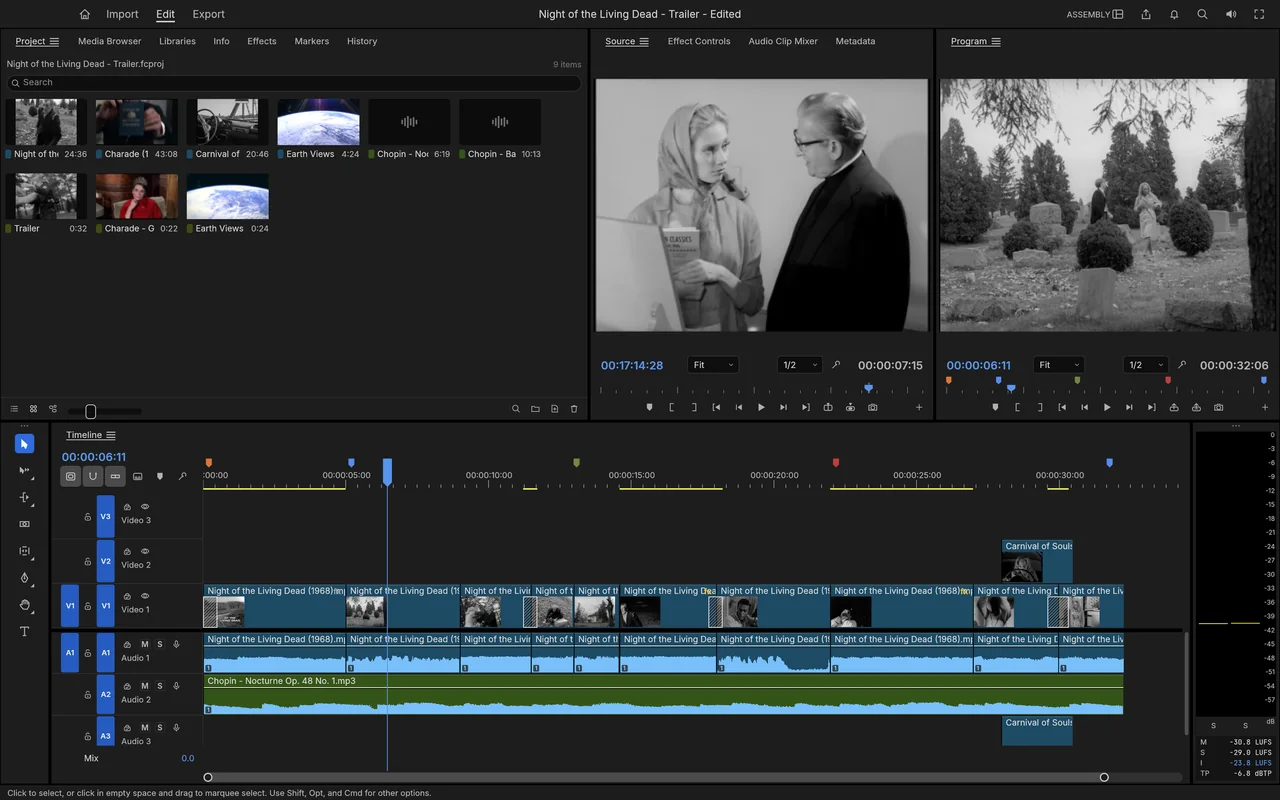
Assembly workspace
Use project bins and source and programme monitors to assemble clips on a multi-track timeline.
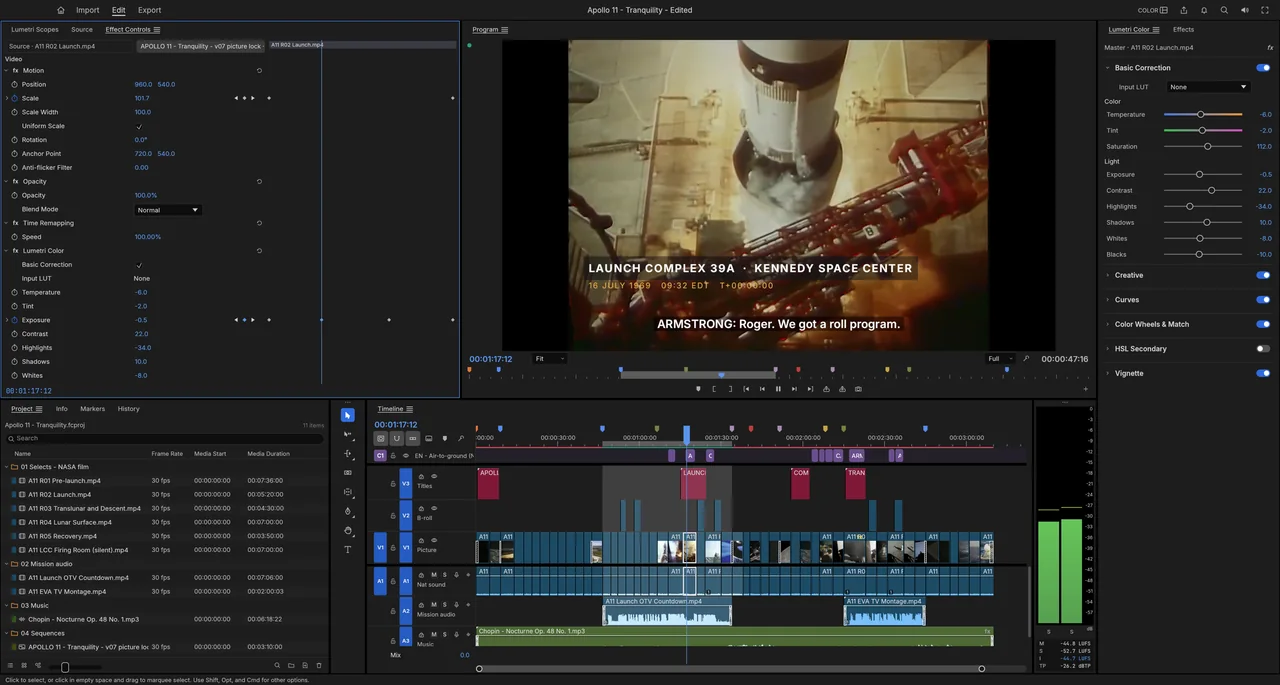
Cut video on a multi-track timeline with colour tools, keyframes and captions.
Free · No subscription · No account needed · Windows / macOS / Linux
.prproj directly.Try it for simpler video edits; keep Premiere for direct project exchange and plug-in-heavy work.
Start with a short sequence and one of your own camera clips before moving a larger project.
The workspace brings together source and programme monitors, a multi-track timeline, effects, audio and captions. A familiar arrangement helps you find the tools, while the media format and final delivery still determine whether it fits your job.
See how FilmCraft arranges clips, colour controls, animation curves and export settings in its official screenshots.
Use project bins and source and programme monitors to assemble clips on a multi-track timeline.
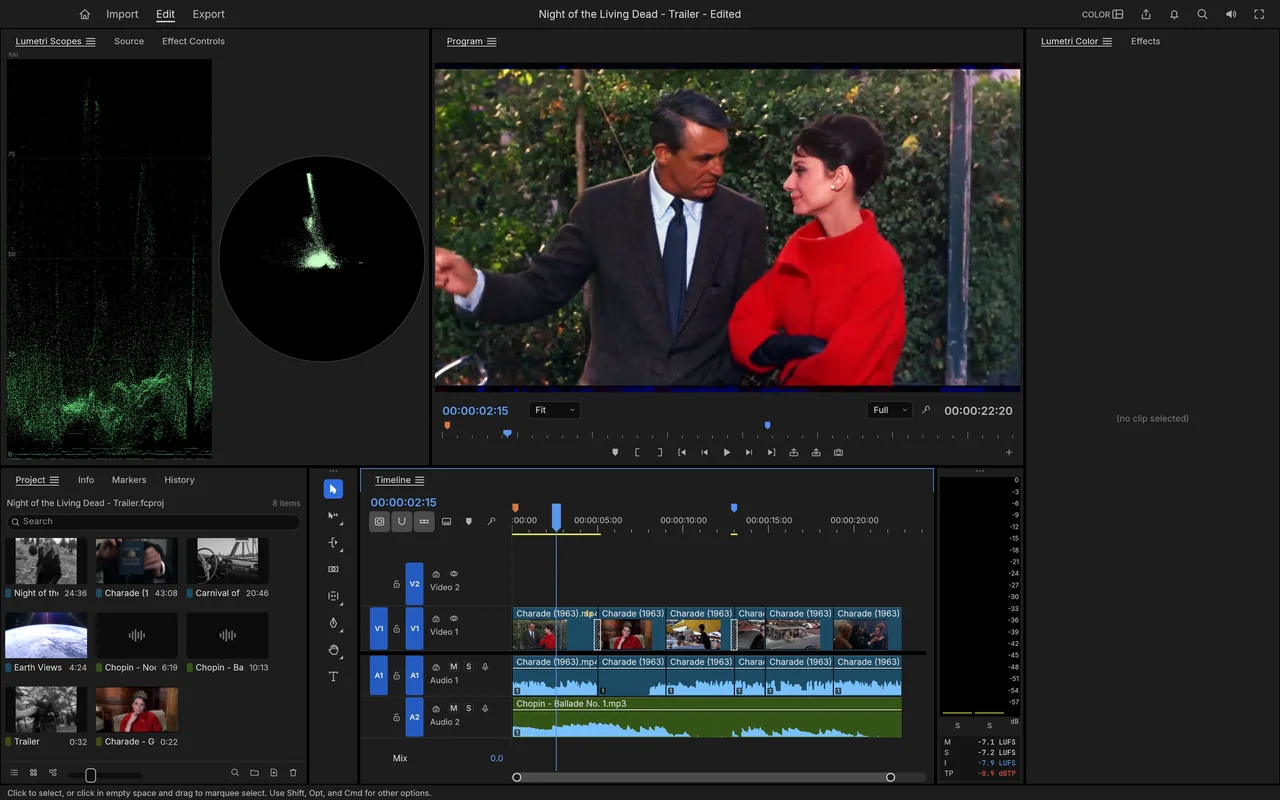
Adjust the picture while viewing colour controls, a waveform and a vectorscope.
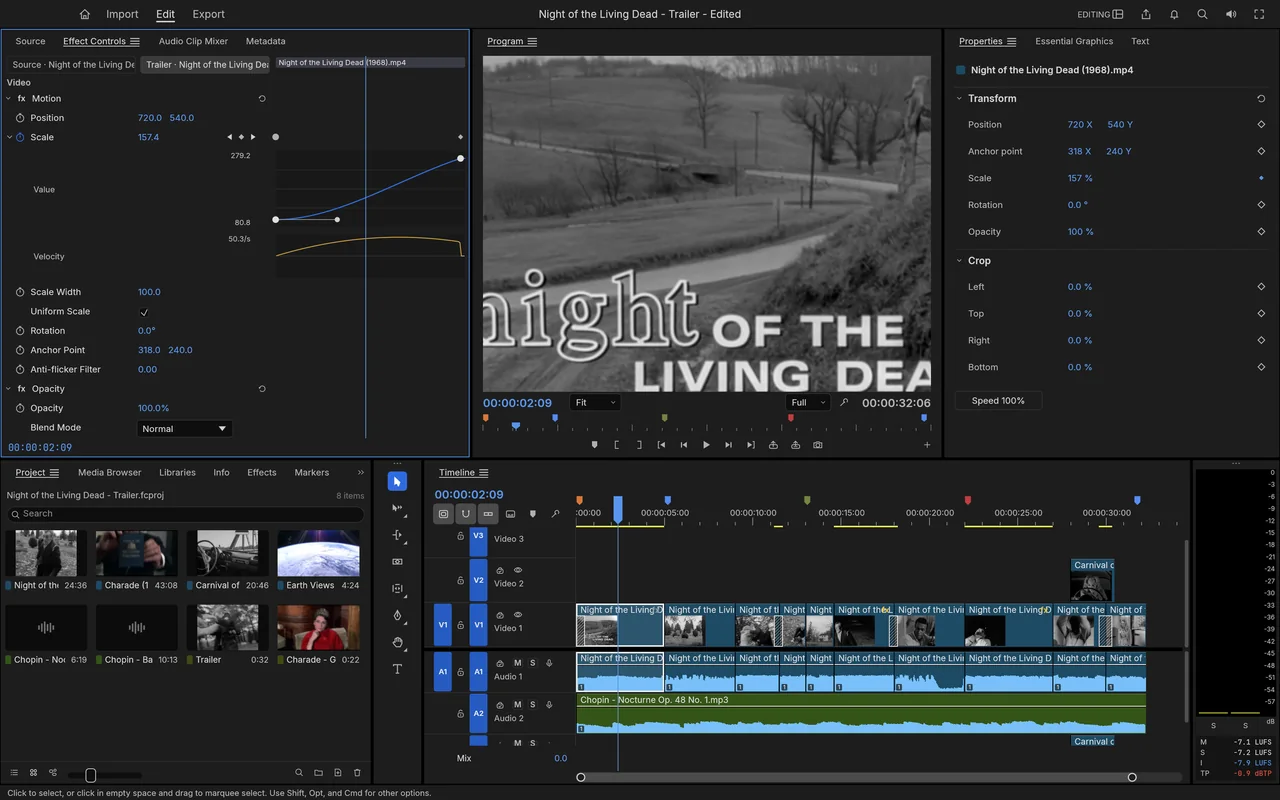
Shape a scale animation with value and velocity graphs beside the timeline.
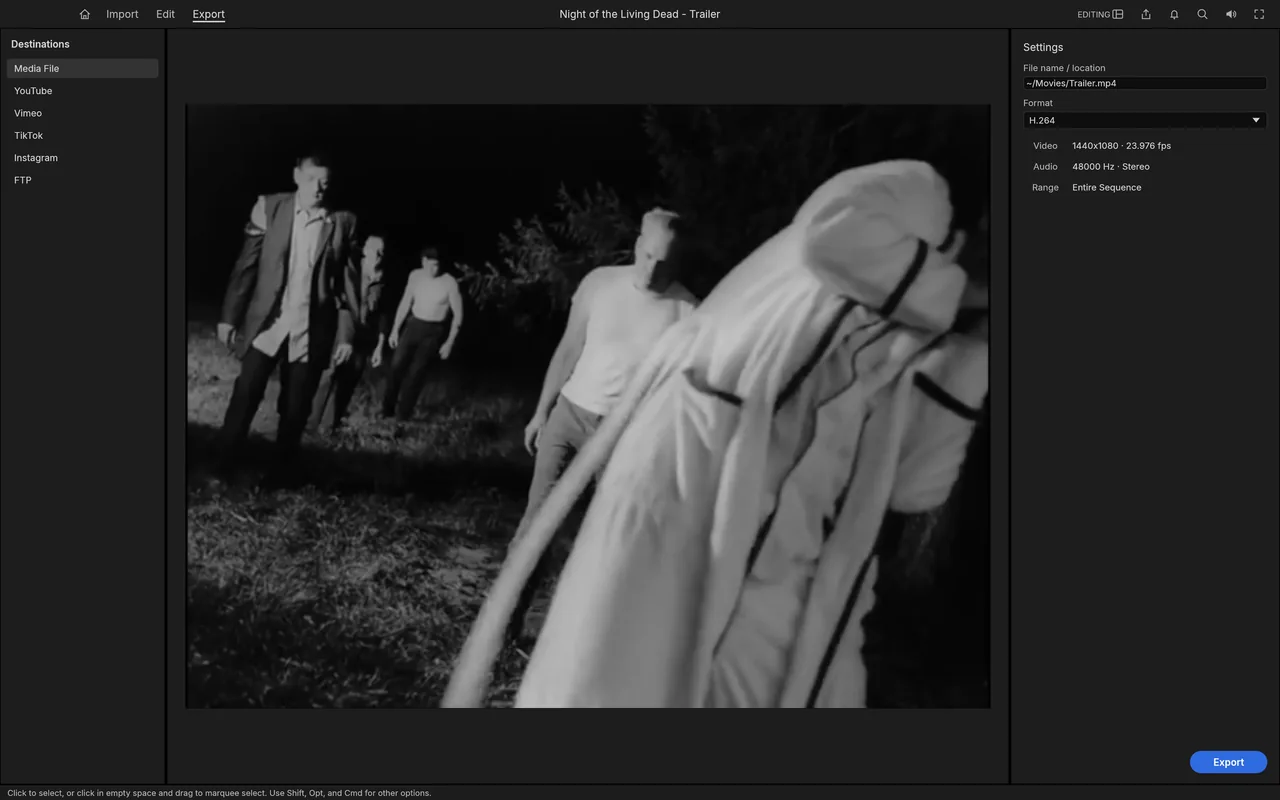
Choose H.264 output and review the export settings before making a video file.
Local video editing is free, with no subscription.
Joe Foley installed and used FilmCraft without creating an account or providing personal details.
The editor works with local media on your computer.
Downloading the app, updates and optional speech models needs internet access. ArtCraft's hosted AI workbench is a separate product that uses credits; see AI Workbench and Is ArtCraft free?.
Choose the official desktop package for your system below. Craft Launcher is another route if you want one place to install and update several apps; FilmCraft also has its own downloads.
For several editing apps, use Craft Launcher to install, verify and update them.
Choose your system and processor to get an official package. The complete package list is available below.
filmcraft-0.7.2-windows-arm64.msi
SHA-256
fca996dfdb313829d405fd9de958f794ff07ea4448ace427d86b4a3a4b910f50Calculate the local file’s SHA-256, then compare the complete value for this filename.
Get-FileHash -LiteralPath "<downloaded-file>" -Algorithm SHA256filmcraft-0.7.2-windows-arm64-portable.zip
SHA-256
82e6f95fec0cdc44b06f41b98a6bb1e9b538ee4f8c3cd412f89ddfdd464b93c2Calculate the local file’s SHA-256, then compare the complete value for this filename.
Get-FileHash -LiteralPath "<downloaded-file>" -Algorithm SHA256filmcraft-0.7.2-windows-x86.msi
SHA-256
5dc5b87663f110660918b359f23b73d27ee64309c0da0ab893254acf3a13c118Calculate the local file’s SHA-256, then compare the complete value for this filename.
Get-FileHash -LiteralPath "<downloaded-file>" -Algorithm SHA256filmcraft-0.7.2-windows-x86-portable.zip
SHA-256
7c04c5b42e9533e24e604c2fe970d8f098f23611a64e73e54bf7e7b7f90b3bf4Calculate the local file’s SHA-256, then compare the complete value for this filename.
Get-FileHash -LiteralPath "<downloaded-file>" -Algorithm SHA256filmcraft-0.7.2-windows-x64.msi
SHA-256
368abb98aa43878c32c8fd3223e0825419c605462c704b30034df8f6317c2a85Calculate the local file’s SHA-256, then compare the complete value for this filename.
Get-FileHash -LiteralPath "<downloaded-file>" -Algorithm SHA256filmcraft-0.7.2-windows-x64-portable.zip
SHA-256
8e22fabdf2f802573d3af4ad9993c05212dead5e933efda0fa290e825313cde7Calculate the local file’s SHA-256, then compare the complete value for this filename.
Get-FileHash -LiteralPath "<downloaded-file>" -Algorithm SHA256filmcraft-0.7.2-macos-universal.dmg
SHA-256
df8f6ec7f7c7d227549c20579c65b9f6b2635ccd994410bb70c8d0369a6b9fb7Calculate the local file’s SHA-256, then compare the complete value for this filename.
shasum -a 256 "<downloaded-file>"filmcraft-0.7.2-linux-aarch64.AppImage
SHA-256
d2767bb36ae350465ad07317f927029b5a89fbb140499da649363be0c66dc849Calculate the local file’s SHA-256, then compare the complete value for this filename.
sha256sum "<downloaded-file>"filmcraft-0.7.2-linux-aarch64.deb
SHA-256
f90bd61a9ac6e28fdb95b0c2bd956a5029a42ba3181bd1493dc79a8f8b6bb715Calculate the local file’s SHA-256, then compare the complete value for this filename.
sha256sum "<downloaded-file>"filmcraft-0.7.2-linux-aarch64.flatpak
SHA-256
99fa041337c493c07b38adc25facea4348e7cea75d11599ebc97bf978a4f0010Calculate the local file’s SHA-256, then compare the complete value for this filename.
sha256sum "<downloaded-file>"filmcraft-0.7.2-linux-aarch64.rpm
SHA-256
ff1aef31eddad4e420e2e355b2a6e2fa9b0240a58e166dbf0d260a835613992eCalculate the local file’s SHA-256, then compare the complete value for this filename.
sha256sum "<downloaded-file>"filmcraft-0.7.2-linux-aarch64.tar.gz
SHA-256
4af56f649a6fb19dcae386abd59921ec6c9190b725014517075fa4d81123c68aCalculate the local file’s SHA-256, then compare the complete value for this filename.
sha256sum "<downloaded-file>"filmcraft-0.7.2-linux-riscv64.deb
SHA-256
e0b2608705ace3f7a8b2a7d8be57e67b6e3ae94becfd6d32258a9d48ecc6dd3aCalculate the local file’s SHA-256, then compare the complete value for this filename.
sha256sum "<downloaded-file>"filmcraft-0.7.2-linux-riscv64.rpm
SHA-256
fa3d2dc104d1258908c900352bd5955f3cea56d51133db0be8fd78c2a9a87c53Calculate the local file’s SHA-256, then compare the complete value for this filename.
sha256sum "<downloaded-file>"filmcraft-0.7.2-linux-riscv64.tar.gz
SHA-256
37ece35bbb02aeaa8eadb3e3cc4414380ab8bd860c63503bd9d0f7ec389d1640Calculate the local file’s SHA-256, then compare the complete value for this filename.
sha256sum "<downloaded-file>"filmcraft-0.7.2-linux-x86_64.AppImage
SHA-256
abf920d98d015860e1f5badc6cf0507d8f8116f5c328f7f7f2425f068ab3aee8Calculate the local file’s SHA-256, then compare the complete value for this filename.
sha256sum "<downloaded-file>"filmcraft-0.7.2-linux-x86_64.deb
SHA-256
1652a4c7e501b66c3a599f898bbe479349e1282e4b9edb50ec5c0291dfc744f7Calculate the local file’s SHA-256, then compare the complete value for this filename.
sha256sum "<downloaded-file>"filmcraft-0.7.2-linux-x86_64.flatpak
SHA-256
06e740c482f351d44385cf60d89430748764a43f75a42d960b73fa060bec11d5Calculate the local file’s SHA-256, then compare the complete value for this filename.
sha256sum "<downloaded-file>"filmcraft-0.7.2-linux-x86_64.rpm
SHA-256
75078cb75e4424ca44c043fffe9df9581461ab7ed4699bfd7303c50856e21b46Calculate the local file’s SHA-256, then compare the complete value for this filename.
sha256sum "<downloaded-file>"filmcraft-0.7.2-linux-x86_64.tar.gz
SHA-256
4171c4bf5f57fd29475655f8a6df4719feda8c8f3ed95b2475d8dc112ad3be86Calculate the local file’s SHA-256, then compare the complete value for this filename.
sha256sum "<downloaded-file>"filmcraft-0.7.2-freebsd-x86_64.tar.gz
SHA-256
80d1bb648bdb11e83cb0a658346fa2996abb629ccc7adf72295679a1e12267dcCalculate the local file’s SHA-256, then compare the complete value for this filename.
sha256 -q "<downloaded-file>"filmcraft.exe in the extracted folder; this route needs no installer../install.sh; the default installs the app and desktop entry under ~/.local, without administrator access.| System | Published requirement |
|---|---|
| macOS | macOS 11 or later; Intel and Apple silicon |
| Windows | x64 for most Windows 10/11 PCs; ARM64 for Windows 11 on ARM; x86 packages also available, with no published minimum Windows version |
| Linux | x86_64/aarch64 packages need glibc 2.35 or later; riscv64 tarballs need 2.39 or later. |
| CPU performance, RAM, GPU and storage | The developers haven't published complete minimum values. |
The developers haven't published app-specific steps for Gatekeeper or SmartScreen warnings. If your computer blocks the app or it won't open, use the official support tracker and include the message and your system.
MSI, AppImage, DEB, RPM and Flatpak are other package choices. Use the official installation guide for the route you choose, and keep the Linux package's runtime requirements in mind.
Trim a short video, save the editable project and export a sharing copy. Use a clip you know well so that playback, sound and the exported result are easy to compare.
.fcproj project.Ten shortcuts for importing, trimming, playback and export.
| Action | Windows / Linux | macOS |
|---|---|---|
| Import | Ctrl+I | Command+I |
| Save | Ctrl+S | Command+S |
| Undo | Ctrl+Z | Command+Z |
| Redo | Ctrl+Shift+Z | Command+Shift+Z |
| Selection Tool | V | V |
| Razor Tool | C | C |
| Play / Stop | Space | Space |
| Mark In | I | I |
| Mark Out | O | O |
| Export | Ctrl+M | Command+M |
| Action | Panel | Key |
|---|---|---|
| Add New Caption Track… | Application | Command+Alt+A |
| Add Caption at Playhead | Application | Command+Alt+C |
| Go to Next Caption Segment | Application | Command+Alt+Down |
| Go to Previous Caption Segment | Application | Command+Alt+Up |
| Bin From Selection | Application | Shift+B |
| Close Project | Application | Command+Shift+W |
| Paste Attributes… | Application | Command+Alt+V |
| Make Subclip… | Application | Command+U |
| Audio Channels… | Application | Shift+G |
| Project… | Application | Command+Alt+N |
| Sequence… | Application | Command+N |
| Bin | Application | Command+B |
| Import… | Application | Command+I |
| Save | Application | Command+S |
| Save As… | Application | Command+Shift+S |
| Save a Copy… | Application | Command+Alt+S |
| Open Project… | Application | Command+O |
| Undo | Application | Command+Z |
| Redo | Application | Command+Shift+Z |
| Cut | Application | Command+X |
| Copy | Application | Command+C |
| Paste | Application | Command+V |
| Paste Insert | Application | Command+Shift+V |
| Clear | Application | Backspace |
| Ripple Delete | Application | Shift+Delete |
| Select All | Application | Command+A |
| Deselect All | Application | Command+Shift+A |
| Duplicate | Application | Command+Shift+/ |
| Speed/Duration… | Application | Command+R |
| Enable | Application | Shift+E |
| Link | Application | Command+L |
| Group | Application | Command+G |
| Ungroup | Application | Command+Shift+G |
| Audio Gain… | Application | G |
| Add Edit | Application | Command+K |
| Add Edit to All Tracks | Application | Command+Shift+K |
| Lift | Application | ; |
| Extract | Application | ' |
| Apply Video Transition | Application | Command+D |
| Apply Audio Transition | Application | Command+Shift+D |
| Snap in Timeline | Application | S |
| Render Effects In to Out | Application | Enter |
| Match Frame | Application | F |
| Mark In | Application | I |
| Mark Out | Application | O |
| Mark Clip | Application | X |
| Mark Selection | Application | / |
| Go to In | Application | Shift+I |
| Go to Out | Application | Shift+O |
| Clear In | Application | Command+Shift+I |
| Clear Out | Application | Command+Shift+O |
| Clear In and Out | Application | Command+Shift+X |
| Add Marker | Application | M |
| Go to Next Marker | Application | Shift+M |
| Go to Previous Marker | Application | Command+Shift+M |
| Clear Selected Marker | Application | Command+Alt+M |
| Clear Markers | Application | Command+Alt+Shift+M |
| Step Forward One Frame | Application | Right |
| Step Back One Frame | Application | Left |
| Step Forward Five Frames | Application | Shift+Right |
| Step Back Five Frames | Application | Shift+Left |
| Go to Next Edit Point | Application | Down |
| Go to Previous Edit Point | Application | Up |
| Go to Sequence Start | Application | Home |
| Go to Sequence End | Application | End |
| Insert | Application | , |
| Overwrite | Application | . |
| Trim Edit | Application | Shift+T |
| Toggle Trim Type | Application | Ctrl+T |
| Trim Backward | Application | Alt+Left |
| Trim Forward | Application | Alt+Right |
| Trim Backward Many | Application | Alt+Shift+Left |
| Trim Forward Many | Application | Alt+Shift+Right |
| Extend Selected Edit to Playhead | Application | E |
| Ripple Trim Previous Edit to Playhead | Application | Q |
| Ripple Trim Next Edit to Playhead | Application | W |
| Trim Previous Edit to Playhead | Application | Alt+Q |
| Trim Next Edit to Playhead | Application | Alt+W |
| Clear | Application | Delete |
| Rectangle | Application | Command+Alt+R |
| Ellipse | Application | Command+Alt+E |
| Select Next Layer | Application | Command+Alt+] |
| Select Previous Layer | Application | Command+Alt+[ |
| Text | Application | Command+T |
| Go to Next Edit Point on Any Track | Application | Shift+Down |
| Go to Previous Edit Point on Any Track | Application | Shift+Up |
| Go to Selected Clip Start | Application | Shift+Home |
| Go to Selected Clip End | Application | Shift+End |
| Reveal Nested Sequence | Application | Command+Alt+F |
| Select Clip at Playhead | Application | D |
| Select Next Clip | Application | Command+Down |
| Select Previous Clip | Application | Command+Up |
| Extend Previous Edit To Playhead | Application | Shift+Q |
| Extend Next Edit To Playhead | Application | Shift+W |
| Toggle All Video Targets | Application | Command+0 |
| Toggle All Audio Targets | Application | Command+9 |
| Toggle All Source Video | Application | Command+Alt+0 |
| Toggle All Source Audio | Application | Command+Alt+9 |
| Increase Clip Volume | Application | ] |
| Decrease Clip Volume | Application | [ |
| Increase Clip Volume Many | Application | Shift+] |
| Decrease Clip Volume Many | Application | Shift+[ |
| Toggle Audio During Scrubbing | Application | Shift+S |
| Increase Font Size by One Unit | Application | Command+Alt+Right |
| Decrease Font Size by One Unit | Application | Command+Alt+Left |
| Increase Font Size by Five Units | Application | Command+Alt+Shift+Right |
| Decrease Font Size by Five Units | Application | Command+Alt+Shift+Left |
| Increase Leading by One Unit | Application | Alt+Up |
| Decrease Leading by One Unit | Application | Alt+Down |
| Increase Leading by Five Units | Application | Alt+Shift+Up |
| Decrease Leading by Five Units | Application | Alt+Shift+Down |
| Left align text | Application | Command+Shift+L |
| Center align text | Application | Command+Shift+C |
| Right align text | Application | Command+Shift+R |
| Set Poster Frame | Application | Command+P |
| Clear Poster Frame | Application | Alt+P |
| Close | Application | Command+W |
| Import from Media Browser | Application | Command+Alt+I |
| Find… | Application | Command+F |
| Edit Original | Application | Command+E |
| Reverse Match Frame | Application | Shift+R |
| Next in Sequence | Application | Shift+; |
| Previous in Sequence | Application | Command+Shift+; |
| Make Subsequence | Application | Shift+U |
| Add Range Marker | Application | Ctrl+Shift+M |
| Add Range Marker to In and Out | Application | Ctrl+M |
| Play/Stop | Application | Space |
| Shuttle Right | Application | L |
| Shuttle Stop | Application | K |
| Shuttle Left | Application | J |
| Play In to Out | Application | Alt+K |
| Zoom In | Application | = |
| Zoom Out | Application | - |
| Zoom to Sequence | Application | \ |
| Multi-Camera View | Application | Shift+0 |
| Multi-Camera Record On/Off Toggle | Application | 0 |
| Editing | Application | Alt+Shift+1 |
| Assembly | Application | Alt+Shift+2 |
| Color | Application | Alt+Shift+3 |
| Effects | Application | Alt+Shift+4 |
| Audio | Application | Alt+Shift+5 |
| Captions and Graphics | Application | Alt+Shift+6 |
| Reset to Saved Layout | Application | Alt+Shift+0 |
| Selection Tool | Application | V |
| Track Select Forward Tool | Application | A |
| Track Select Backward Tool | Application | Shift+A |
| Ripple Edit Tool | Application | B |
| Rolling Edit Tool | Application | N |
| Rate Stretch Tool | Application | R |
| Razor Tool | Application | C |
| Slip Tool | Application | Y |
| Slide Tool | Application | U |
| Pen Tool | Application | P |
| Hand Tool | Application | H |
| Zoom Tool | Application | Z |
| Type Tool | Application | T |
| Export | Application | Command+M |
| Keyboard Shortcuts… | Application | Command+Alt+K |
| General… | Application | Command+, |
| Maximize or Restore Active Frame | Application | Shift+` |
| Maximize or Restore Frame Under Cursor | Application | ` |
| Toggle Full Screen | Application | Ctrl+` |
| Select Next Panel | Application | Ctrl+Shift+. |
| Select Previous Panel | Application | Ctrl+Shift+, |
| Open Search | Application | Command+Shift+F |
| Select Find Box | Application | Shift+F |
| Learning | Application | Alt+Shift+7 |
| Review | Application | Alt+Shift+8 |
| Zoom Program Monitor to 100% | Application | Command+Shift+1 |
| Zoom Program Monitor to Fit | Application | Command+Shift+0 |
| Zoom Source Monitor to 100% | Application | Command+Alt+Shift+1 |
| Zoom Source Monitor to Fit | Application | Command+Alt+Shift+0 |
| Play In to Out with Preroll/Postroll | Application | Shift+Space |
| Play from Playhead to Out Point | Application | Ctrl+Space |
| Expand All Tracks | Application | Shift+= |
| Minimize All Tracks | Application | Shift+- |
| Begin Text Editing for a Graphic Layer | Application | Command+Alt+' |
| FilmCraft Help… | Application | F1 |
| Quit FilmCraft | Application | Command+Q |
| Select Camera 1 | Application | 1 |
| Cut to Camera 1 | Application | Ctrl+1 |
| Select Camera 2 | Application | 2 |
| Cut to Camera 2 | Application | Ctrl+2 |
| Select Camera 3 | Application | 3 |
| Cut to Camera 3 | Application | Ctrl+3 |
| Select Camera 4 | Application | 4 |
| Cut to Camera 4 | Application | Ctrl+4 |
| Select Camera 5 | Application | 5 |
| Cut to Camera 5 | Application | Ctrl+5 |
| Select Camera 6 | Application | 6 |
| Cut to Camera 6 | Application | Ctrl+6 |
| Select Camera 7 | Application | 7 |
| Cut to Camera 7 | Application | Ctrl+7 |
| Select Camera 8 | Application | 8 |
| Cut to Camera 8 | Application | Ctrl+8 |
| Select Camera 9 | Application | 9 |
| Cut to Camera 9 | Application | Ctrl+9 |
| Project | Application | Shift+1 |
| Source | Application | Shift+2 |
| Timeline | Application | Shift+3 |
| Program | Application | Shift+4 |
| EffectControls | Application | Shift+5 |
| AudioClipMixer | Application | Shift+9 |
| Effects | Application | Shift+7 |
| MediaBrowser | Application | Shift+8 |
| AudioTrackMixer | Application | Shift+6 |
| Clear | Project | Backspace |
| Clear | Timeline | Delete |
| Bin | Project | Command+B |
| Undo | History | Left |
| Redo | History | Right |
| Close Sequence | Timeline | Command+W |
| Nudge Clip Selection Left One Frame | Timeline | Command+Left |
| Nudge Clip Selection Right One Frame | Timeline | Command+Right |
| Nudge Clip Selection Left Five Frames | Timeline | Command+Shift+Left |
| Nudge Clip Selection Right Five Frames | Timeline | Command+Shift+Right |
| Nudge Clip Selection Up | Timeline | Alt+Up |
| Nudge Clip Selection Down | Timeline | Alt+Down |
| Slip Clip Selection Left One Frame | Timeline | Command+Alt+Left |
| Slip Clip Selection Right One Frame | Timeline | Command+Alt+Right |
| Slip Clip Selection Left Five Frames | Timeline | Command+Alt+Shift+Left |
| Slip Clip Selection Right Five Frames | Timeline | Command+Alt+Shift+Right |
| Slide Clip Selection Left One Frame | Timeline | Alt+, |
| Slide Clip Selection Right One Frame | Timeline | Alt+. |
| Slide Clip Selection Left Five Frames | Timeline | Alt+Shift+, |
| Slide Clip Selection Right Five Frames | Timeline | Alt+Shift+. |
| Increase Video Tracks Height | Timeline | Command+= |
| Decrease Video Tracks Height | Timeline | Command+- |
| Increase Audio Tracks Height | Timeline | Alt+= |
| Decrease Audio Tracks Height | Timeline | Alt+- |
| Show Next Screen | Timeline | PageDown |
| Show Previous Screen | Timeline | PageUp |
| Nudge Selected Object to left by one | Program | Command+Left |
| Nudge Selected Object to right by one | Program | Command+Right |
| Nudge Selected Object up by one | Program | Command+Up |
| Nudge Selected Object down by one | Program | Command+Down |
| Nudge Selected Object to left by five | Program | Command+Shift+Left |
| Nudge Selected Object to right by five | Program | Command+Shift+Right |
| Nudge Selected Object up by five | Program | Command+Shift+Up |
| Nudge Selected Object down by five | Program | Command+Shift+Down |
| Nudge Selected Object to left by one | Properties | Command+Left |
| Nudge Selected Object to right by one | Properties | Command+Right |
| Nudge Selected Object up by one | Properties | Command+Up |
| Nudge Selected Object down by one | Properties | Command+Down |
| Nudge Selected Object to left by five | Properties | Command+Shift+Left |
| Nudge Selected Object to right by five | Properties | Command+Shift+Right |
| Nudge Selected Object up by five | Properties | Command+Shift+Up |
| Nudge Selected Object down by five | Properties | Command+Shift+Down |
| Clear | Properties | Backspace |
| Show Rulers | Program | Command+R |
| Show Guides | Program | Command+; |
| Snap in Program Monitor | Program | Command+Shift+; |
| Lock Guides | Program | Command+Alt+Shift+R |
| List | Project | Command+PageUp |
| Icon | Project | Command+PageDown |
| Toggle View | Project | Shift+\ |
| Hover Scrub | Project | Shift+H |
| Mark In (Hover Scrub) | Project | I |
| Mark Out (Hover Scrub) | Project | O |
| Thumbnail Size Next | Project | Shift+] |
| Thumbnail Size Next | Project | = |
| Thumbnail Size Previous | Project | Shift+[ |
| Thumbnail Size Previous | Project | - |
| Move Selection Up | Project | Up |
| Move Selection Down | Project | Down |
| Move Selection Left | Project | Left |
| Move Selection Right | Project | Right |
| Move Selection Home | Project | Home |
| Move Selection End | Project | End |
| Move Selection Page Up | Project | PageUp |
| Move Selection Page Down | Project | PageDown |
| Extend Selection Up | Project | Shift+Up |
| Extend Selection Down | Project | Shift+Down |
| Extend Selection Left | Project | Shift+Left |
| Extend Selection Right | Project | Shift+Right |
| Navigate to Previous Word | Text | Left |
| Navigate to Next Word | Text | Right |
| Select to Previous Word | Text | Shift+Left |
| Select to Next Word | Text | Shift+Right |
| Navigate to Previous Line | Text | Up |
| Navigate to Next Line | Text | Down |
| Select to Previous Line | Text | Shift+Up |
| Select to Next Line | Text | Shift+Down |
| Navigate to Start of Segment | Text | Home |
| Navigate to End of Segment | Text | End |
| Select to Segment Start | Text | Shift+Home |
| Select to Segment End | Text | Command+Shift+Down |
| Delete | Text | Alt+Backspace |
| Ripple Delete | Text | Backspace |
| Show Program Transcript | Text | Shift+X |
| Merge Captions | Text | Alt+M |
| Split Caption | Text | Alt+S |
| Loop | Audio Track Mixer | Command+L |
| Play/Stop | Metadata | Space |
| Loop | Metadata | Command+L |
| open In Source | Media Browser | Shift+O |
| Apply Default Transitions to Selection | Application | Shift+D |
| Shuttle Slow Left | Application | Shift+J |
| Shuttle Slow Right | Application | Shift+L |
| Play Around | Application | Shift+K |
| add | Application | Alt+Shift+M |
| media Properties | Application | Command+Shift+H |
| bring To Front | Application | Command+Shift+] |
| bring Forward | Application | Command+] |
| send Backward | Application | Command+[ |
| send To Back | Application | Command+Shift+[ |
| All Panels | Application | Alt+Shift+9 |
| Open in Source Monitor | Project | Shift+O |
| Action | Panel | Key |
|---|---|---|
| Add New Caption Track… | Application | Ctrl+Alt+A |
| Add Caption at Playhead | Application | Ctrl+Alt+C |
| Go to Next Caption Segment | Application | Ctrl+Alt+Down |
| Go to Previous Caption Segment | Application | Ctrl+Alt+Up |
| Bin From Selection | Application | Shift+B |
| Close Project | Application | Ctrl+Shift+W |
| Paste Attributes… | Application | Ctrl+Alt+V |
| Make Subclip… | Application | Ctrl+U |
| Audio Channels… | Application | Shift+G |
| Project… | Application | Ctrl+Alt+N |
| Sequence… | Application | Ctrl+N |
| Bin | Application | Ctrl+B |
| Import… | Application | Ctrl+I |
| Save | Application | Ctrl+S |
| Save As… | Application | Ctrl+Shift+S |
| Save a Copy… | Application | Ctrl+Alt+S |
| Open Project… | Application | Ctrl+O |
| Undo | Application | Ctrl+Z |
| Redo | Application | Ctrl+Shift+Z |
| Cut | Application | Ctrl+X |
| Copy | Application | Ctrl+C |
| Paste | Application | Ctrl+V |
| Paste Insert | Application | Ctrl+Shift+V |
| Clear | Application | Backspace |
| Ripple Delete | Application | Shift+Delete |
| Select All | Application | Ctrl+A |
| Deselect All | Application | Ctrl+Shift+A |
| Duplicate | Application | Ctrl+Shift+/ |
| Speed/Duration… | Application | Ctrl+R |
| Enable | Application | Shift+E |
| Link | Application | Ctrl+L |
| Group | Application | Ctrl+G |
| Ungroup | Application | Ctrl+Shift+G |
| Audio Gain… | Application | G |
| Add Edit | Application | Ctrl+K |
| Add Edit to All Tracks | Application | Ctrl+Shift+K |
| Lift | Application | ; |
| Extract | Application | ' |
| Apply Video Transition | Application | Ctrl+D |
| Apply Audio Transition | Application | Ctrl+Shift+D |
| Snap in Timeline | Application | S |
| Render Effects In to Out | Application | Enter |
| Match Frame | Application | F |
| Mark In | Application | I |
| Mark Out | Application | O |
| Mark Clip | Application | X |
| Mark Selection | Application | / |
| Go to In | Application | Shift+I |
| Go to Out | Application | Shift+O |
| Clear In | Application | Ctrl+Shift+I |
| Clear Out | Application | Ctrl+Shift+O |
| Clear In and Out | Application | Ctrl+Shift+X |
| Add Marker | Application | M |
| Go to Next Marker | Application | Shift+M |
| Go to Previous Marker | Application | Ctrl+Shift+M |
| Clear Selected Marker | Application | Ctrl+Alt+M |
| Clear Markers | Application | Ctrl+Alt+Shift+M |
| Step Forward One Frame | Application | Right |
| Step Back One Frame | Application | Left |
| Step Forward Five Frames | Application | Shift+Right |
| Step Back Five Frames | Application | Shift+Left |
| Go to Next Edit Point | Application | Down |
| Go to Previous Edit Point | Application | Up |
| Go to Sequence Start | Application | Home |
| Go to Sequence End | Application | End |
| Insert | Application | , |
| Overwrite | Application | . |
| Trim Edit | Application | Shift+T |
| Trim Backward | Application | Alt+Left |
| Trim Forward | Application | Alt+Right |
| Trim Backward Many | Application | Alt+Shift+Left |
| Trim Forward Many | Application | Alt+Shift+Right |
| Extend Selected Edit to Playhead | Application | E |
| Ripple Trim Previous Edit to Playhead | Application | Q |
| Ripple Trim Next Edit to Playhead | Application | W |
| Trim Previous Edit to Playhead | Application | Alt+Q |
| Trim Next Edit to Playhead | Application | Alt+W |
| Clear | Application | Delete |
| Rectangle | Application | Ctrl+Alt+R |
| Ellipse | Application | Ctrl+Alt+E |
| Select Next Layer | Application | Ctrl+Alt+] |
| Select Previous Layer | Application | Ctrl+Alt+[ |
| Text | Application | Ctrl+T |
| Go to Next Edit Point on Any Track | Application | Shift+Down |
| Go to Previous Edit Point on Any Track | Application | Shift+Up |
| Go to Selected Clip Start | Application | Shift+Home |
| Go to Selected Clip End | Application | Shift+End |
| Reveal Nested Sequence | Application | Ctrl+Alt+F |
| Select Clip at Playhead | Application | D |
| Select Next Clip | Application | Ctrl+Down |
| Select Previous Clip | Application | Ctrl+Up |
| Extend Previous Edit To Playhead | Application | Shift+Q |
| Extend Next Edit To Playhead | Application | Shift+W |
| Toggle All Video Targets | Application | Ctrl+0 |
| Toggle All Audio Targets | Application | Ctrl+9 |
| Toggle All Source Video | Application | Ctrl+Alt+0 |
| Toggle All Source Audio | Application | Ctrl+Alt+9 |
| Increase Clip Volume | Application | ] |
| Decrease Clip Volume | Application | [ |
| Increase Clip Volume Many | Application | Shift+] |
| Decrease Clip Volume Many | Application | Shift+[ |
| Toggle Audio During Scrubbing | Application | Shift+S |
| Increase Font Size by One Unit | Application | Ctrl+Alt+Right |
| Decrease Font Size by One Unit | Application | Ctrl+Alt+Left |
| Increase Font Size by Five Units | Application | Ctrl+Alt+Shift+Right |
| Decrease Font Size by Five Units | Application | Ctrl+Alt+Shift+Left |
| Increase Leading by One Unit | Application | Alt+Up |
| Decrease Leading by One Unit | Application | Alt+Down |
| Increase Leading by Five Units | Application | Alt+Shift+Up |
| Decrease Leading by Five Units | Application | Alt+Shift+Down |
| Left align text | Application | Ctrl+Shift+L |
| Center align text | Application | Ctrl+Shift+C |
| Right align text | Application | Ctrl+Shift+R |
| Set Poster Frame | Application | Ctrl+P |
| Clear Poster Frame | Application | Alt+P |
| Close | Application | Ctrl+W |
| Import from Media Browser | Application | Ctrl+Alt+I |
| Find… | Application | Ctrl+F |
| Edit Original | Application | Ctrl+E |
| Reverse Match Frame | Application | Shift+R |
| Next in Sequence | Application | Shift+; |
| Previous in Sequence | Application | Ctrl+Shift+; |
| Make Subsequence | Application | Shift+U |
| Play/Stop | Application | Space |
| Shuttle Right | Application | L |
| Shuttle Stop | Application | K |
| Shuttle Left | Application | J |
| Play In to Out | Application | Alt+K |
| Zoom In | Application | = |
| Zoom Out | Application | - |
| Zoom to Sequence | Application | \ |
| Multi-Camera View | Application | Shift+0 |
| Multi-Camera Record On/Off Toggle | Application | 0 |
| Editing | Application | Alt+Shift+1 |
| Assembly | Application | Alt+Shift+2 |
| Color | Application | Alt+Shift+3 |
| Effects | Application | Alt+Shift+4 |
| Audio | Application | Alt+Shift+5 |
| Captions and Graphics | Application | Alt+Shift+6 |
| Reset to Saved Layout | Application | Alt+Shift+0 |
| Selection Tool | Application | V |
| Track Select Forward Tool | Application | A |
| Track Select Backward Tool | Application | Shift+A |
| Ripple Edit Tool | Application | B |
| Rolling Edit Tool | Application | N |
| Rate Stretch Tool | Application | R |
| Razor Tool | Application | C |
| Slip Tool | Application | Y |
| Slide Tool | Application | U |
| Pen Tool | Application | P |
| Hand Tool | Application | H |
| Zoom Tool | Application | Z |
| Type Tool | Application | T |
| Export | Application | Ctrl+M |
| Keyboard Shortcuts… | Application | Ctrl+Alt+K |
| General… | Application | Ctrl+, |
| Maximize or Restore Active Frame | Application | Shift+` |
| Maximize or Restore Frame Under Cursor | Application | ` |
| Toggle Full Screen | Application | Ctrl+` |
| Select Next Panel | Application | Ctrl+Shift+. |
| Select Previous Panel | Application | Ctrl+Shift+, |
| Open Search | Application | Ctrl+Shift+F |
| Select Find Box | Application | Shift+F |
| Learning | Application | Alt+Shift+7 |
| Review | Application | Alt+Shift+8 |
| Zoom Program Monitor to 100% | Application | Ctrl+Shift+1 |
| Zoom Program Monitor to Fit | Application | Ctrl+Shift+0 |
| Zoom Source Monitor to 100% | Application | Ctrl+Alt+Shift+1 |
| Zoom Source Monitor to Fit | Application | Ctrl+Alt+Shift+0 |
| Play In to Out with Preroll/Postroll | Application | Shift+Space |
| Play from Playhead to Out Point | Application | Ctrl+Space |
| Expand All Tracks | Application | Shift+= |
| Minimize All Tracks | Application | Shift+- |
| Begin Text Editing for a Graphic Layer | Application | Ctrl+Alt+' |
| FilmCraft Help… | Application | F1 |
| Quit FilmCraft | Application | Ctrl+Q |
| Select Camera 1 | Application | 1 |
| Cut to Camera 1 | Application | Ctrl+1 |
| Select Camera 2 | Application | 2 |
| Cut to Camera 2 | Application | Ctrl+2 |
| Select Camera 3 | Application | 3 |
| Cut to Camera 3 | Application | Ctrl+3 |
| Select Camera 4 | Application | 4 |
| Cut to Camera 4 | Application | Ctrl+4 |
| Select Camera 5 | Application | 5 |
| Cut to Camera 5 | Application | Ctrl+5 |
| Select Camera 6 | Application | 6 |
| Cut to Camera 6 | Application | Ctrl+6 |
| Select Camera 7 | Application | 7 |
| Cut to Camera 7 | Application | Ctrl+7 |
| Select Camera 8 | Application | 8 |
| Cut to Camera 8 | Application | Ctrl+8 |
| Select Camera 9 | Application | 9 |
| Project | Application | Shift+1 |
| Source | Application | Shift+2 |
| Timeline | Application | Shift+3 |
| Program | Application | Shift+4 |
| EffectControls | Application | Shift+5 |
| AudioClipMixer | Application | Shift+9 |
| Effects | Application | Shift+7 |
| MediaBrowser | Application | Shift+8 |
| AudioTrackMixer | Application | Shift+6 |
| Clear | Project | Backspace |
| Clear | Timeline | Delete |
| Bin | Project | Ctrl+B |
| Undo | History | Left |
| Redo | History | Right |
| Close Sequence | Timeline | Ctrl+W |
| Nudge Clip Selection Left One Frame | Timeline | Ctrl+Left |
| Nudge Clip Selection Right One Frame | Timeline | Ctrl+Right |
| Nudge Clip Selection Left Five Frames | Timeline | Ctrl+Shift+Left |
| Nudge Clip Selection Right Five Frames | Timeline | Ctrl+Shift+Right |
| Nudge Clip Selection Up | Timeline | Alt+Up |
| Nudge Clip Selection Down | Timeline | Alt+Down |
| Slip Clip Selection Left One Frame | Timeline | Ctrl+Alt+Left |
| Slip Clip Selection Right One Frame | Timeline | Ctrl+Alt+Right |
| Slip Clip Selection Left Five Frames | Timeline | Ctrl+Alt+Shift+Left |
| Slip Clip Selection Right Five Frames | Timeline | Ctrl+Alt+Shift+Right |
| Slide Clip Selection Left One Frame | Timeline | Alt+, |
| Slide Clip Selection Right One Frame | Timeline | Alt+. |
| Slide Clip Selection Left Five Frames | Timeline | Alt+Shift+, |
| Slide Clip Selection Right Five Frames | Timeline | Alt+Shift+. |
| Increase Video Tracks Height | Timeline | Ctrl+= |
| Decrease Video Tracks Height | Timeline | Ctrl+- |
| Increase Audio Tracks Height | Timeline | Alt+= |
| Decrease Audio Tracks Height | Timeline | Alt+- |
| Show Next Screen | Timeline | PageDown |
| Show Previous Screen | Timeline | PageUp |
| Nudge Selected Object to left by one | Program | Ctrl+Left |
| Nudge Selected Object to right by one | Program | Ctrl+Right |
| Nudge Selected Object up by one | Program | Ctrl+Up |
| Nudge Selected Object down by one | Program | Ctrl+Down |
| Nudge Selected Object to left by five | Program | Ctrl+Shift+Left |
| Nudge Selected Object to right by five | Program | Ctrl+Shift+Right |
| Nudge Selected Object up by five | Program | Ctrl+Shift+Up |
| Nudge Selected Object down by five | Program | Ctrl+Shift+Down |
| Nudge Selected Object to left by one | Properties | Ctrl+Left |
| Nudge Selected Object to right by one | Properties | Ctrl+Right |
| Nudge Selected Object up by one | Properties | Ctrl+Up |
| Nudge Selected Object down by one | Properties | Ctrl+Down |
| Nudge Selected Object to left by five | Properties | Ctrl+Shift+Left |
| Nudge Selected Object to right by five | Properties | Ctrl+Shift+Right |
| Nudge Selected Object up by five | Properties | Ctrl+Shift+Up |
| Nudge Selected Object down by five | Properties | Ctrl+Shift+Down |
| Clear | Properties | Backspace |
| Show Rulers | Program | Ctrl+R |
| Show Guides | Program | Ctrl+; |
| Snap in Program Monitor | Program | Ctrl+Shift+; |
| Lock Guides | Program | Ctrl+Alt+Shift+R |
| List | Project | Ctrl+PageUp |
| Icon | Project | Ctrl+PageDown |
| Toggle View | Project | Shift+\ |
| Hover Scrub | Project | Shift+H |
| Mark In (Hover Scrub) | Project | I |
| Mark Out (Hover Scrub) | Project | O |
| Thumbnail Size Next | Project | Shift+] |
| Thumbnail Size Next | Project | = |
| Thumbnail Size Previous | Project | Shift+[ |
| Thumbnail Size Previous | Project | - |
| Move Selection Up | Project | Up |
| Move Selection Down | Project | Down |
| Move Selection Left | Project | Left |
| Move Selection Right | Project | Right |
| Move Selection Home | Project | Home |
| Move Selection End | Project | End |
| Move Selection Page Up | Project | PageUp |
| Move Selection Page Down | Project | PageDown |
| Extend Selection Up | Project | Shift+Up |
| Extend Selection Down | Project | Shift+Down |
| Extend Selection Left | Project | Shift+Left |
| Extend Selection Right | Project | Shift+Right |
| Navigate to Previous Word | Text | Left |
| Navigate to Next Word | Text | Right |
| Select to Previous Word | Text | Shift+Left |
| Select to Next Word | Text | Shift+Right |
| Navigate to Previous Line | Text | Up |
| Navigate to Next Line | Text | Down |
| Select to Previous Line | Text | Shift+Up |
| Select to Next Line | Text | Shift+Down |
| Navigate to Start of Segment | Text | Home |
| Navigate to End of Segment | Text | End |
| Select to Segment Start | Text | Shift+Home |
| Select to Segment End | Text | Ctrl+Shift+Down |
| Delete | Text | Alt+Backspace |
| Ripple Delete | Text | Backspace |
| Show Program Transcript | Text | Shift+X |
| Merge Captions | Text | Alt+M |
| Split Caption | Text | Alt+S |
| Loop | Audio Track Mixer | Ctrl+L |
| Play/Stop | Metadata | Space |
| Loop | Metadata | Ctrl+L |
| open In Source | Media Browser | Shift+O |
| Apply Default Transitions to Selection | Application | Shift+D |
| Shuttle Slow Left | Application | Shift+J |
| Shuttle Slow Right | Application | Shift+L |
| Play Around | Application | Shift+K |
| add | Application | Alt+Shift+M |
| media Properties | Application | Ctrl+Shift+H |
| bring To Front | Application | Ctrl+Shift+] |
| bring Forward | Application | Ctrl+] |
| send Backward | Application | Ctrl+[ |
| send To Back | Application | Ctrl+Shift+[ |
| All Panels | Application | Alt+Shift+9 |
| Open in Source Monitor | Project | Shift+O |
Use the official keyboard guide when you want to work faster in the timeline. Save a project copy before exploring a more involved edit.
Reviewers found familiar tools, with different results for camera footage and performance.
Importing and assembling a sequence felt approachable on his Intel Mac. Trimming, slow effects and noisy audio caused problems in the same session. Read his earlier-release review.
His 4K 60fps 10-bit clip played smoothly, and familiar editing tools mostly behaved as expected. Read his original-app experience.
His 10-bit 4:2:2 footage needed conversion, and 4K editing was slow on his Windows PC. Read his review.
Try a sample from your own camera before committing to a full edit.
FilmCraft cannot open Premiere .prproj files directly. Export the sequence from Premiere as Final Cut Pro 7 XML, AAF or OpenTimelineIO, then inspect the imported timeline and linked media.
| Format | Open / save | What to watch |
|---|---|---|
| Premiere PRPROJ | No direct opening | Export an exchange timeline from Premiere first. |
| FCP7 XML / AAF / OTIO | Import and export routes | Check timing, transitions, keyframes and linked media. |
| MP4 and other video media | Support depends on codec and encoding | Some 10-bit and 4:2:2 camera files need extra attention. |
| SRT / WebVTT / SCC | Import and export | Check caption timing and the receiving app's format. |
Keep media files together with the exchanged timeline, especially when an AAF arrives with accompanying media. An editable sequence and a finished video serve different recipients; choose the delivery format before editing. See the full format reference.
Choose by the work you need to finish. FilmCraft offers a familiar Premiere-style layout; these other editors give you different routes to multi-track work and simpler personal videos.
| App | Good for | Free option |
|---|---|---|
| FilmCraft | Trying familiar tools for simpler video edits | Free local editor; Premiere projects need an exchange format. |
| Kdenlive | Multi-track edits, subtitles, proxies and effects | Free open source download, with no subscription or paid feature unlocks. |
| Shotcut | Native multi-format timelines and basic filters | Free open source download. |
| OpenShot | Family and social videos, titles and simple keyframes | Free open source desktop app, with no watermark or project limits. |
Try it for simpler personal edits. Keep Premiere for direct project exchange, plug-ins and client work whose delivery depends on those features.
FilmCraft cannot load Premiere plug-ins, VST3, Audio Units or OpenFX effects.
The filename extension doesn't describe the full codec or encoding. Report the actual media format, your system and the import message to the official support tracker.
The developers provide a self-hosted browser bundle but haven't published an official hosted editor URL. Use the desktop download for the route shown here.
Save a .fcproj project and retain its media files. Export a separate video for sharing.
Based on official docs and published reviews; we didn't install it ourselves.
Last checked: 14 Oct 2026.
Current release: 0.7.2.


