A deck at a glance
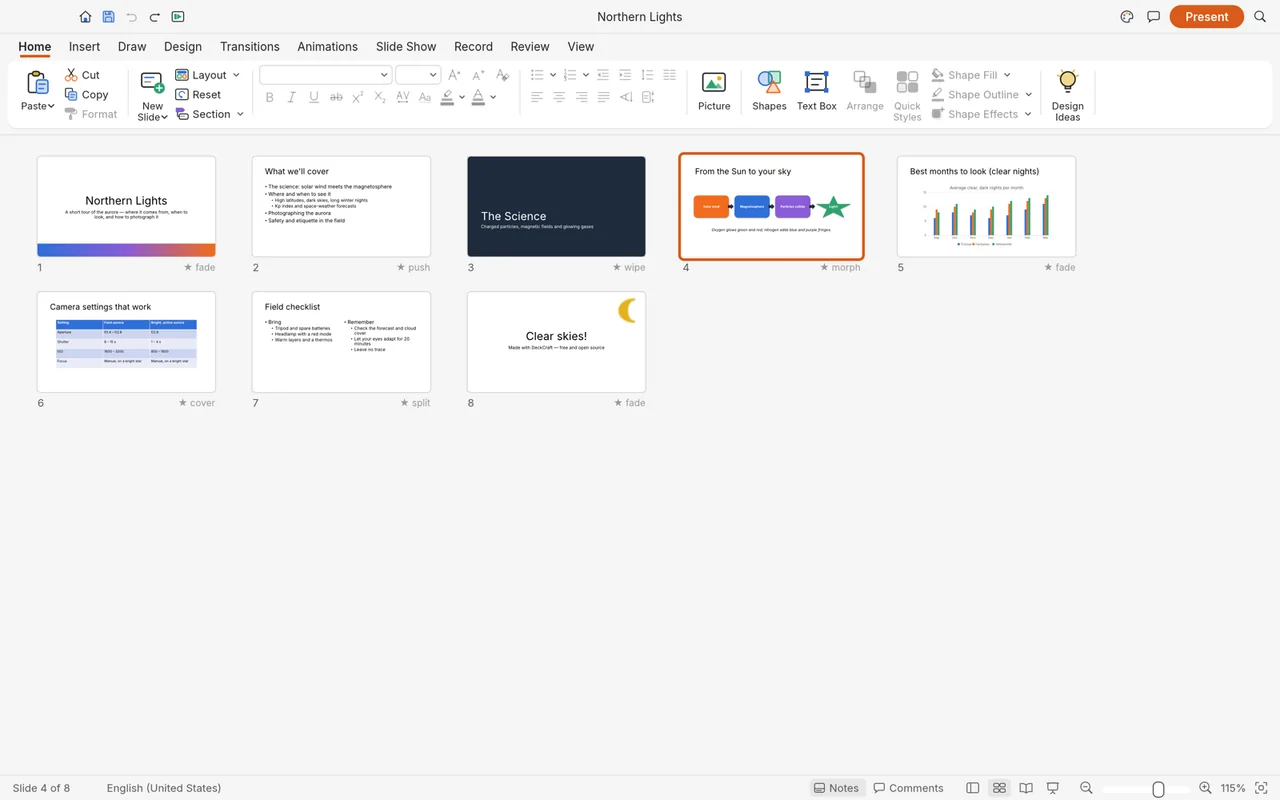
See eight sample slides together in the sorter so you can look over the flow of a presentation.
Create slides with themes, layouts, pictures, transitions and presenter tools.
Try everyday decks; check fonts, animations and embedded content after PPTX exchange.
Keep PowerPoint for complex files, macros and add-ins.
The PowerPoint-style workspace includes themes, slide masters, layouts and presenter tools. A short deck with your own text and pictures is a useful first project; a presentation whose recipient will keep editing needs an extra check in PowerPoint.
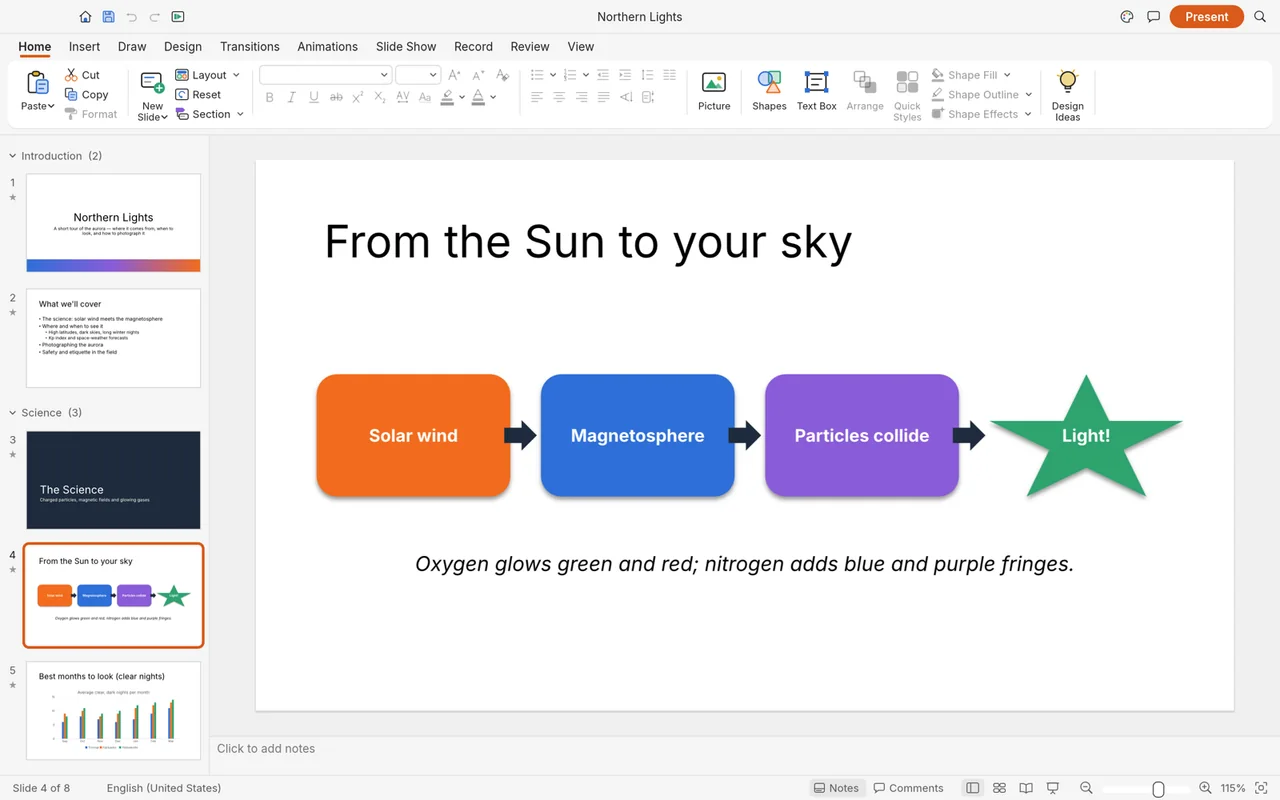
The official screenshots show a sample slide in the editor and a deck in slide-sorter view. The first image above includes a shapes-based flowchart and the editing ribbon.
See eight sample slides together in the sorter so you can look over the flow of a presentation.
Local slide editing is free, with no subscription.
The developers haven't published a complete app-wide account policy.
DeckCraft is a desktop editor for local presentations; the developers haven't published a full offline feature list.
ArtCraft's AI workbench is a separate product, and hosted generation uses credits. You can choose a local presentation editor separately from that image and video generation service.
You need internet access to get the installer. See Is ArtCraft free? for local-app pricing and AI Workbench for the separate generation service.
Choose the official DeckCraft package for your system below. Craft Launcher can install and update several Craft apps from one place; a separate DeckCraft download is available too.
For several editing apps, use Craft Launcher to install, verify and update them.
Choose your system and processor to get an official package. The complete package list is available below.
deckcraft-0.6.1-windows-arm64.msi
SHA-256
9f51abf964c734184ea1c7d03572833ad7c130cf4299541cb8e35ccde8f93ef6Calculate the local file’s SHA-256, then compare the complete value for this filename.
Get-FileHash -LiteralPath "<downloaded-file>" -Algorithm SHA256deckcraft-0.6.1-windows-arm64-portable.zip
SHA-256
03a7755795cfe30f37e09c865c8a5176cf2c42b42f13922fca7b2e5a2df097f4Calculate the local file’s SHA-256, then compare the complete value for this filename.
Get-FileHash -LiteralPath "<downloaded-file>" -Algorithm SHA256deckcraft-0.6.1-windows-x86.msi
SHA-256
e8ea6f3745cbbdf12995bec2e39cb3d814a32a51f5950fe8108fadb990c1f376Calculate the local file’s SHA-256, then compare the complete value for this filename.
Get-FileHash -LiteralPath "<downloaded-file>" -Algorithm SHA256deckcraft-0.6.1-windows-x86-portable.zip
SHA-256
520a339251c8cb1f72f37e96e2bce0f24c09742182830a3c52d15120abb6d39aCalculate the local file’s SHA-256, then compare the complete value for this filename.
Get-FileHash -LiteralPath "<downloaded-file>" -Algorithm SHA256deckcraft-0.6.1-windows-x64.msi
SHA-256
a6ae56e5474cdd6293141d28cd84e564624901a36f8dbecf643703baa5661942Calculate the local file’s SHA-256, then compare the complete value for this filename.
Get-FileHash -LiteralPath "<downloaded-file>" -Algorithm SHA256deckcraft-0.6.1-windows-x64-portable.zip
SHA-256
339ea7b9a4901fd0bc6fe1b96fedbc34e72a3c0d0897c44ad1750262d63db84fCalculate the local file’s SHA-256, then compare the complete value for this filename.
Get-FileHash -LiteralPath "<downloaded-file>" -Algorithm SHA256deckcraft-0.6.1-macos-universal.dmg
SHA-256
7f9dcb6dc235cc605dfff31a68c4c75fd2ace8a5117cd3b4ef31deaee941619aCalculate the local file’s SHA-256, then compare the complete value for this filename.
shasum -a 256 "<downloaded-file>"deckcraft-0.6.1-linux-aarch64.AppImage
SHA-256
72523202a8dc07577af0b417973e3ed47723b999dfe8e94437a66cb7e7573619Calculate the local file’s SHA-256, then compare the complete value for this filename.
sha256sum "<downloaded-file>"deckcraft-0.6.1-linux-aarch64.deb
SHA-256
2821cb9093156610b9fd8137dde94e382f7ad9d43e2c6d972b0f9fb69d7af689Calculate the local file’s SHA-256, then compare the complete value for this filename.
sha256sum "<downloaded-file>"deckcraft-0.6.1-linux-aarch64.flatpak
SHA-256
eba7a46558eb4c67db41a1dfc1af36def333b73ed012aabf422a03a6d9544a46Calculate the local file’s SHA-256, then compare the complete value for this filename.
sha256sum "<downloaded-file>"deckcraft-0.6.1-linux-aarch64.rpm
SHA-256
0f22888f793bf65d81a842eccb75a1502e7d9f3fc2788ef33a519087b8bce543Calculate the local file’s SHA-256, then compare the complete value for this filename.
sha256sum "<downloaded-file>"deckcraft-0.6.1-linux-aarch64.tar.gz
SHA-256
686b51d14dee18d505fcfc1ce5dd42b93de42350735d55311793a63f44f1b145Calculate the local file’s SHA-256, then compare the complete value for this filename.
sha256sum "<downloaded-file>"deckcraft-0.6.1-linux-riscv64.deb
SHA-256
d7e912e1788afddf4253b6d3d616ebb9c8268798e82abc0ed8fb74c6dc898153Calculate the local file’s SHA-256, then compare the complete value for this filename.
sha256sum "<downloaded-file>"deckcraft-0.6.1-linux-riscv64.rpm
SHA-256
6e6ea46711724c1cf3b849146a1755a7805f753acf98aa9697c93ad7f3b8b1baCalculate the local file’s SHA-256, then compare the complete value for this filename.
sha256sum "<downloaded-file>"deckcraft-0.6.1-linux-riscv64.tar.gz
SHA-256
fbb424dbd5094ca8fc642690b290a2c43e475cb85d4c18d5fda79605d693f10eCalculate the local file’s SHA-256, then compare the complete value for this filename.
sha256sum "<downloaded-file>"deckcraft-0.6.1-linux-x86_64.AppImage
SHA-256
821650d3f87a7212306f33b8b7b05cf19d13390a31359ef3b74a3c33cf18ed21Calculate the local file’s SHA-256, then compare the complete value for this filename.
sha256sum "<downloaded-file>"deckcraft-0.6.1-linux-x86_64.deb
SHA-256
08addbc73ea5b7f7662ce552288eb953f7c813036d6b603fea3589e8a0c4eedbCalculate the local file’s SHA-256, then compare the complete value for this filename.
sha256sum "<downloaded-file>"deckcraft-0.6.1-linux-x86_64.flatpak
SHA-256
82e41c844851f549c3956232e400feb36a516af2c97a2d2df02a6de3fab177e8Calculate the local file’s SHA-256, then compare the complete value for this filename.
sha256sum "<downloaded-file>"deckcraft-0.6.1-linux-x86_64.rpm
SHA-256
e9c255d5b2f6c660701f4502dedaa1cf26e9e3233b26953cb0bffbb8f7e9b355Calculate the local file’s SHA-256, then compare the complete value for this filename.
sha256sum "<downloaded-file>"deckcraft-0.6.1-linux-x86_64.tar.gz
SHA-256
1215e64f11aa68529be3efe2078f51c39a7669de1d63cce1b558ac1193f17569Calculate the local file’s SHA-256, then compare the complete value for this filename.
sha256sum "<downloaded-file>"deckcraft-0.6.1-freebsd-x86_64.tar.gz
SHA-256
c556868fd7c344a5b01468cb640662b1b374debfcc2a70f1e4fdf21aa885bb29Calculate the local file’s SHA-256, then compare the complete value for this filename.
sha256 -q "<downloaded-file>"flatpak install --user followed by its filename.| System | Published requirement |
|---|---|
| macOS | Universal package for Intel and Apple silicon; minimum macOS version unpublished. |
| Windows | x64, ARM64 and x86 packages; minimum Windows version unpublished. |
| Linux | General minimum OS and runtime requirements unpublished; riscv64 tarball needs glibc 2.39 or later. |
| RAM, GPU and storage | The developers haven't published complete minimum values. |
The developers haven't published app-specific steps for Gatekeeper or SmartScreen warnings. If DeckCraft is blocked or won't open, use the official support tracker and include the message and your system.
Choose a package that matches your processor before installing. For Linux package options beyond Flatpak, follow the official download notes for the format you choose.
Add one slide to a small PPTX copy, then save an editable deck and a PDF. Keep the original presentation so you can compare the fonts and layouts after saving.
Ten shortcuts for opening, saving and everyday slide edits.
| Action | Windows / Linux | macOS |
|---|---|---|
| New Presentation | Ctrl+N | Command+N |
| Open | Ctrl+O | Command+O |
| Save | Ctrl+S | Command+S |
| Save As | Ctrl+Shift+S | Command+Shift+S |
| Close | Ctrl+W | Command+W |
| Next Window | Ctrl+` | Command+` |
| Undo | Ctrl+Z | Command+Z |
| Redo | Ctrl+Y | Command+Y |
| Cut | Ctrl+X | Command+X |
| Copy | Ctrl+C | Command+C |
| Action | Windows / Linux | macOS |
|---|---|---|
| New Presentation | Ctrl+N | Command+N |
| Open… | Ctrl+O | Command+O |
| Save | Ctrl+S | Command+S |
| Save As… | Ctrl+Shift+S | Command+Shift+S |
| Close | Ctrl+W | Command+W |
| Next Window | Ctrl+` | Command+` |
| Undo | Ctrl+Z | Command+Z |
| Redo | Ctrl+Y | Command+Y |
| Cut | Ctrl+X | Command+X |
| Copy | Ctrl+C | Command+C |
| Paste | Ctrl+V | Command+V |
| Paste and Match Formatting | Ctrl+Shift+V | Command+Shift+V |
| Duplicate | Ctrl+D | Command+D |
| Delete | Delete | Delete |
| Select All | Ctrl+A | Command+A |
| Deselect | Escape | Escape |
| New Slide | Ctrl+Shift+N | Command+Shift+N |
| Next Slide | PageDown | PageDown |
| Previous Slide | PageUp | PageUp |
| First Slide | Home | Home |
| Last Slide | End | End |
Use the five-step edit above to begin in the desktop app. The pilot guide helps you decide what to check before using DeckCraft for a wider workplace project.
One user liked simple PDF work, while a published article recommends a small workplace trial before switching.
This user said DeckCraft worked well for simple document-to-PDF needs and described their use as light. Read the comment.
His article recommends keeping PowerPoint for demanding decks and trying DeckCraft on a small workplace project first. Read his pilot guide.
Begin with a short presentation whose saved files you can inspect.
DeckCraft opens and saves PPTX presentations. Inspect any report of skipped parts and reopen the saved deck in PowerPoint to check fonts, animations and embedded content.
| Format | Open / save | What to watch |
|---|---|---|
| PPTX | Read and write | Some parts can be skipped; check the saved deck in PowerPoint. |
| .deckcraft | Read and write | Native editable project file. |
| Export | Fixed slides, notes pages or handouts. | |
| PNG / JPEG | Export | Slide images. |
| PPT / PPTM / ODP | Unsupported | Use a supported PPTX copy when moving an existing presentation. |
Choose the output around what your recipient needs: an editable deck, a PDF handout or slide images. Keep a separate editable copy when exporting, then look through the reading copy for missing text and layout changes. See the full format reference.
Choose around your presentations and how you deliver them. DeckCraft offers familiar slide tools; LibreOffice Impress and ONLYOFFICE provide other free desktop routes for making presentations.
| App | Good for | Free option |
|---|---|---|
| DeckCraft | Everyday decks and PDF slides | Free local editing; complex PPTX exchange needs checking. |
| LibreOffice Impress | Offline presentations and PDF handouts | Free open-source desktop app; professional support can cost money. |
| ONLYOFFICE Desktop Editors | Common PPTX presentations | Free desktop editors; cloud collaboration and enterprise services have separate terms. |
No. DeckCraft's local slide editing is free; the separate ArtCraft AI workbench uses credits for hosted generation.
Try everyday decks and PDF slides first. Keep PowerPoint for complex presentations, macros, add-ins and files that lose required content after exchange.
PPTM and VBA workflows are unsupported. Legacy PPT and ODP are also outside the supported presentation formats.
Send PPTX when the recipient needs to edit the deck. PDF provides a fixed-slide or handout delivery; check the exported pages before sharing.
Use the official download selector above or Craft Launcher. The selector links to DeckCraft's official GitHub release packages.
Based on official docs and published reviews; we didn't install it ourselves.
Last checked: 14 Oct 2026.
Current release: 0.6.1.

