
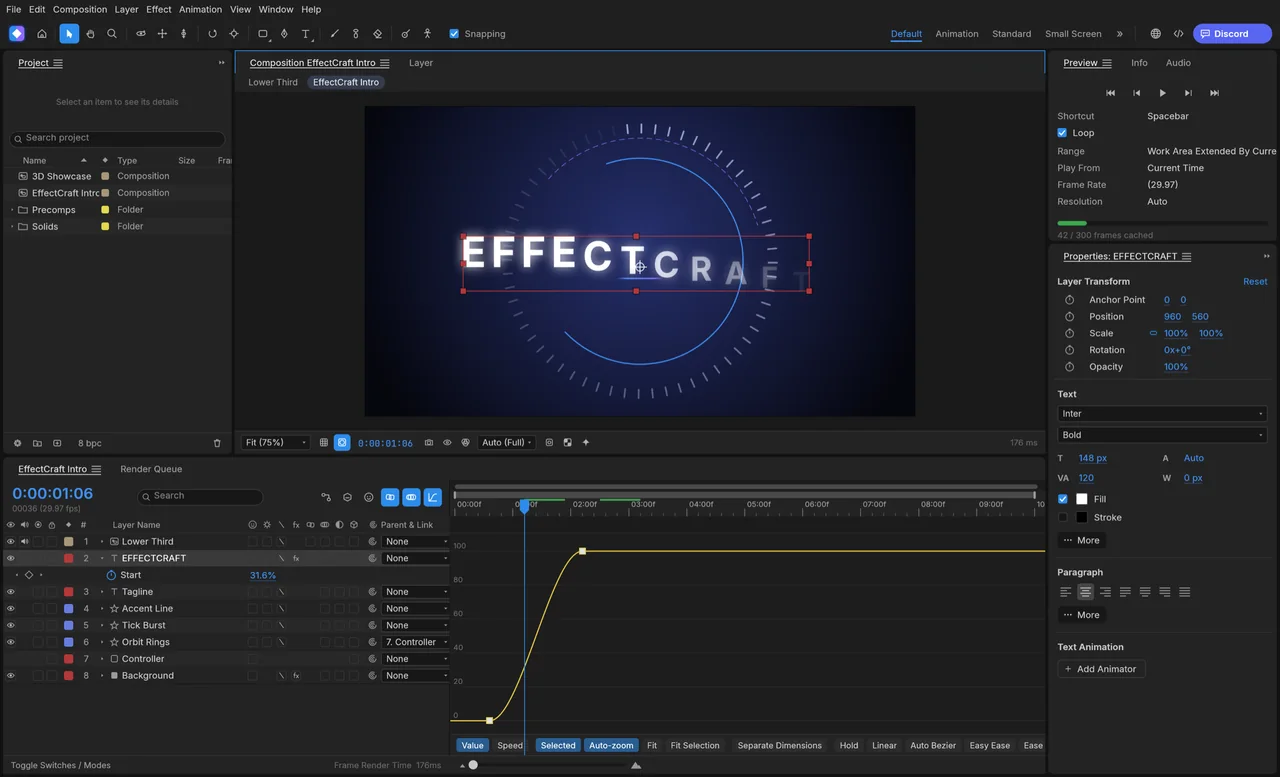
Control the pace of an animation
Use the Graph Editor's value and speed curves to adjust how a title starts, moves and settles.
Build layered motion graphics with keyframes, masks, text and expressions.
.aep or .aepx project.Try it for supported renders and Lottie animation; keep After Effects for its projects and plug-ins.
EffectCraft makes more sense for a new, self-contained animation than for taking over someone else's After Effects project.
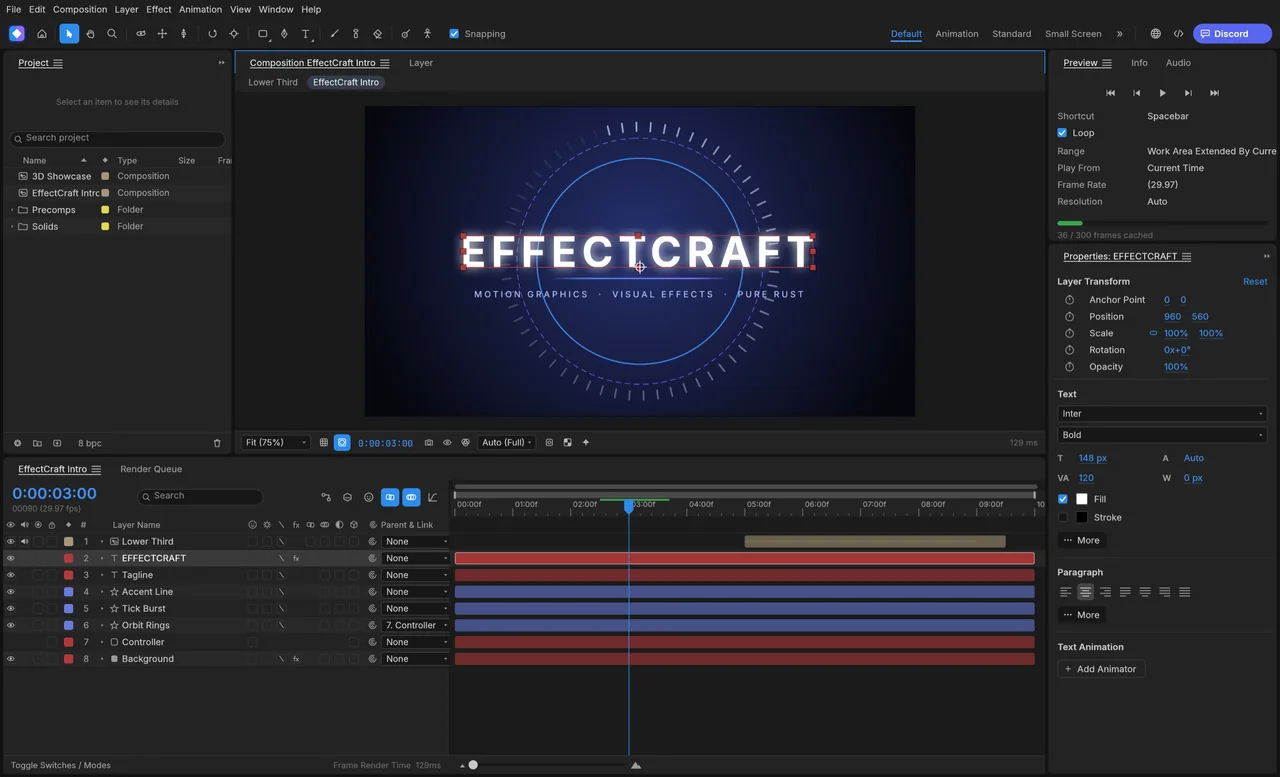
The workspace has Project, Composition, Timeline and Effect Controls panels, together with a render queue. Layers can contain text, shapes, footage and nested compositions, so you can build a title from editable parts rather than flattening everything into an image.
The official images show a title composition and its animation curves. Use the first image to see how the layers sit on the timeline, then look at the curve view for the timing controls.
Use the Graph Editor's value and speed curves to adjust how a title starts, moves and settles.
Local motion editing is free, with no subscription.
The developers haven't published a separate account policy for EffectCraft.
Network access is off by default, and the app has no telemetry.
ArtCraft's AI workbench is a separate product, and hosted generation uses credits. Choose the local editor for your own compositions; see AI Workbench and Is ArtCraft free? for the generation service.
Choose the official desktop package for your system below. Craft Launcher gives you another way to install and update several Craft apps, while the standalone package installs EffectCraft on its own.
Check your processor as well as your operating system before downloading. Windows has separate x64, x86 and ARM64 packages; the macOS universal package covers both Intel and Apple silicon.
For several editing apps, use Craft Launcher to install, verify and update them.
Choose your system and processor to get an official package. The complete package list is available below.
effectcraft-0.9.2-windows-arm64.msi
SHA-256
c6fd41cbddd9b0492cc228d116408d030c4184253bbd3ca528fd06164a4a7bcaCalculate the local file’s SHA-256, then compare the complete value for this filename.
Get-FileHash -LiteralPath "<downloaded-file>" -Algorithm SHA256effectcraft-0.9.2-windows-arm64-portable.zip
SHA-256
2dede4e9aac41d989544e0f1e61c9c61c29dd65d15282ae18d5de5b56da5486cCalculate the local file’s SHA-256, then compare the complete value for this filename.
Get-FileHash -LiteralPath "<downloaded-file>" -Algorithm SHA256effectcraft-0.9.2-windows-x86.msi
SHA-256
8d031b59c029a02e5b117dcdb3eec438f5128c9ac0bccbcee5cc3ff7b18f88b0Calculate the local file’s SHA-256, then compare the complete value for this filename.
Get-FileHash -LiteralPath "<downloaded-file>" -Algorithm SHA256effectcraft-0.9.2-windows-x86-portable.zip
SHA-256
59777f4a6e8f4d3a70ff9d7edc7f09f79376f9ae96dae747578470ecc0ef0dd4Calculate the local file’s SHA-256, then compare the complete value for this filename.
Get-FileHash -LiteralPath "<downloaded-file>" -Algorithm SHA256effectcraft-0.9.2-windows-x64.msi
SHA-256
32b1b4d78d158227c51389bcd382fc1a80293a87f4207b0d4c4d47172fcf0521Calculate the local file’s SHA-256, then compare the complete value for this filename.
Get-FileHash -LiteralPath "<downloaded-file>" -Algorithm SHA256effectcraft-0.9.2-windows-x64-portable.zip
SHA-256
1f6fbb3a348f1b12b15faa3bc2c78a079414f07454cc1402208793486e79bee4Calculate the local file’s SHA-256, then compare the complete value for this filename.
Get-FileHash -LiteralPath "<downloaded-file>" -Algorithm SHA256effectcraft-0.9.2-macos-universal.dmg
SHA-256
abc02b0b7afda63802dbd4af8ded9c0c35f18af7b09e88002adcc986f676f6feCalculate the local file’s SHA-256, then compare the complete value for this filename.
shasum -a 256 "<downloaded-file>"effectcraft-0.9.2-linux-aarch64.AppImage
SHA-256
130631b777434f0d84beb88b2d7a89909a450a70bb54ed98becb406d08d2d1baCalculate the local file’s SHA-256, then compare the complete value for this filename.
sha256sum "<downloaded-file>"effectcraft-0.9.2-linux-aarch64.deb
SHA-256
bf62dc3dd0b9c839b7312c90896b852903be3fff0a531742ea311277b3daf4bfCalculate the local file’s SHA-256, then compare the complete value for this filename.
sha256sum "<downloaded-file>"effectcraft-0.9.2-linux-aarch64.flatpak
SHA-256
0bd76ca66a336eed62137e6fb048666ed7103da03eca16a50cc30032141d7726Calculate the local file’s SHA-256, then compare the complete value for this filename.
sha256sum "<downloaded-file>"effectcraft-0.9.2-linux-aarch64.rpm
SHA-256
001eab953b23e28688adc23b099f6ac40c27ce6a54dd4b70e068800904b96c54Calculate the local file’s SHA-256, then compare the complete value for this filename.
sha256sum "<downloaded-file>"effectcraft-0.9.2-linux-aarch64.tar.gz
SHA-256
3efab284d4f06380a0f36d9e8d21cafc9a05e505607cdacb8beb6d37b932d160Calculate the local file’s SHA-256, then compare the complete value for this filename.
sha256sum "<downloaded-file>"effectcraft-0.9.2-linux-riscv64.deb
SHA-256
1f9fcf5e7bb088272f9fe1f7cd23e11ff0b3dbbe465d4fbf4b069e0f1231c70bCalculate the local file’s SHA-256, then compare the complete value for this filename.
sha256sum "<downloaded-file>"effectcraft-0.9.2-linux-riscv64.rpm
SHA-256
593ef7c253561739b9d88c79df87b6f29d9f97f162e1b72aed61cdb68e78fd72Calculate the local file’s SHA-256, then compare the complete value for this filename.
sha256sum "<downloaded-file>"effectcraft-0.9.2-linux-riscv64.tar.gz
SHA-256
014d116158291b6f746a058d249b21537970b491d31f11baa21281d250825307Calculate the local file’s SHA-256, then compare the complete value for this filename.
sha256sum "<downloaded-file>"effectcraft-0.9.2-linux-x86_64.AppImage
SHA-256
f5ef1c2ad32051ea6c13b13c170a73bd6f2d0a839a4ff71895b16a90d3a3ae37Calculate the local file’s SHA-256, then compare the complete value for this filename.
sha256sum "<downloaded-file>"effectcraft-0.9.2-linux-x86_64.deb
SHA-256
f24f4083a6ced1e51c43a7aa80b8eed09a83bc9ecb7133e60ea0a7da6c74cc51Calculate the local file’s SHA-256, then compare the complete value for this filename.
sha256sum "<downloaded-file>"effectcraft-0.9.2-linux-x86_64.flatpak
SHA-256
108397c948c48ecfee5a404c866a375196ced4078a06f7f31d55354e224c7701Calculate the local file’s SHA-256, then compare the complete value for this filename.
sha256sum "<downloaded-file>"effectcraft-0.9.2-linux-x86_64.rpm
SHA-256
75335edee5ac140b4b10de342acb09f07c083c25a6b63d68af47a763323f6213Calculate the local file’s SHA-256, then compare the complete value for this filename.
sha256sum "<downloaded-file>"effectcraft-0.9.2-linux-x86_64.tar.gz
SHA-256
916d35d7dc0fd5650b57f576e6556256d05dedf93e83a9740c1892319bb4ac1cCalculate the local file’s SHA-256, then compare the complete value for this filename.
sha256sum "<downloaded-file>"effectcraft-0.9.2-freebsd-x86_64.tar.gz
SHA-256
23f51d762803689e40cbf16f4c372de9090174c6071e2dca3aacff84c7041219Calculate the local file’s SHA-256, then compare the complete value for this filename.
sha256 -q "<downloaded-file>"flatpak install --user followed by the downloaded filename.| System | Published requirement |
|---|---|
| macOS | macOS 11 or later; Intel and Apple silicon |
| Windows | Windows 10 or later for x64/x86; Windows 11 for ARM64 |
| Linux | Normal x86_64/aarch64 builds need glibc 2.35 or later; riscv64 needs 2.39. |
| RAM, GPU and storage | The developers haven't published complete minimum values. |
The developers haven't published EffectCraft-specific steps for Gatekeeper or SmartScreen warnings. If the app is blocked or won't open, describe the message and your system in the official support tracker.
Start with a short title composition and save an editable project. Keeping the project separate from the finished render lets you return to the text, layers and timing later.
Ten shortcuts for selecting tools and working with animation properties.
| Action | Windows / Linux | macOS |
|---|---|---|
| Selection Tool | V | V |
| Hand Tool | H | H |
| Zoom Tool | Z | Z |
| Reveal Position | P | P |
| Reveal Scale | S | S |
| Reveal Rotation | R | R |
| Reveal Opacity | T | T |
| Reveal Anchor Point | A | A |
| Graph Editor | Shift+F3 | Shift+F3 |
| Easy Ease | F9 | F9 |
| Action | Windows / Linux | macOS |
|---|---|---|
| Preview (Numpad 0) | Num0 | Num0 |
| Preview (Shift+Spacebar) | Shift+Space | Shift+Space |
| Preview (Shift+Numpad 0) | Shift+Num0 | Shift+Num0 |
| Preview (Alt+Numpad 0) | Alt+Num0 | Option+Num0 |
| Fit | Shift+/ | Shift+/ |
| 100% | / | / |
| Move Selected Layers Up 1 Pixel at Current Magnification | ArrowUp | ArrowUp |
| Move Selected Layers Down 1 Pixel at Current Magnification | ArrowDown | ArrowDown |
| Move Selected Layers Left 1 Pixel at Current Magnification | ArrowLeft | ArrowLeft |
| Move Selected Layers Right 1 Pixel at Current Magnification | ArrowRight | ArrowRight |
| Move Selected Layers Up 10 Pixels at Current Magnification | Shift+ArrowUp | Shift+ArrowUp |
| Move Selected Layers Down 10 Pixels at Current Magnification | Shift+ArrowDown | Shift+ArrowDown |
| Move Selected Layers Left 10 Pixels at Current Magnification | Shift+ArrowLeft | Shift+ArrowLeft |
| Move Selected Layers Right 10 Pixels at Current Magnification | Shift+ArrowRight | Shift+ArrowRight |
| Zoom In Time | = | = |
| Zoom Out Time | - | - |
| Zoom In to Frame Level / Out to the Whole Comp | ; | ; |
| Graph Editor | Shift+F3 | Shift+F3 |
| Toggle Switches / Modes | F4 | F4 |
| Set Work Area Begin | B | B |
| Set Work Area End | N | N |
| Move Layer In Point to Current Time | [ | [ |
| Move Layer Out Point to Current Time | ] | ] |
| Trim Layer In Point to Current Time | Alt+[ | Option+[ |
| Trim Layer Out Point to Current Time | Alt+] | Option+] |
| Reveal Position | P | P |
| Reveal Scale | S | S |
| Reveal Rotation | R | R |
| Reveal Opacity | T | T |
| Reveal Anchor Point | A | A |
| Reveal Effects | E | E |
| Reveal Masks | M | M |
| Reveal Mask Feather | F | F |
| Reveal Audio Levels (press twice: Waveform) | L | L |
| Add Position to Revealed Properties | Shift+P | Shift+P |
| Add Scale to Revealed Properties | Shift+S | Shift+S |
| Add Rotation to Revealed Properties | Shift+R | Shift+R |
| Add Opacity to Revealed Properties | Shift+T | Shift+T |
| Add Anchor Point to Revealed Properties | Shift+A | Shift+A |
| Add Effects to Revealed Properties | Shift+E | Shift+E |
| Add Masks to Revealed Properties | Shift+M | Shift+M |
| Add Mask Feather to Revealed Properties | Shift+F | Shift+F |
| Add Audio Levels to Revealed Properties | Shift+L | Shift+L |
| Add Animated Properties to Revealed Properties | Shift+U | Shift+U |
| Twirl Selected Layers Open / Closed | Ctrl+` | Command+` |
| Add or Remove Anchor Point Keyframe | Alt+Shift+A | Option+Shift+A |
| Add or Remove Position Keyframe | Alt+Shift+P | Option+Shift+P |
| Add or Remove Scale Keyframe | Alt+Shift+S | Option+Shift+S |
| Add or Remove Rotation Keyframe | Alt+Shift+R | Option+Shift+R |
| Add or Remove Opacity Keyframe | Alt+Shift+T | Option+Shift+T |
| Selection Tool | V | V |
| Hand Tool | H | H |
| Zoom Tool | Z | Z |
| Orbit Tool | 1 | 1 |
| Pan Camera Tool | 2 | 2 |
| Dolly Tool | 3 | 3 |
| Rotation Tool | W | W |
| Pan Behind Tool | Y | Y |
| Shape Tools | Q | Q |
| Pen Tool | G | G |
| Type Tools | Ctrl+T | Command+T |
| Brush Tools | Ctrl+B | Command+B |
| Roto Brush & Refine Edge Tools | Alt+W | Option+W |
| Puppet Tools | Ctrl+P | Command+P |
| Maximize Panel Under Pointer | ` | ` |
| Maximize or Restore Application Window | Ctrl+\ | Command+\ |
| Easy Ease | F9 | F9 |
Use the animation sections to choose a tool for your next change. The README also includes code examples for creating a composition; those are a separate route from the desktop steps above.
One published production account describes useful animation output and some extra work around fonts and playback.
The author's Windows workflow using Claude Code and scripts produced animated titles, transparent overlays and Lottie output. Variable-font styling and browser Lottie playback needed workarounds. Read the earlier-release production account.
EffectCraft cannot open or save After Effects AEP or AEPX projects. Use its native project for ongoing edits, a rendered file for finished video, or Lottie for supported animation exchange.
| Format | Open / save | What to watch |
|---|---|---|
| AEP / AEPX | Unsupported | Keep the original After Effects project. |
| ECPROJ | Read and write | EffectCraft's editable project format. |
| Lottie JSON / LOTTIE | Import and export | Check the export warnings and playback in the receiving player. |
| MP4 / MOV | Render output | Choose a supported codec; MOV uses ProRes. |
| PNG / EXR | Image-sequence output | Deliver the sequence separately from the editable project. |
Decide what the recipient needs before rendering. A video can be used without your project, while a Lottie animation needs a player that handles the exported features. See the full format reference.
Choose by the kind of animation you want to make. EffectCraft uses layers and a timeline; Natron suits node-based compositing, and Blender adds a full 3D workflow alongside compositing.
| App | Good for | Free option |
|---|---|---|
| EffectCraft | Standalone motion graphics and animated titles | Free local editor. |
| Natron | Node compositing, keying and tracking | Free and open source; third-party plug-ins may cost money. |
| Blender | 3D animation, compositing and tracking | Free and open source; Studio content and third-party assets have separate terms. |
No. EffectCraft's local editing is free; hosted generation in the separate AI workbench uses credits.
AEP and AEPX are unsupported. Start a new EffectCraft project or use a supported animation or rendered-media route.
Keep After Effects for projects that depend on its plug-ins.
Lottie import and export are available. Check the export warnings and the animation in the website's player.
Create and save the title composition above, then use the official animation overview to learn the timing and render controls.
Based on official docs and published reviews; we didn't install it ourselves.
Last checked: 14 Oct 2026.
Current release: 0.9.2.

