
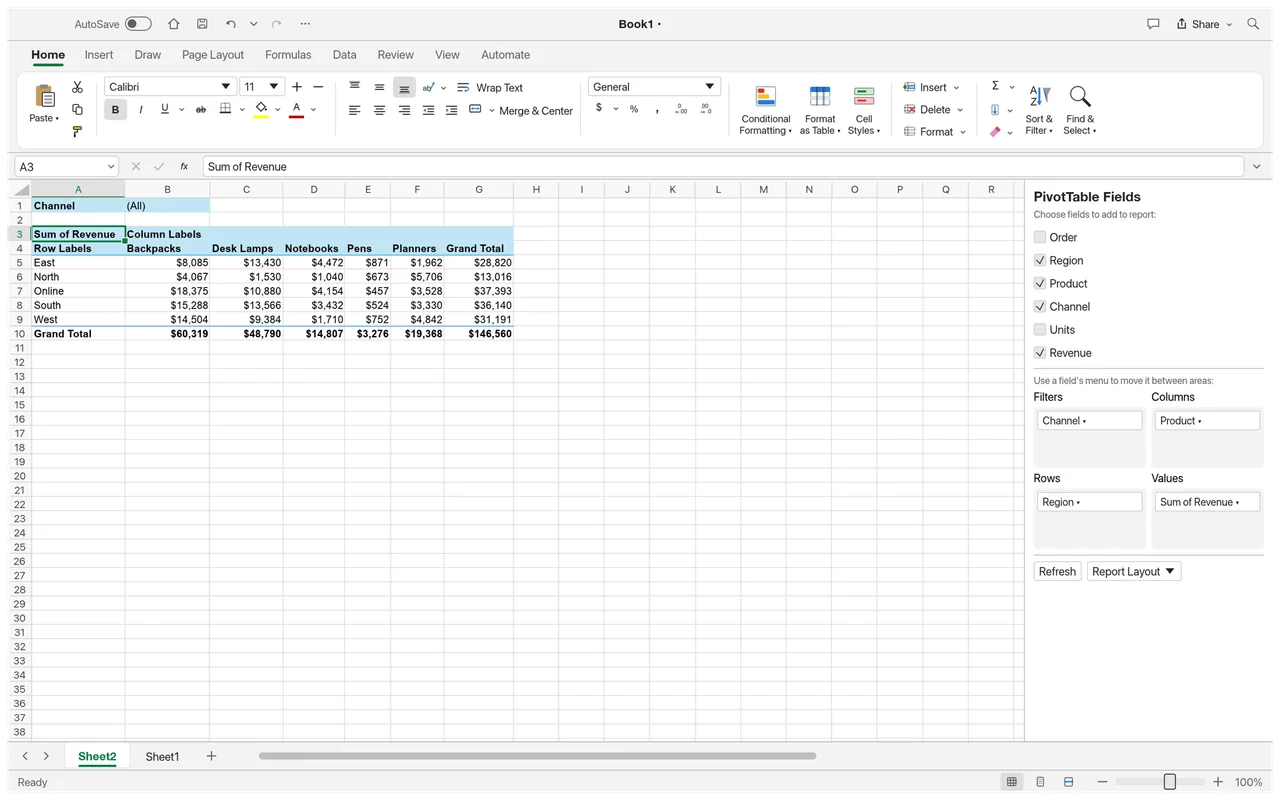
Pivot tables
See a pivot table with its field panel for arranging a summary of worksheet data.
Work with formulas, tables, charts, sorting and data validation.
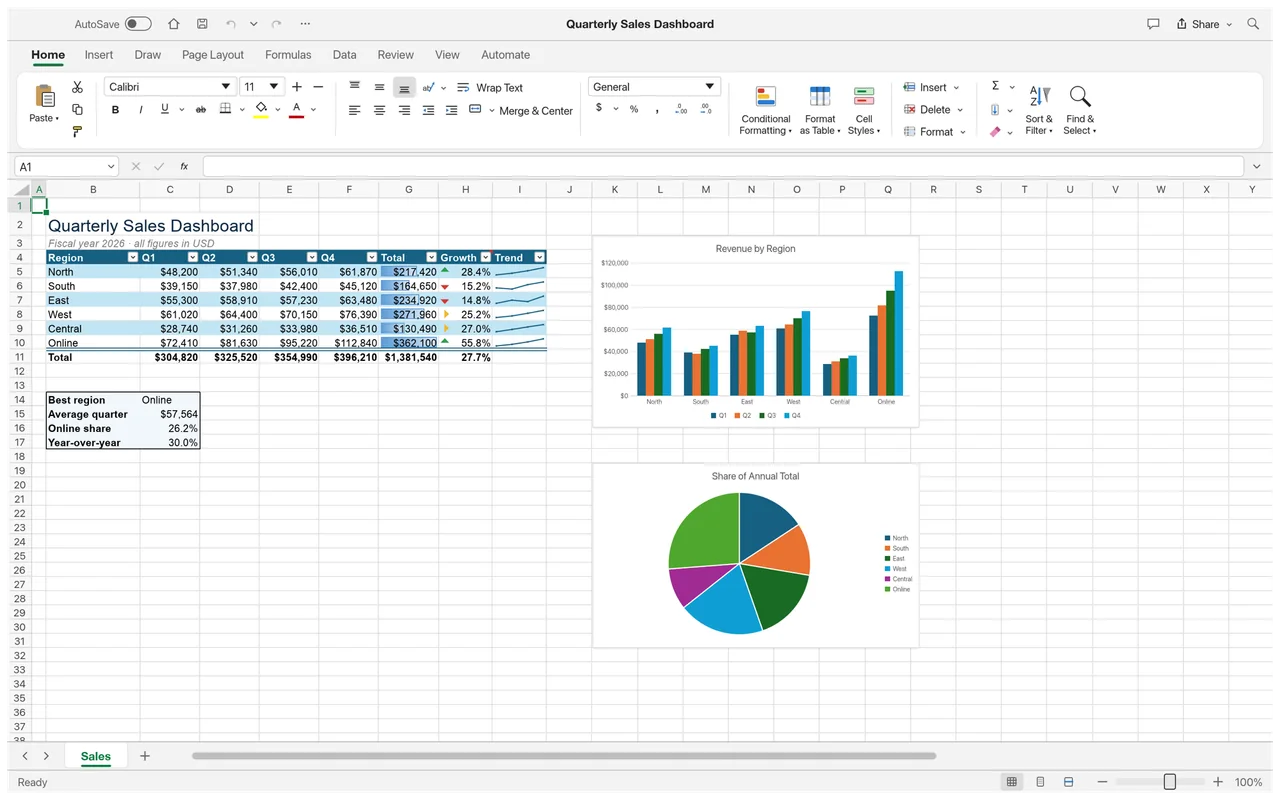
Try ordinary XLSX workbooks; check formulas and imported content before handing them back.
Keep Excel for macro-driven or advanced data work.
The Excel-style ribbon, formula bar and calculation tools make a simple personal worksheet a useful starting point. Choose an XLSX with results you can compare, then check the saved file in Excel before moving a more complicated job.
The official screenshots show sample sales data, charts and a pivot-table workspace. The first image above places a worksheet beside column and pie charts.
See a pivot table with its field panel for arranging a summary of worksheet data.
Local spreadsheet editing is free, with no subscription.
The developers haven't published a complete app-wide account policy.
GridCraft is a desktop editor for local workbooks; the developers haven't published a full offline feature list.
ArtCraft's AI workbench is a separate product, and hosted generation uses credits. Downloading a Craft spreadsheet app and paying for generated images or video are separate choices.
You need internet access to get the installer. See Is ArtCraft free? for local-app pricing and AI Workbench for the separate generation service.
Choose the official GridCraft package for your system below. Craft Launcher is another route for installing and updating several apps; you can download GridCraft on its own.
For several editing apps, use Craft Launcher to install, verify and update them.
Choose your system and processor to get an official package. The complete package list is available below.
gridcraft-0.6.1-windows-arm64.msi
SHA-256
fd8c1e99ed34e45d1a1721e9ab5bda708cbc348290d51bbd582244814b1a1c89Calculate the local file’s SHA-256, then compare the complete value for this filename.
Get-FileHash -LiteralPath "<downloaded-file>" -Algorithm SHA256gridcraft-0.6.1-windows-arm64-portable.zip
SHA-256
484b879e301a24ddbbfb3a3555883cfbffad3852d7bd953a866002588abd2431Calculate the local file’s SHA-256, then compare the complete value for this filename.
Get-FileHash -LiteralPath "<downloaded-file>" -Algorithm SHA256gridcraft-0.6.1-windows-x86.msi
SHA-256
e692a3b69adc5e1b0d468f40f8f7fc71625391ecbb09862328a5a053f8edb3caCalculate the local file’s SHA-256, then compare the complete value for this filename.
Get-FileHash -LiteralPath "<downloaded-file>" -Algorithm SHA256gridcraft-0.6.1-windows-x86-portable.zip
SHA-256
377114e3e936770184885fb37bbded4d3766f8abc637c841ab9bacdf7ffbcd0cCalculate the local file’s SHA-256, then compare the complete value for this filename.
Get-FileHash -LiteralPath "<downloaded-file>" -Algorithm SHA256gridcraft-0.6.1-windows-x64.msi
SHA-256
984e9a85942ce55953ce2b875c4e93ddd70d47fb4bf5f07c74d1d9f9b98e56c9Calculate the local file’s SHA-256, then compare the complete value for this filename.
Get-FileHash -LiteralPath "<downloaded-file>" -Algorithm SHA256gridcraft-0.6.1-windows-x64-portable.zip
SHA-256
595604b4be6f395c02bc15f99e3e6e2babde964cb9ae17aad7824981bcc14ce0Calculate the local file’s SHA-256, then compare the complete value for this filename.
Get-FileHash -LiteralPath "<downloaded-file>" -Algorithm SHA256gridcraft-0.6.1-macos-universal.dmg
SHA-256
65b374d3098e7c6a76de93babccfe561201a02629433a392463c9eb298a3ba4fCalculate the local file’s SHA-256, then compare the complete value for this filename.
shasum -a 256 "<downloaded-file>"gridcraft-0.6.1-linux-aarch64.AppImage
SHA-256
9669cf7e0dd66b0aa4ef3569f1f37a2f683f8889df3af79adc4f697c5a5a3f77Calculate the local file’s SHA-256, then compare the complete value for this filename.
sha256sum "<downloaded-file>"gridcraft-0.6.1-linux-aarch64.deb
SHA-256
8e5b8fea1f69fca37ec0dd33d9924e32439e860464487c9bcd14be855a182a0bCalculate the local file’s SHA-256, then compare the complete value for this filename.
sha256sum "<downloaded-file>"gridcraft-0.6.1-linux-aarch64.flatpak
SHA-256
ff948566c69b4c1bbc55e8e0260250039606a235c0b25019db34a4e4193d952cCalculate the local file’s SHA-256, then compare the complete value for this filename.
sha256sum "<downloaded-file>"gridcraft-0.6.1-linux-aarch64.rpm
SHA-256
c1bdfc1512dfba08f3be4bb9aa14ed33de14c345e4f862fc60cb5bed22b285a3Calculate the local file’s SHA-256, then compare the complete value for this filename.
sha256sum "<downloaded-file>"gridcraft-0.6.1-linux-aarch64.tar.gz
SHA-256
ec8e2c43653d24382f59cb167643b487b2d5063cb21efa0ad1ef25ebe24a500aCalculate the local file’s SHA-256, then compare the complete value for this filename.
sha256sum "<downloaded-file>"gridcraft-0.6.1-linux-riscv64.deb
SHA-256
301b2d09d645a7c6c451a377d389fb1aee40831ca8611adc5060724970c92fe3Calculate the local file’s SHA-256, then compare the complete value for this filename.
sha256sum "<downloaded-file>"gridcraft-0.6.1-linux-riscv64.rpm
SHA-256
4784650cf684805510147529eb297781aeaccda2e76d4b3af709b4014a5761afCalculate the local file’s SHA-256, then compare the complete value for this filename.
sha256sum "<downloaded-file>"gridcraft-0.6.1-linux-riscv64.tar.gz
SHA-256
5c9f96c4955f750b7d84bc1bf1de0f278c1988abdb1c0a8a91602a4af63a46e6Calculate the local file’s SHA-256, then compare the complete value for this filename.
sha256sum "<downloaded-file>"gridcraft-0.6.1-linux-x86_64.AppImage
SHA-256
9db72f49a856f439a5c89b3eb4fd3ed51c4a7a996ebe6692e58d1e8f5da3c954Calculate the local file’s SHA-256, then compare the complete value for this filename.
sha256sum "<downloaded-file>"gridcraft-0.6.1-linux-x86_64.deb
SHA-256
002e695c88a676d1f4a156433b6a842a08705047a3b7f74ef553048d44f43620Calculate the local file’s SHA-256, then compare the complete value for this filename.
sha256sum "<downloaded-file>"gridcraft-0.6.1-linux-x86_64.flatpak
SHA-256
cef385ccfb4ce5bb3f5a9fde487bb521eed70de0e9825a21394bbb6ae1abf688Calculate the local file’s SHA-256, then compare the complete value for this filename.
sha256sum "<downloaded-file>"gridcraft-0.6.1-linux-x86_64.rpm
SHA-256
b4e9f740b11f94baa13c67f9e7acaa16bfe3c06fd8d93e576bfd9c79fc34b640Calculate the local file’s SHA-256, then compare the complete value for this filename.
sha256sum "<downloaded-file>"gridcraft-0.6.1-linux-x86_64.tar.gz
SHA-256
61163b62d9faf814b864e1b255d15dc310a71a72ca03d8791fa8024420162745Calculate the local file’s SHA-256, then compare the complete value for this filename.
sha256sum "<downloaded-file>"gridcraft-0.6.1-freebsd-x86_64.tar.gz
SHA-256
44f285143bb11eb637f655739ed7b8e67c5e04e9631c2894989aeab2e2b974beCalculate the local file’s SHA-256, then compare the complete value for this filename.
sha256 -q "<downloaded-file>"flatpak install --user followed by its filename.| System | Published requirement |
|---|---|
| macOS | macOS 11 or later; universal Intel and Apple silicon package. |
| Windows | Windows 10 or later for x64 and x86; Windows 11 for ARM64. |
| Linux | Normal builds need glibc 2.35 or later; riscv64 needs 2.39. |
| RAM, GPU and storage | The developers haven't published complete minimum values. |
The developers haven't published app-specific steps for Gatekeeper or SmartScreen warnings. If GridCraft is blocked or won't open, use the official support tracker and include the message and your system.
Choose a package that matches both your operating system and processor. For AppImage, distribution packages or other Linux routes, follow the official download notes instead of combining instructions for different package types.
Start with a copy of a small XLSX and make one visible formatting change. Save that copy separately and export a PDF so you can compare the editable workbook with a reading copy.
Ten shortcuts for files, cell edits and calculation.
| Action | Windows / Linux | macOS |
|---|---|---|
| Open | Ctrl+O | Command+O |
| Save | Ctrl+S | Command+S |
| Undo | Ctrl+Z | Command+Z |
| Redo | Ctrl+Y | Command+Y |
| Copy | Ctrl+C | Command+C |
| Paste | Ctrl+V | Command+V |
| Bold | Ctrl+B | Command+B |
| Edit cell | F2 | F2 |
| Format Cells | Ctrl+1 | Command+1 |
| Calculate | F9 | F9 |
| Action | Windows / Linux | macOS |
|---|---|---|
| Open | Ctrl+O | Command+O |
| Save | Ctrl+S | Command+S |
| Undo | Ctrl+Z | Command+Z |
| Redo | Ctrl+Y | Command+Y |
| Copy | Ctrl+C | Command+C |
| Paste | Ctrl+V | Command+V |
| Bold | Ctrl+B | Command+B |
| Edit cell | F2 | F2 |
| Format Cells | Ctrl+1 | Command+1 |
| Calculate | F9 | F9 |
| clipboard, undo/redo, select all, bold/italic/underline | Ctrl+C / X / V, Ctrl+Z / Y, Ctrl+A, Ctrl+B / I / U | Use Command instead of Ctrl |
| save, save as, open, new, close | Ctrl+S, Ctrl+Shift+S, Ctrl+O, Ctrl+N, Ctrl+W | Use Command instead of Ctrl |
| find, replace, go to, hyperlink, table | Ctrl+F, Ctrl+H, Ctrl+G, Ctrl+K, Ctrl+T | Use Command instead of Ctrl; keep Ctrl+H |
| fill down/right, Flash Fill, Format Cells, hide/unhide | Ctrl+D, Ctrl+R, Ctrl+E, Ctrl+1, Ctrl+9 / 0, Ctrl+Shift+9 / 0 | Use Command instead of Ctrl; Flash Fill uses Control+E |
| Delete / Insert cells dialog | Ctrl+- , Ctrl+Shift+= | Use Command instead of Ctrl |
| current date, show formulas | Ctrl+; , Ctrl+` | Control+; |
| navigation and extension | Arrows, Shift / Ctrl / Ctrl+Shift+arrows, Home, Ctrl+Home / End, Page Up / Down, Ctrl+Page Up / Down | Command+arrows |
| entry and selection | Tab, Shift+Tab, Enter, Shift+Enter, Ctrl+Space, Shift+Space, Delete, Esc | Same keys as Windows / Linux |
| edit, calculate, references, new line, fill, array | F2, F9, F10 (key tips), F4 / Alt+Enter / Ctrl+Enter / Ctrl+Shift+Enter while editing | Same keys as Windows / Linux |
| General, Number, Time, Date, Currency, Percent, Scientific | Ctrl+Shift+~ ! @ # $ % ^ | Control+Shift |
| outline border / remove borders | Ctrl+Shift+& / Ctrl+Shift+_ | Command+Option+0 / Command+Option+- (and Command+Option+arrows for one side) |
| bold / italic / underline / strikethrough | Ctrl+2 / 3 / 4 / 5 | Not listed in the Mac guide |
| current time | Ctrl+Shift+: | Command+; |
| formula / value from the cell above | Ctrl+' / Ctrl+Shift+" | Control |
| create table | Ctrl+L | Command+L is Align Left, Command+E Center, Control+E Flash Fill |
| filter | Ctrl+Shift+L | Command+Shift+F (present) / Control+Shift+L |
| Format Cells Font tab, Workbook Statistics | Ctrl+Shift+F, Ctrl+Shift+G | Not listed in the Mac guide |
| replace, sort, group / ungroup, Define Name, edit cell | — | Command+Shift+H, Command+Shift+R, Command+Shift+K / J, Control+L, Control+U |
| group / ungroup | Alt+Shift+Right / Left | Option+Right / Left is next/previous sheet |
| current region, select all | Ctrl+Shift+* (Ctrl+Shift+8), Ctrl+Shift+Space | Command+Shift+Space |
| extend to A1 / last used cell / row start | Ctrl+Shift+Home / End, Shift+Home | Same keys as Windows / Linux |
| Ctrl+P | Command+P | |
| font size | Ctrl+Shift+> / < | Command+Shift+> / < |
| Paste Special | Ctrl+Alt+V | Command+Control+V, Command+Option+V |
| zoom in / out (10% steps) | Ctrl+Alt+= / Ctrl+Alt+- | Not listed in the Mac guide |
| AutoSum, drop-down list, one screen right / left | Alt+=, Alt+Down, Alt+Page Down / Up | Option+Down, Option+Page Down / Up |
| Open the existing AutoFilter popup; validation dropdowns keep priority | Alt+Down on a filter header | Option+Down |
| embedded chart, new sheet | Alt+F1, Alt+Shift+F1, Shift+F11 | Shift+F11 |
| note, threaded comment | Shift+F2, Ctrl+Shift+F2 | Shift+F2, Command+Shift+F2 |
| Insert Function, Name Manager, Create from Selection | Shift+F3, Ctrl+F3, Ctrl+Shift+F3 | Shift+F3, Command+F3 (Define Name), Command+Shift+F3 |
| Go To, Find, Spelling, calculate sheet / all, Save As, close | F5, Shift+F5 (Mac), F7, Shift+F9, Ctrl+Alt+F9, F12, Ctrl+F4 | Same keys as Windows / Linux |
| context menu, Error Checking, ribbon | Shift+F10, Alt+Shift+F10, Ctrl+F1 | Shift+F10, Command+Option+R |
Start with the quick start's worksheet instructions. The second guide is for Spanish formula entry; use it when that is the interface and formula language you want.
One user found GridCraft useful for personal spreadsheets but had trouble copying data from other editors.
GridCraft met this user's personal spreadsheet needs, but copying from Excel or Google Sheets did not work correctly. Read the comment.
Check pasted cells before using them in a calculation.
GridCraft opens and saves XLSX workbooks. XLS, XLSB and ODS take different import routes, so choose by whether you need formulas, formatting or saved values.
| Format | Open / save | What to watch |
|---|---|---|
| XLSX | Read and write | Check formulas, charts, styles and other workbook content after saving. |
| XLS | Import with limits | Values, formulas and number formats import; formatting and embedded objects are omitted. |
| XLSB / ODS | Import saved values | Original formulas are not imported or recalculated; export is undocumented. |
| CSV / TSV | Import and export | Use the text-table route for exchanging worksheet data. |
An imported sheet of saved values can look complete while no longer calculating from its original formulas. Keep the source workbook, reopen the saved XLSX in Excel and compare the cells and charts that matter to your job. See the full format reference.
Choose around the workbooks you already use. GridCraft offers a familiar local spreadsheet workspace, while LibreOffice Calc and ONLYOFFICE provide other free desktop routes for office files.
| App | Good for | Free option |
|---|---|---|
| GridCraft | Ordinary XLSX worksheets and charts | Free local editing; macro and advanced-data work still needs Excel. |
| LibreOffice Calc | Local spreadsheets and data analysis | Free open-source desktop app; support services can cost money. |
| ONLYOFFICE Desktop Editors | Common Office workbooks | Free desktop editors; cloud and enterprise services have separate terms. |
No. GridCraft's local spreadsheet editing is free; the separate ArtCraft AI workbench uses credits for hosted generation.
Keep Excel for workbooks that depend on VBA macros. GridCraft is a better starting point for ordinary worksheets and charts.
No. ODS import uses saved worksheet values, without importing or recalculating the original formulas. XLSB import has the same limit.
Reopen it in Excel and inspect formulas, results, charts, styles and any other workbook content your recipient needs.
Use the official download selector above or Craft Launcher. The selector links to GridCraft's official GitHub release packages.
Based on official docs and published reviews; we didn't install it ourselves.
Last checked: 14 Oct 2026.
Current release: 0.6.1.

