Components and variants
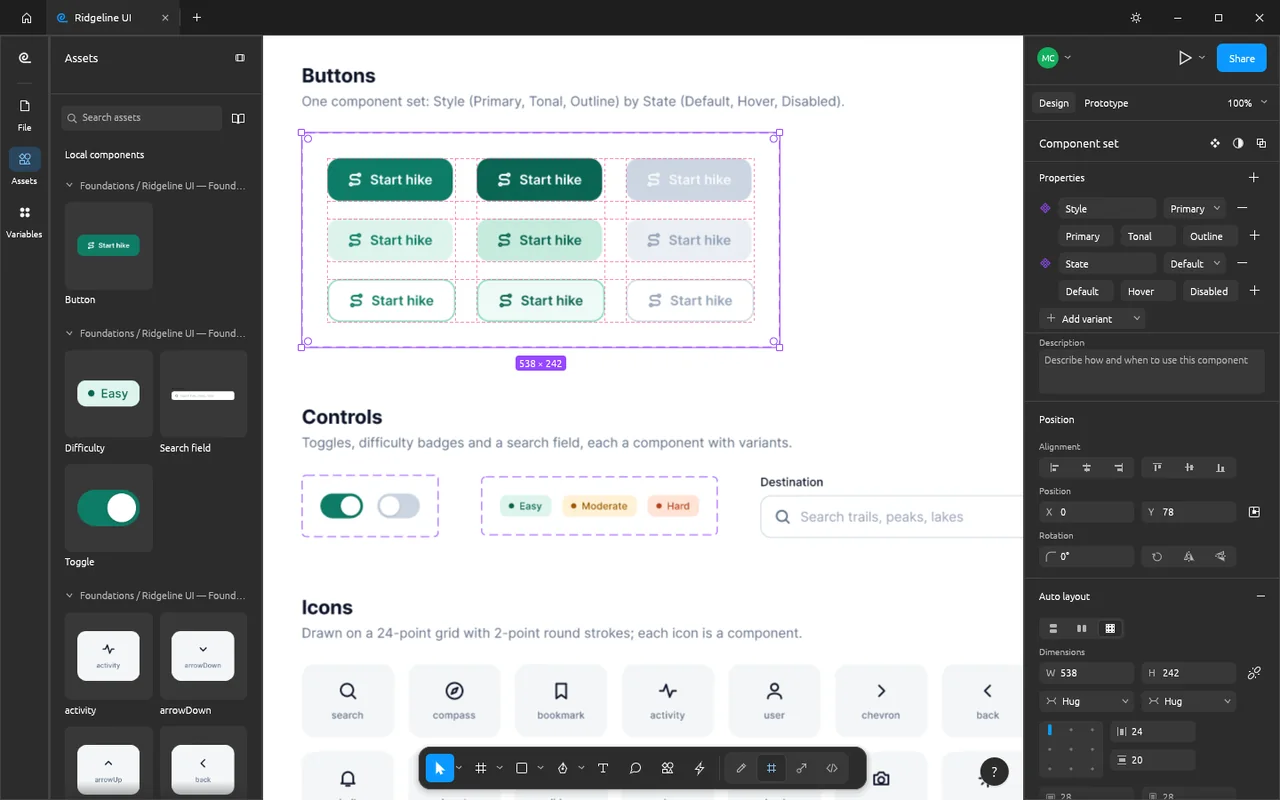
See button variants alongside the Assets panel for reusing interface pieces across a design.
Design interfaces with auto layout, components, prototypes and vector tools.
Free · No subscription · No account needed for local editing · Windows / macOS / Linux
Good for local interface work; check FIG exchange and sharing before moving team projects.
Keep Figma for dependable file exchange and established team or plug-in workflows.
The local editor brings frames, auto layout, components and vector tools together in a Figma-style workspace. Start with a small screen of your own, then choose whether the next person needs an editable project, an exported asset or online access.
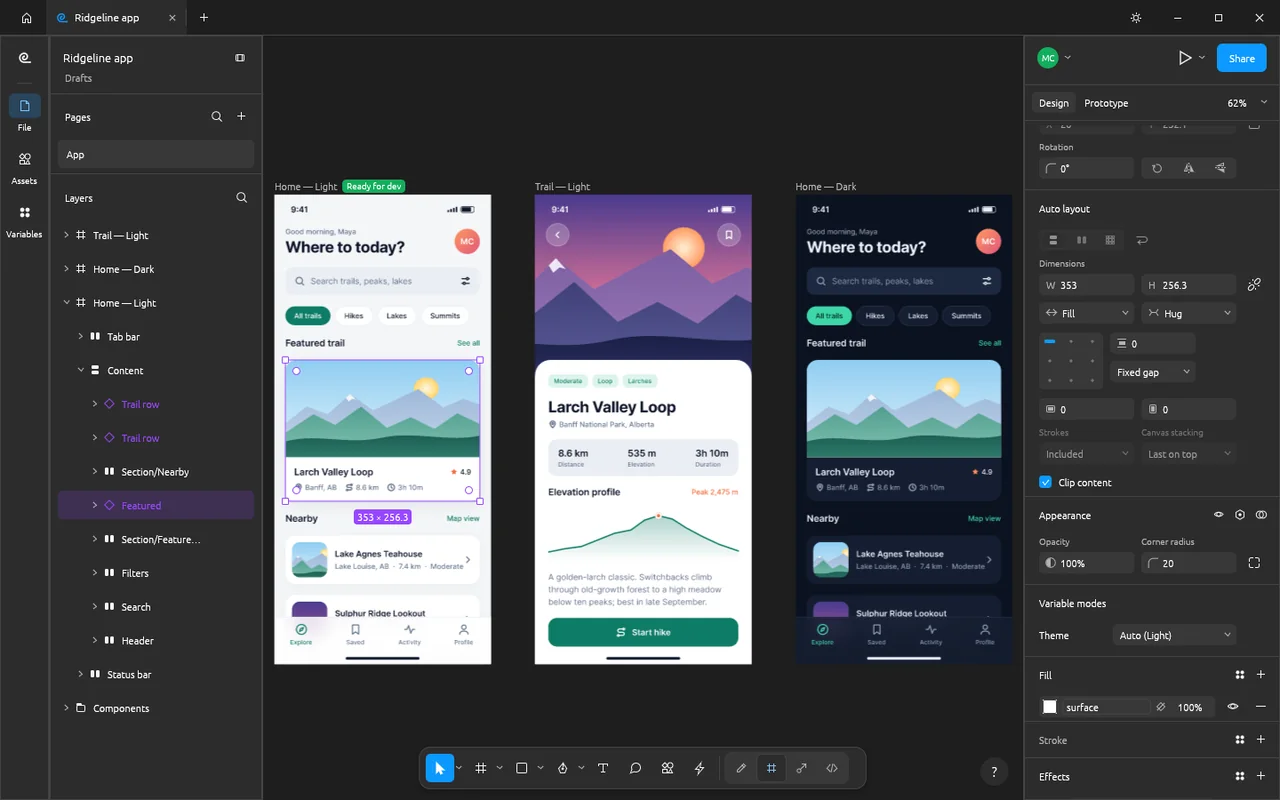
The official screenshots show sample interface frames and a collection of button components. The first image above includes three artboards, the layer list and auto-layout controls.
See button variants alongside the Assets panel for reusing interface pieces across a design.
Local interface design is free, with no subscription.
FigCraft's local editor works without an account.
Your design stays on your computer while you edit offline; sharing or joining a file connects to a network.
ArtCraft's AI workbench is a separate product, and hosted generation uses credits. See AI Workbench and Is ArtCraft free? for that service.
FigCraft's live sharing is a preview. Online sharing uploads the file to a server, where it is stored unencrypted; edit and view links grant their respective access, so choose the sharing route and recipient before sending a link.
Keep your own saved project when using online sharing. A local project handoff and an online invitation give the recipient different ways to access your work.
Choose the official FigCraft package for your system below. Craft Launcher can install and update several Craft apps from one place; FigCraft also has a separate download.
For several editing apps, use Craft Launcher to install, verify and update them.
Choose your system and processor to get an official package. The complete package list is available below.
figcraft-0.5.1-windows-arm64.msi
SHA-256
d5012eae9aae29a2f64c70b4cc11e30bdc94f10c074a5686be6391df6e94e86bCalculate the local file’s SHA-256, then compare the complete value for this filename.
Get-FileHash -LiteralPath "<downloaded-file>" -Algorithm SHA256figcraft-0.5.1-windows-arm64-portable.zip
SHA-256
9d1fbd41bb9a50983fc2cebcb89634bc849d72edc7e554bb67209cb8dcfeec10Calculate the local file’s SHA-256, then compare the complete value for this filename.
Get-FileHash -LiteralPath "<downloaded-file>" -Algorithm SHA256figcraft-0.5.1-windows-x86.msi
SHA-256
19e02c267167ccac7168a9a860e62b4391eb9c886b75bdeeb56200de327f91ffCalculate the local file’s SHA-256, then compare the complete value for this filename.
Get-FileHash -LiteralPath "<downloaded-file>" -Algorithm SHA256figcraft-0.5.1-windows-x86-portable.zip
SHA-256
72731c54251d2da7f8b1724fb855243134ea3aad05e84ce3108baa44c2051329Calculate the local file’s SHA-256, then compare the complete value for this filename.
Get-FileHash -LiteralPath "<downloaded-file>" -Algorithm SHA256figcraft-0.5.1-windows-x64.msi
SHA-256
7939c059b3b7d72480c3d9f71629ac73849d2c97f8e56b3e0013cbcb26e5ae8eCalculate the local file’s SHA-256, then compare the complete value for this filename.
Get-FileHash -LiteralPath "<downloaded-file>" -Algorithm SHA256figcraft-0.5.1-windows-x64-portable.zip
SHA-256
554c28eb0bac0e19a18e7d68f7a77eedfd000bd83f7f3a40e05b8032590c69a3Calculate the local file’s SHA-256, then compare the complete value for this filename.
Get-FileHash -LiteralPath "<downloaded-file>" -Algorithm SHA256figcraft-0.5.1-macos-universal.dmg
SHA-256
4fa3323b58646e6b6008d11e90c47bd169d7002f36f83f62ec15feaf2b0b1e37Calculate the local file’s SHA-256, then compare the complete value for this filename.
shasum -a 256 "<downloaded-file>"figcraft-0.5.1-linux-aarch64.AppImage
SHA-256
d38427313649df4289c74e8c666821066815feb88b988551576f644d0b340f04Calculate the local file’s SHA-256, then compare the complete value for this filename.
sha256sum "<downloaded-file>"figcraft-0.5.1-linux-aarch64.deb
SHA-256
c2567fc2e1ab6312bd7b3376e71ddf797bdc2ecd80ed0964ac86ee4a38792c7eCalculate the local file’s SHA-256, then compare the complete value for this filename.
sha256sum "<downloaded-file>"figcraft-0.5.1-linux-aarch64.flatpak
SHA-256
166bc289b3a2f99bd28b93e201ca8967891b189f130598a1f6204bcc116678b1Calculate the local file’s SHA-256, then compare the complete value for this filename.
sha256sum "<downloaded-file>"figcraft-0.5.1-linux-aarch64.rpm
SHA-256
e34593a4c7c062f9fd99cc732bfed53d1aff086c01a15f00111cecdd3b7f65feCalculate the local file’s SHA-256, then compare the complete value for this filename.
sha256sum "<downloaded-file>"figcraft-0.5.1-linux-aarch64.tar.gz
SHA-256
7a672cf9a8c356dff6b2943bd3d67eb4ad65dbcf866acf845741b17cd7191d8cCalculate the local file’s SHA-256, then compare the complete value for this filename.
sha256sum "<downloaded-file>"figcraft-0.5.1-linux-riscv64.tar.gz
SHA-256
5b3673c235f0b34229214ce2610b0468d58d0266c10b5c239eaa57aae0eab17aCalculate the local file’s SHA-256, then compare the complete value for this filename.
sha256sum "<downloaded-file>"figcraft-0.5.1-linux-x86_64.AppImage
SHA-256
ee44890974cad9e67aed438bcd03f5cbeff35149f548887d7b18fe3f80adf484Calculate the local file’s SHA-256, then compare the complete value for this filename.
sha256sum "<downloaded-file>"figcraft-0.5.1-linux-x86_64.deb
SHA-256
2dd0b7c6d8ddda3e2c52124f93f61dab8755b3b1777041210d1763bf0ea474e8Calculate the local file’s SHA-256, then compare the complete value for this filename.
sha256sum "<downloaded-file>"figcraft-0.5.1-linux-x86_64.flatpak
SHA-256
79b0d186c2be9a5a114d8d72e81739a5057df055a2fc8eabd8b44a421c8d8e8dCalculate the local file’s SHA-256, then compare the complete value for this filename.
sha256sum "<downloaded-file>"figcraft-0.5.1-linux-x86_64.rpm
SHA-256
e2482bb5a3a327fb8446eff2d178ccddee1d3598584b5636cdecaa9ace950aafCalculate the local file’s SHA-256, then compare the complete value for this filename.
sha256sum "<downloaded-file>"figcraft-0.5.1-linux-x86_64.tar.gz
SHA-256
8ae2b6a9fb0d814df716cbb05226582de741394bc6326ea2b8462544545ffc16Calculate the local file’s SHA-256, then compare the complete value for this filename.
sha256sum "<downloaded-file>"figcraft-0.5.1-freebsd-x86_64.tar.gz
SHA-256
fb510122a6793891d6a46c098baf593259dfb75936c36af779ba3d42729cc92cCalculate the local file’s SHA-256, then compare the complete value for this filename.
sha256 -q "<downloaded-file>"flatpak install --user followed by its filename.| System | Published requirement |
|---|---|
| macOS | macOS 11 or later; universal Intel and Apple silicon package. |
| Windows | Windows 10 or later; x64, ARM64 and x86 packages. |
| Linux | Normal builds need glibc 2.35 or later; riscv64 needs 2.39. |
| RAM, GPU and storage | The developers haven't published complete minimum values. |
The developers haven't published app-specific steps for Gatekeeper or SmartScreen warnings. If FigCraft is blocked or won't open, use the official support tracker and include the message and your system.
Check your operating system and processor before choosing a package. The official release instructions describe the available platform packages.
Make a small interface sketch with a frame and a title, then save the project and export an asset. Start locally so your first design can stay in a file you control.
.figcraft project.Ten shortcuts for files, common design tools and export.
| Action | Windows / Linux | macOS |
|---|---|---|
| New design file | Ctrl+N | Command+N |
| Open | Ctrl+O | Command+O |
| Save | Ctrl+S | Command+S |
| Undo | Ctrl+Z | Command+Z |
| Redo | Shift+Ctrl+Z | Shift+Command+Z |
| Move | V | V |
| Frame | F / A | F / A |
| Rectangle | R | R |
| Text | T | T |
| Export | Shift+Ctrl+E | Shift+Command+E |
| Action | Windows / Linux | macOS |
|---|---|---|
| Actions… | Ctrl+K / Ctrl+/ | Command+K / Command+/ |
| Keyboard shortcuts | Ctrl+Shift+? | Ctrl+Shift+? |
| Show/Hide UI | Ctrl+\ | Command+\ |
| Pick color | I | I / Ctrl+C |
| Preferences… | Ctrl+, | Command+, |
| New design file | Ctrl+N | Command+N |
| Open… | Ctrl+O | Command+O |
| Save | Ctrl+S | Command+S |
| Save as… | Shift+Ctrl+S | Shift+Command+S |
| Save to version history… | Alt+Ctrl+S | Option+Command+S |
| Close tab | Ctrl+W | Command+W |
| Find and replace… | Ctrl+F | Command+F |
| cursor Chat | / | / |
| Run last plugin | Ctrl+Alt+Shift+P | Option+Command+P |
| Move | V | V |
| Scale | K | K |
| Hand | H | H |
| Frame | F / A | F / A |
| Section | Shift+S | Shift+S |
| Slice | S | S |
| Rectangle | R | R |
| Line | L | L |
| Arrow | Shift+L | Shift+L |
| Ellipse | O | O |
| Place image or video | Shift+Ctrl+K | Shift+Command+K |
| Pen | P | P |
| Pencil | Shift+P | Shift+P |
| Text | T | T |
| Comment | C | C |
| Shape builder | Shift+M | Shift+M |
| Pixel grid | Shift+' / Ctrl+' | Shift+' / Command+' |
| Layout grids | Shift+G / Ctrl+Shift+4 | Shift+G / Ctrl+G |
| Rulers | Shift+R | Shift+R |
| Show outlines | Shift+Ctrl+O | Shift+Command+O |
| Pixel preview | Ctrl+Alt+P | Ctrl+P |
| Comments | Shift+C | Shift+C |
| Multiplayer cursors | Alt+Ctrl+\ | Option+Command+\ |
| Snap to pixel grid | Shift+Ctrl+' | Shift+Command+' |
| Layers panel | Alt+1 | Option+1 |
| Assets panel | Alt+2 | Option+2 |
| Open libraries | Alt+3 | Option+3 |
| Design panel | Alt+8 | Option+8 |
| Prototype panel | Alt+9 | Option+9 |
| design Prototype | Shift+E | Shift+E |
| Dev Mode on/off | Shift+D | Shift+D |
| left Sidebar | Shift+Ctrl+\ | Shift+Command+\ |
| Focus the next region (toolbar, layers, canvas, properties) | F6 / Ctrl+F6 | F6 |
| Focus the previous region | Shift+F6 | Shift+F6 |
| Context menu of the selection (the focused layer row or the canvas) | Shift+F10 | Shift+F10 |
| Collapse layers | Alt+L | Option+L |
| next Tab | Ctrl+Tab | Ctrl+Tab |
| previous Tab | Ctrl+Shift+Tab | Ctrl+Shift+Tab |
| Previous page | PageUp | PageUp |
| Next page | PageDown | PageDown |
| Zoom in | Ctrl+= / Shift+= / Shift+Ctrl+= | Command+= / Shift+= / Shift+Command+= |
| Zoom out | Ctrl+- / - / Shift+- | Command+- / - / Shift+- |
| Zoom to 100% | Shift+0 / Ctrl+0 | Shift+0 / Command+0 |
| Zoom to fit | Shift+1 | Shift+1 |
| Zoom to selection | Shift+2 | Shift+2 |
| Zoom to previous frame | Shift+N / Home | Shift+N / Home |
| Zoom to next frame | N / End | N / End |
| Bold | Ctrl+B | Command+B |
| Italic | Ctrl+I | Command+I |
| Underline | Ctrl+U | Command+U |
| Strikethrough | Shift+Ctrl+X | Shift+Command+X |
| Create link | Shift+Ctrl+U / Ctrl+K | Shift+Command+U / Command+K |
| Bulleted list | Shift+Ctrl+8 | Shift+Command+8 |
| Numbered list | Shift+Ctrl+7 | Shift+Command+7 |
| list Outdent | Ctrl+[ | Command+[ |
| Text align left | Alt+Ctrl+L | Option+Command+L |
| Text align center | Alt+Ctrl+T | Option+Command+T |
| Text align right | Alt+Ctrl+R | Option+Command+R |
| Text align justified | Alt+Ctrl+J | Option+Command+J |
| Increase font size | Shift+Ctrl+. | Shift+Command+. |
| Decrease font size | Shift+Ctrl+, | Shift+Command+, |
| Increase font weight | Alt+Ctrl+. | Option+Command+. |
| Decrease font weight | Alt+Ctrl+, | Option+Command+, |
| Increase line height | Alt+Shift+. | Option+Shift+. |
| Decrease line height | Alt+Shift+, | Option+Shift+, |
| Increase letter spacing | Alt+. | Option+. |
| Decrease letter spacing | Alt+, | Option+, |
| Flatten | Alt+Shift+F / Ctrl+E | Option+Shift+F / Command+E |
| Outline stroke | Alt+Ctrl+O | Option+Command+O |
| Union | Alt+Shift+U | Option+Shift+U |
| Subtract | Alt+Shift+S | Option+Shift+S |
| Intersect | Alt+Shift+I | Option+Shift+I |
| Exclude | Alt+Shift+E | Option+Shift+E |
| Remove fill | Alt+/ | Option+/ |
| Remove stroke | Shift+/ | Shift+/ |
| Swap fill and stroke | Shift+X | Shift+X |
| Join selection | Ctrl+J | Command+J |
| Smooth join selection | Shift+Ctrl+J | Shift+Command+J |
| Delete and heal selection | Shift+Delete | Shift+Delete |
| Select all | Ctrl+A | Command+A |
| Select inverse | Shift+Ctrl+A | Shift+Command+A |
| Select matching layers | Alt+Ctrl+A | Option+Command+A |
| Select none | Escape | Escape |
| Select children | Enter | Enter |
| Select parent | Shift+Enter / \ | Shift+Enter / \ |
| Select next sibling | Tab | Tab |
| Select previous sibling | Shift+Tab | Shift+Tab |
| Group selection | Ctrl+G | Command+G |
| Ungroup selection | Shift+Ctrl+G / Ctrl+Delete | Shift+Command+G / Command+Delete |
| Frame selection | Alt+Ctrl+G | Option+Command+G |
| Show/Hide selection | Shift+Ctrl+H | Shift+Command+H |
| Lock/Unlock selection | Shift+Ctrl+L | Shift+Command+L |
| Rename | Ctrl+R / F2 | Command+R / F2 |
| Select with a box from the keyboard (arrows move it, Shift or Cmd/Ctrl+arrows size it, Enter selects) | Ctrl+Space / F8 | Option+Space / F8 |
| Undo | Ctrl+Z | Command+Z |
| Redo | Shift+Ctrl+Z | Shift+Command+Z |
| Copy | Ctrl+C | Command+C |
| Cut | Ctrl+X | Command+X |
| Paste | Ctrl+V | Command+V |
| Paste over selection | Shift+Ctrl+V | Shift+Command+V |
| Paste to replace | Shift+Ctrl+R | Shift+Command+R |
| Duplicate | Ctrl+D | Command+D |
| Delete | Delete | Delete |
| Copy properties | Alt+Ctrl+C | Option+Command+C |
| Paste properties | Alt+Ctrl+V | Option+Command+V |
| Copy as PNG | Shift+Ctrl+C | Shift+Command+C |
| Export… | Shift+Ctrl+E | Shift+Command+E |
| Import from file… | Shift+Ctrl+I | Shift+Command+I |
| Flip horizontal | Shift+H | Shift+H |
| Flip vertical | Shift+V | Shift+V |
| Use as mask | Ctrl+Alt+M | Ctrl+Command+M |
| Resize to fit | Alt+Shift+Ctrl+R | Option+Shift+Command+R |
| rotation Origin | Alt+R | Option+R |
| Send backward | Ctrl+[ | Command+[ |
| Send to back | Shift+Ctrl+[ | Option+Command+[ |
| Align left | Alt+A | Option+A |
| Align horizontal centers | Alt+H | Option+H |
| Align right | Alt+D | Option+D |
| Align top | Alt+W | Option+W |
| Align vertical centers | Alt+V | Option+V |
| Align bottom | Alt+S | Option+S |
| Distribute horizontal spacing | Alt+Shift+H | Ctrl+Option+H |
| Distribute vertical spacing | Alt+Shift+V | Ctrl+Option+V |
| Tidy up | Ctrl+Alt+Shift+T | Ctrl+Option+T |
| Add auto layout | Shift+A | Shift+A |
| Remove auto layout | Alt+Shift+A | Option+Shift+A |
| Suggest auto layout | Ctrl+Alt+Shift+A | Ctrl+Shift+A |
| Create component | Alt+Ctrl+K | Option+Command+K |
| Detach instance | Alt+Ctrl+B | Option+Command+B |
| Go to main component | Ctrl+Alt+Shift+K | Ctrl+Option+Command+K |
| Insert a component (Assets) | Shift+I | Shift+I |
| Present | Alt+Ctrl+Enter | Option+Command+Enter |
| Preview in the canvas | Shift+Space | Shift+Space |
Use the five steps above for a first local sketch. Open the official tour to choose the tool you need, then use the article for a broader introduction to how the app is organised.
One published article sees promise for local design while recommending Figma for established client and team work.
His article sees promise for students, solo designers and agent-driven screen sketches. He recommends waiting when daily work depends on client Figma files or mature team permissions. Read his article.
FIG import is best effort and FIG export is experimental. Check effects, images, prototypes and fonts after importing, then check the saved design in Figma before handing it back.
| Format | Open / save | What to watch |
|---|---|---|
| FIG | Import with limits; experimental export | Check the design in the receiving app before delivery. |
| .figcraft | Read and write | Native local project file. |
| Figma design JSON | Import | Use a Figma design export; unrelated JSON files are not designs. |
| SVG / PNG / JPEG / WebP / PDF | Import and export | Choose vector, image or fixed-page output for the recipient's task. |
Save your ongoing work as .figcraft and choose a separate asset export when that is what the recipient needs. An exported image shows a design, while an editable FIG handoff also needs its fonts, effects and prototype connections checked. See the full format reference.
Choose around your next design task and how you work with others. FigCraft suits local interface work; Penpot focuses on design and team handoff, while Pencil Project is another route for wireframes and interface models.
| App | Good for | Free option |
|---|---|---|
| FigCraft | Local interfaces, components and prototypes | Free local editing without an account; FIG exchange and sharing need checking. |
| Penpot | Design systems, prototypes and team handoff | Open source and self-hostable; free cloud plan has team, storage and history limits. |
| Pencil Project | Wireframes, flowcharts and interface models | Free open-source desktop prototyping app. |
No. FigCraft's local design tools are free; the separate ArtCraft AI workbench uses credits for hosted generation.
Yes, local editing works offline without an account. Sharing or joining a file uses a network connection.
FigCraft has its own WebAssembly plug-in system. It does not run Figma plug-ins unchanged.
FIG export is experimental. Check the returned design's effects, images, prototypes and fonts in Figma before delivery.
The file is uploaded to a server and stored unencrypted there. Anyone with the corresponding edit or view link has that access; keep a saved local copy.
Based on official docs and published reviews; we didn't install it ourselves.
Last checked: 14 Oct 2026.
Current release: 0.5.1.

