Drawing with dimensions
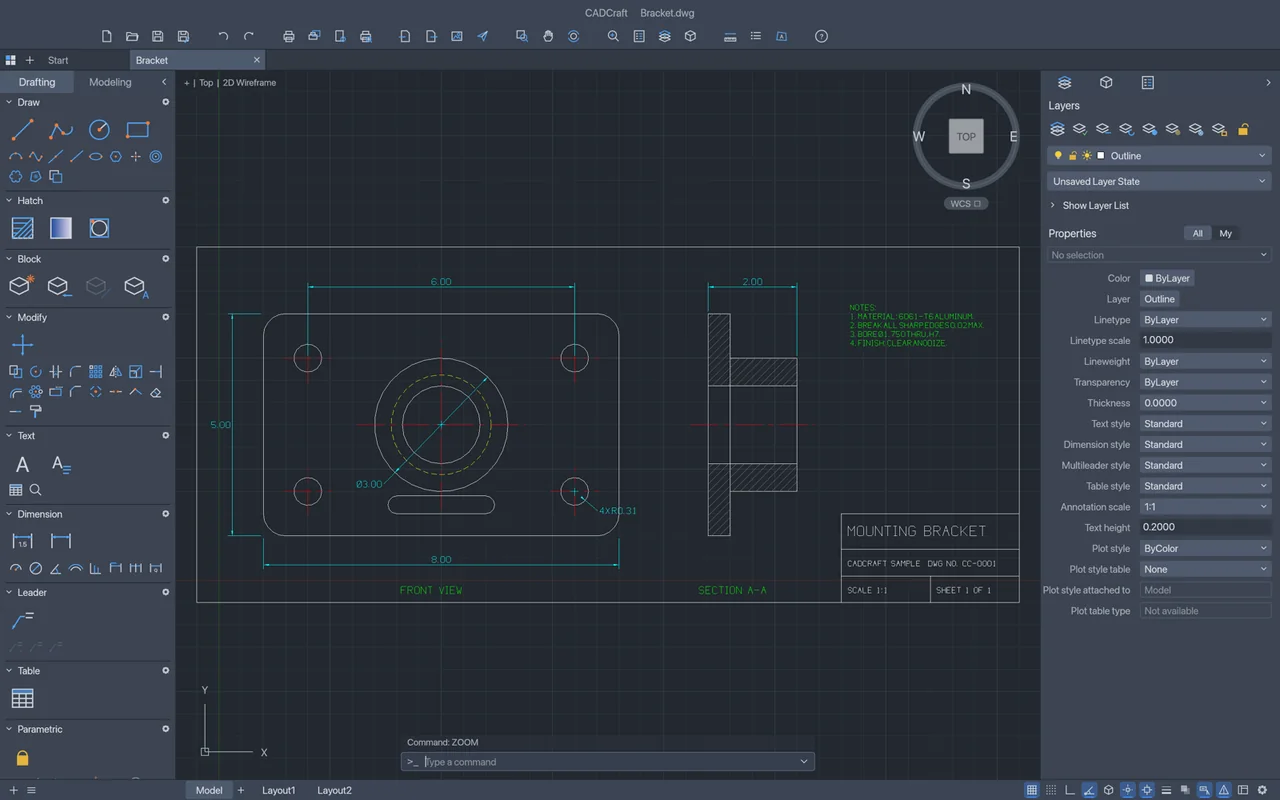
The official bracket example shows a 2D outline, circular features and dimension annotations in the drafting workspace.
Draw and modify 2D CAD plans with snaps, layers, dimensions and blocks.
Free · No subscription · No account needed · Windows / macOS / Linux
Try drawings you can check in the receiving app; keep AutoCAD for objects that fail to round-trip.
CADCraft is a useful starting point for basic 2D drafting, with familiar commands and a drawing you can inspect before sharing.
The workspace has a command line, layers, properties, dimensions and layouts. You can type coordinates when you want exact placement, use object snaps to meet existing geometry, and keep a separate plot for someone who only needs to view the plan.
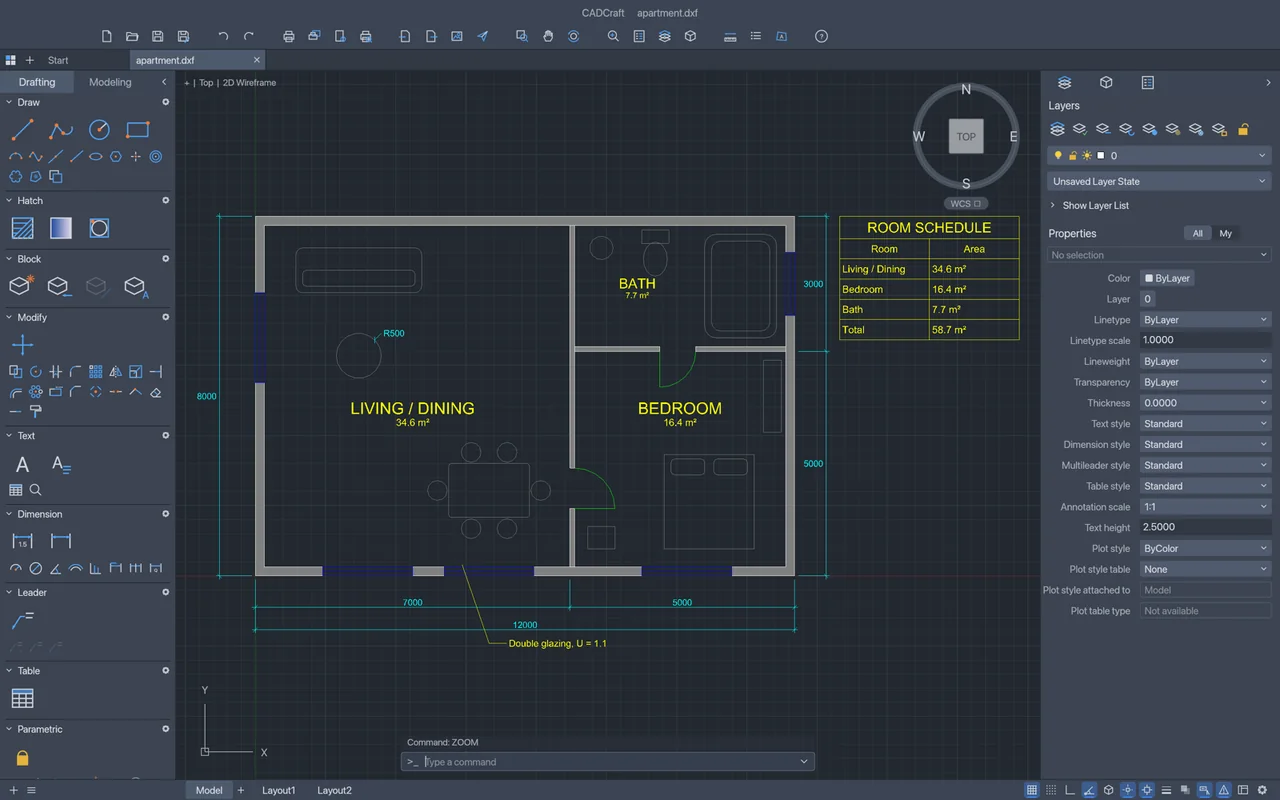
The opening official screenshot shows a 2D apartment plan and its layer and properties panels. The second image shows a mechanical drawing with dimensions, giving you another view of how the app presents a finished 2D shape.
The official bracket example shows a 2D outline, circular features and dimension annotations in the drafting workspace.
Local 2D drafting is free, with no subscription.
You don't need an account to use CADCraft.
The developers haven't published an app-wide offline policy.
ArtCraft's AI workbench is a separate product, and hosted generation uses credits. Use the desktop app for drawing work; see AI Workbench and Is ArtCraft free? for the separate generation service.
Choose the official desktop package for your system below. Craft Launcher can manage several Craft apps together, while the standalone download lets you install CADCraft on its own.
Match the package to your system and processor. A macOS universal package covers Intel and Apple silicon, while Windows packages are separate for x64, x86 and ARM64; on Linux, follow the instructions for the package type you chose.
For several editing apps, use Craft Launcher to install, verify and update them.
Choose your system and processor to get an official package. The complete package list is available below.
cadcraft-0.6.2-windows-arm64.msi
SHA-256
c9d5fd11c06425b086be401622af04f25e20427a1eff50ecc79b5d8d1547fd33Calculate the local file’s SHA-256, then compare the complete value for this filename.
Get-FileHash -LiteralPath "<downloaded-file>" -Algorithm SHA256cadcraft-0.6.2-windows-arm64-portable.zip
SHA-256
e23e77202e260abfaffd49ebe79bfea02ba88ee3150ab9b3b18de6df71e65613Calculate the local file’s SHA-256, then compare the complete value for this filename.
Get-FileHash -LiteralPath "<downloaded-file>" -Algorithm SHA256cadcraft-0.6.2-windows-x86.msi
SHA-256
38a6fad91369a01fabaa9d851a3159c76ec0319818322d76a3750bf6675ec5f3Calculate the local file’s SHA-256, then compare the complete value for this filename.
Get-FileHash -LiteralPath "<downloaded-file>" -Algorithm SHA256cadcraft-0.6.2-windows-x86-portable.zip
SHA-256
eb926bf956643fa135ec88105a7855d392409fc16f4dcc6f62d42bbe8f1725f8Calculate the local file’s SHA-256, then compare the complete value for this filename.
Get-FileHash -LiteralPath "<downloaded-file>" -Algorithm SHA256cadcraft-0.6.2-windows-x64.msi
SHA-256
6fc023040b4c12be4e016508569ed176e015b76d19ff65235ca9d524c64fbbb1Calculate the local file’s SHA-256, then compare the complete value for this filename.
Get-FileHash -LiteralPath "<downloaded-file>" -Algorithm SHA256cadcraft-0.6.2-windows-x64-portable.zip
SHA-256
624f01d53407ed9078328a1ad10bbbde7656a83567e8a757654fbcba2cd97b9bCalculate the local file’s SHA-256, then compare the complete value for this filename.
Get-FileHash -LiteralPath "<downloaded-file>" -Algorithm SHA256cadcraft-0.6.2-macos-universal.dmg
SHA-256
f8255281d824a1a8b0f051f7d11e41a786ab081d8873f517ae64bbb7e1a14c8cCalculate the local file’s SHA-256, then compare the complete value for this filename.
shasum -a 256 "<downloaded-file>"cadcraft-0.6.2-linux-aarch64.AppImage
SHA-256
0a00a4270f8d012de3b2adbf072cc040d7dc472417df065bf156884e5e638998Calculate the local file’s SHA-256, then compare the complete value for this filename.
sha256sum "<downloaded-file>"cadcraft-0.6.2-linux-aarch64.deb
SHA-256
d89512f708ee46d5d415e08d43dbffc205489ce9d368a97338ef98e5378ff9e6Calculate the local file’s SHA-256, then compare the complete value for this filename.
sha256sum "<downloaded-file>"cadcraft-0.6.2-linux-aarch64.flatpak
SHA-256
4d056df19e6a411177a9bb63ccae235f56752112a234760bbddefd22c5d3596bCalculate the local file’s SHA-256, then compare the complete value for this filename.
sha256sum "<downloaded-file>"cadcraft-0.6.2-linux-aarch64.rpm
SHA-256
92320801853dc8439e6bdf4e958dca6dad3c9857581d93621aab0e31233ff003Calculate the local file’s SHA-256, then compare the complete value for this filename.
sha256sum "<downloaded-file>"cadcraft-0.6.2-linux-aarch64.tar.gz
SHA-256
0700b0f032517177d9dee6891d892ee0137a8ffe12b0051d5da0bddb6a9fe332Calculate the local file’s SHA-256, then compare the complete value for this filename.
sha256sum "<downloaded-file>"cadcraft-0.6.2-linux-riscv64.deb
SHA-256
9151220ba0e770de03826c61e97439f026f657bee29f21874edac51a1bf84713Calculate the local file’s SHA-256, then compare the complete value for this filename.
sha256sum "<downloaded-file>"cadcraft-0.6.2-linux-riscv64.rpm
SHA-256
13dc7fd10a168aa1fb78f775fce990b4f067dfc6dd2ee03e37c06b3c0cb4ab04Calculate the local file’s SHA-256, then compare the complete value for this filename.
sha256sum "<downloaded-file>"cadcraft-0.6.2-linux-riscv64.tar.gz
SHA-256
dcbc71614e33ea282f627dcf195d49c94434fd93155279bb3606df44b7d8d127Calculate the local file’s SHA-256, then compare the complete value for this filename.
sha256sum "<downloaded-file>"cadcraft-0.6.2-linux-x86_64.AppImage
SHA-256
32daada11b9b6e512e72aa071cebf3caf17f741b85f094749bff39ad36036ad1Calculate the local file’s SHA-256, then compare the complete value for this filename.
sha256sum "<downloaded-file>"cadcraft-0.6.2-linux-x86_64.deb
SHA-256
cac8361d04e4a7ebf0ab98649738920848e0ac9e91cf4112f2a36321d46ca02cCalculate the local file’s SHA-256, then compare the complete value for this filename.
sha256sum "<downloaded-file>"cadcraft-0.6.2-linux-x86_64.flatpak
SHA-256
f0ab90aeaef39d1c70be12afca23f75791a6bbb34e2ada59ee88608d2e64b227Calculate the local file’s SHA-256, then compare the complete value for this filename.
sha256sum "<downloaded-file>"cadcraft-0.6.2-linux-x86_64.rpm
SHA-256
8eda04bd76c7df92b49e5512e9e1eda1175c51b0df35fd734ab28e9127ea8ef6Calculate the local file’s SHA-256, then compare the complete value for this filename.
sha256sum "<downloaded-file>"cadcraft-0.6.2-linux-x86_64.tar.gz
SHA-256
4a3ec7c5350e7212bdb4f735af6c6cf319ee177c11529ec547c77c92642ad49dCalculate the local file’s SHA-256, then compare the complete value for this filename.
sha256sum "<downloaded-file>"cadcraft-0.6.2-freebsd-x86_64.tar.gz
SHA-256
c99638e837b890b3de64375d8a3213fcb4ec1b33f3c8fac2fe15408aef52ce64Calculate the local file’s SHA-256, then compare the complete value for this filename.
sha256 -q "<downloaded-file>"flatpak install --user followed by the downloaded filename.| System | Published requirement |
|---|---|
| macOS | Intel and Apple silicon universal package; minimum OS not published. |
| Windows | x64, x86 and ARM64 packages; minimum OS not published. |
| Linux | General minimum OS/runtime not published; riscv64 tarball needs glibc 2.39 or later. |
| RAM, GPU and storage | The developers haven't published complete minimum values. |
The developers haven't published CADCraft-specific steps for Gatekeeper or SmartScreen warnings. If the app is blocked or won't open, describe the message and your system in the official support tracker.
Draw a simple closed outline and a circle, then save the practice drawing. This short exercise introduces coordinate entry and zooming without using an existing production file.
line 0,0 @10,0 @0,5 c to draw a closed triangular outline.circle 5,2 1 to place a circle at the stated coordinates with a radius of 1.zoom e to fit the drawing's extent in the view.qsave, or press Ctrl+S / Command+S, and save the practice drawing separately from your existing files.Ten shortcuts for files and common drawing aids.
| Action | Windows / Linux | macOS |
|---|---|---|
New drawing (new) |
Ctrl+N | Command+N |
Open (ui.open) |
Ctrl+O | Command+O |
Save (qsave) |
Ctrl+S | Command+S |
Undo (u) |
Ctrl+Z | Command+Z |
Redo (redo) |
Ctrl+Shift+Z | Command+Shift+Z |
Object snaps (osnap) |
F3 | F3 |
Grid (grid) |
F7 | F7 |
Ortho (ortho) |
F8 | F8 |
Snap (snap) |
F9 | F9 |
Polar tracking (polar) |
F10 | F10 |
| Action | Windows / Linux | macOS |
|---|---|---|
| Toggle group selection | Ctrl+Shift+A | Command+Shift+A |
| redo | Ctrl+Shift+Z | Command+Shift+Z |
| Undo | Ctrl+Z | Command+Z |
| redo | Ctrl+Y | Command+Y |
| New drawing | Ctrl+N | Command+N |
| Open drawing | Ctrl+O | Command+O |
| Save as | Ctrl+Shift+S | Command+Shift+S |
| Save | Ctrl+S | Command+S |
| Plot | Ctrl+P | Command+P |
| Select all | Ctrl+A | Command+A |
| Copy with base point | Ctrl+Shift+C | Command+Shift+C |
| Copy | Ctrl+C | Command+C |
| Cut | Ctrl+X | Command+X |
| Paste as block | Ctrl+Shift+V | Command+Shift+V |
| Paste | Ctrl+V | Command+V |
| Properties panel | Ctrl+1 | Command+1 |
| Toolsets | Ctrl+3 | Command+3 |
| Command line | Ctrl+9 | Command+9 |
| Commands dialog | F1 | F1 |
| Command history | F2 | F2 |
| Object snap | F3 | F3 |
| Cycle isoplane | F5 | F5 |
| Cycle isoplane | Ctrl+E | Command+E |
| Grid | F7 | F7 |
| Ortho | F8 | F8 |
| Snap | F9 | F9 |
| Polar tracking | F10 | F10 |
| Object snap tracking | F11 | F11 |
| Dynamic input | F12 | F12 |
Start with the drawing commands, then read the plotters reference when you need a shareable page. The plotter document includes configuration examples for more detailed output setup.
One published analysis focuses on basic 2D use and the importance of drawing exchange.
In his introduction based on the project's published information, Pillitteri recommends trying 2D drawing copies and keeping established CAD software for dependable DWG exchange. Read his analysis.
CADCraft reads and writes DWG and DXF, with output versions from 2000 to 2018. Keep the original and inspect the saved copy in the receiving CAD app, especially when a DWG contains objects CADCraft does not model.
| Format | Open / save | What to watch |
|---|---|---|
| DWG | Read and write | Check unmodelled objects in the saved drawing. |
| DXF | Read and write; binary DXF available | Unknown DXF entities are preserved; check the selected output version and drawing contents. |
| Plot output | Compare the page setup and plotted drawing before delivery. | |
| SVG / PNG | Export | Separate viewing outputs from the editable CAD drawing. |
The preservation of unknown DXF objects and the handling of DWG objects are separate details. Choose the required drawing version before saving, and check both the geometry and annotations in the returned file. See the full format reference.
Choose by whether your work is a 2D drawing or a 3D model. CADCraft and LibreCAD serve 2D drafting, while FreeCAD is the more relevant option for parametric 3D parts and drawings made from those models.
| App | Good for | Free option |
|---|---|---|
| CADCraft | 2D plans and drawings you can inspect after exchange | Free local drafting app. |
| LibreCAD | 2D CAD drawing | Free and open source; no trial, subscription or licence fee. |
| FreeCAD | Parametric 3D parts and drawings from 3D models | Free and open source. |
No. CADCraft's local drawing app is free, with no account or subscription.
CADCraft is for 2D drafting. Keep AutoCAD for your existing 3D workflow, or consider FreeCAD for parametric 3D work.
Inspect the saved file in the receiving app, particularly unmodelled objects. Keep the original DWG until the returned drawing has been checked.
Yes. CADCraft has PDF plotting; check the page setup and output before sharing.
Follow the five-step drawing above, then use the official quick start for more commands and the plotters reference for output.
Based on official docs and published reviews; we didn't install it ourselves.
Last checked: 14 Oct 2026.
Current release: 0.6.2.

